Intermediate concepts in Flutter & Dart
Dart Collections: Choosing List, Set, or Map
Dart collections organize data: use a List for ordered items, a Set for unique items, and a Map for key-value pairs. This choice is fundamental for storing UI widgets or parsing JSON. The common footgun is using a List for lookups, which is slow; use.
Dart's Sound Null Safety: No More Null Errors
In Dart, variables can't be null unless you explicitly allow it. This flips the usual model, turning potential runtime null pointer crashes into compile-time errors you can fix immediately.
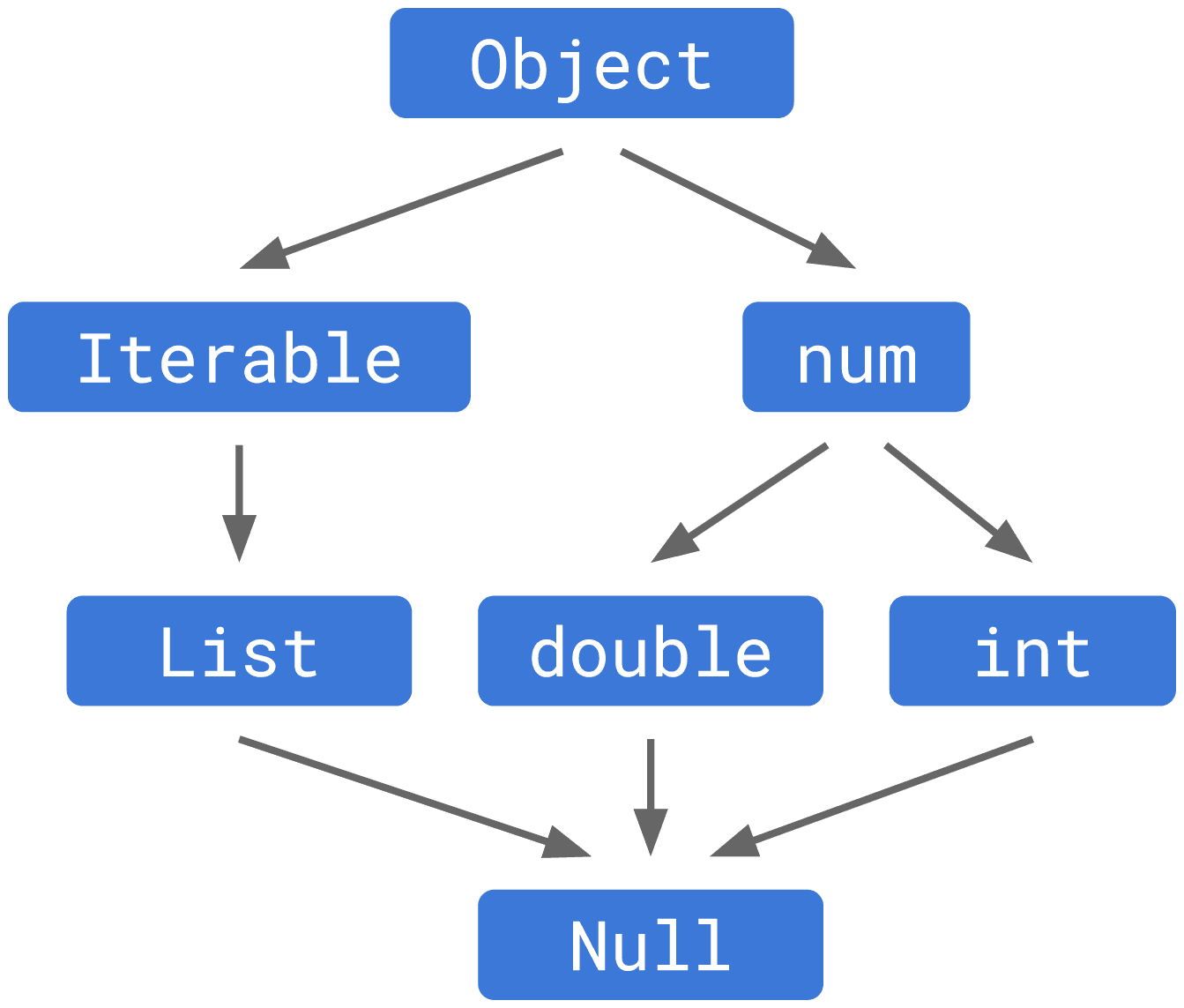
Dart's Null-Aware Operators: Safely Handle Nulls
Null-aware operators let you work with potentially null values without a cascade of if (x != null) checks. Use them to access properties, provide defaults, or assign values only when a variable is null. The footgun is confusing safe ?. with unsafe !.
Dart's Cascade Notation: Chain Calls on One Object
Cascade notation (..) lets you perform a sequence of operations on the same object without repeating its name. It's ideal for configuring new instances in one block.
Dart's async/await: Non-Blocking Code That Reads Synchronously
Dart's async/await makes non-blocking code read like a simple script. Use it for network requests or file I/O to keep your UI from freezing. The biggest footgun is calling an async function but forgetting to await its Future result.
Dart's Lazy Iterable Methods: map() and where()
Think of map() or where() not as instant transformations, but as recipes for a new list. They're lazy, only doing work when you iterate. Use them to chain operations without creating intermediate lists.
Dart's Specialized Constructors: Named, Factory, and Constant
Dart constructors offer more than one way to create an object. Use named constructors for clarity (e.g., fromJSON), factory for caching or returning subtypes, and const for compile-time constant objects.
Dart: Abstract Classes & Implicit Interfaces
An abstract class is a blueprint that other classes must follow, but it can't be instantiated itself. Dart also lets any class act as an 'implicit interface,' forcing other classes to implement its public API without inheritance.
Why hashCode and operator== Must Be Overridden Together
Overriding == without hashCode breaks collections like Set and Map. If two objects are equal, they MUST have the same hash code. This is vital for custom classes used as map keys or set elements.
Dart's Enhanced Enums: More Than Just Constants
An enhanced enum is a class with a fixed set of instances. It lets you add fields, methods, and constructors to your enums, turning them from simple labels into powerful objects with attached data and behavior.
Future.wait: Run Concurrent Dart Operations
Run multiple async operations concurrently and collect their results in a single list. Use it to fire off independent tasks, like multiple network requests, and wait for them all to finish. The footgun: if one future fails, you lose all results by default.
Dart's Stream: Asynchronous Data Pipelines
Think of a Dart Stream as a conveyor belt for asynchronous data, delivering events over time. It's ideal for handling sequences like user input or file I/O.
StreamController: The Faucet for Your Data Stream
A StreamController is the faucet handle for your data stream. Use it to create a custom stream from any data source and push events to it. The main footgun is that a default controller only allows one listener; use StreamController.broadcast for multiple.
Completer: Manually Control a Future's Lifecycle
A Completer gives you a Future now but lets you decide when and how it finishes later. It's essential for converting old callback-based APIs into modern async/await code. The main footgun is trying to complete it more than once, which throws an error.
Flutter's build(): Why It Lives on State, Not the Widget
Flutter's build() method turns state into UI. It's on the State object, not the StatefulWidget, to ensure it always paints with the latest data. The framework calls it on init, after setState(), or when dependencies change.
BuildContext: Your Widget's Address in the Tree
A BuildContext is a widget's address in the Flutter tree, letting it find ancestors like themes or navigators. It's used for Theme.of(context) or Scaffold.of(context). The key footgun: a widget's context can't find its own children, only its parents.
StatefulWidget and State: Two Parts of a Whole
A StatefulWidget is an immutable blueprint, while its separate State object holds the mutable data. The widget is disposable; the state persists across rebuilds. Use this for interactive UI like forms or counters.
Flutter's setState(): Triggering UI Updates
setState() tells Flutter "my data changed, so rebuild the UI." It's not the change itself, but the notification that a change happened. Use it in a StatefulWidget's State class when events modify data your build() method uses.
Flutter's Box Constraint System: Parents Rule
In Flutter, parents tell children their size limits, not their size. A widget must obey its parent's constraints (min/max width/height), but it chooses its own size within those bounds. The footgun is trying to size a child widget against its parent's rules.
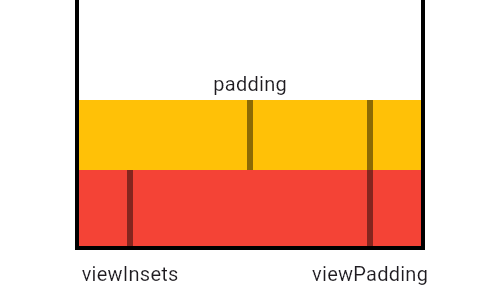
MediaQuery: Reading Device Properties Efficiently
MediaQuery is your widget's window to the device, providing screen size, orientation, and safe areas. Use it to build responsive UIs that avoid system elements like notches or the keyboard. The footgun: MediaQuery.of(context) rebuilds on any change.
We are hiring for this. Every open role lists the topics its interview covers, so you can prepare for the real thing rather than guessing.
See open roles