Easy everything in Flutter & Dart, page 2
How do you retrieve and listen to TextField changes in Flutter?
Use TextEditingController, attach to TextField, listen with addListener, read controller.text, dispose in State.dispose.
Handle taps on a non-button Container: GestureDetector vs InkWell
This tests gesture propagation and Material feedback. Use GestureDetector for raw taps, drags, or scales; InkWell for Material ripples, which needs a Material ancestor. Red flag: InkWell without Material or ignoring GestureDetector drag support.
mainAxisAlignment vs crossAxisAlignment in Column, and textDirection in Row
Tests Flutter flex axis awareness. In a Column, mainAxisAlignment is vertical and crossAxisAlignment is horizontal. In a Row, textDirection governs the main axis, not crossAxisAlignment; verticalDirection governs the cross axis.
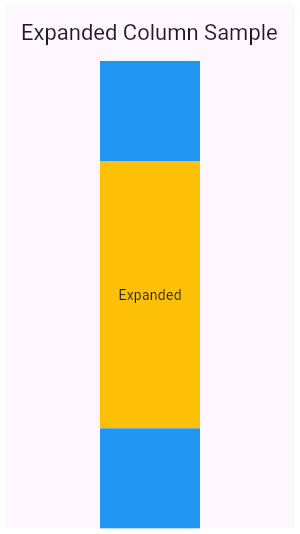
How do you split a Column 1/3 and 2/3 using Expanded?
Tests understanding of flex allocation in Flutter layouts. Strong answers wrap both containers in Expanded, assign flex values of 1 and 2, and note that Expanded forces children to fill the Column's main axis. Red flag: proposing fixed heights instead of flex.

In a Row, how do you space children evenly across the width?
Set mainAxisAlignment to spaceEvenly; contrast with spaceBetween and spaceAround.
What is the build method's purpose and key constraints?
It returns a Widget tree, can run every frame, must avoid side effects, and uses BuildContext for inherited data.
Explain StatelessWidget vs StatefulWidget and when to choose each
This tests immutable UI versus persistent state. StatelessWidget rebuilds when config changes; StatefulWidget owns State surviving rebuilds. Use StatelessWidget for static UI and StatefulWidget for interactive elements.
Difference between Future<void> and void from an async function
Future<void> lets callers await and catch errors; void hides the Future, preventing await and leaving exceptions uncaught.
Define a Dart Future, return Future<String>, and handle errors with both patterns.
Tests Dart async primitives and error handling. A strong answer defines Future as a pending async result, writes a delayed Future<String>, consumes it with then/catchError, and mirrors with async/await try/catch.
Deduplicate a List of emails in Dart
Tests knowledge of Dart's Set semantics and LinkedHashSet insertion order. The idiomatic solution is emails.toSet().toList(), which deduplicates in O(n) time while preserving order. Avoid manual loops with contains, which are O(n^2) and unidiomatic.
Difference between final and const Dart class properties?
This tests your grasp of Dart's compile-time versus runtime constant model. A strong answer contrasts final variables set once with static const compile-time values, notes const is implicitly final, gives examples. Red flag: const as non-static instance field.
Convert List<User> to Map<String, User> keyed by user id
Tests Dart collection-to-map idioms. A strong answer picks the for-element literal {for (var u in users) u.id: u}, mentions Map.fromIterable as a verbose alternative, and flags duplicate-key overwrites. Red flag: manually looping to populate an empty map.
Explain Dart positional vs named parameters and write one signature
Tests Dart parameter syntax. A strong answer covers required positional args, optional positional args in square brackets, and named args in curly braces with defaults. Red flag: claiming named parameters are always optional or confusing bracket types.
What is the difference between final and const in Dart?
Tests compile-time versus runtime immutability in Dart. A strong answer: final allows single assignment at runtime, but const requires a compile-time constant and deep immutability.
Passing Arguments to Flutter Named Routes
Flutter named routes pass data through an arguments field instead of global variables. Use this when navigating to a route that needs an ID or configuration object. Arguments are untyped by default, so unsafe casts crash at runtime.
Profiling Flutter Apps with Dart DevTools
Dart DevTools is your app's diagnostic tool, letting you see exactly why frames drop or memory spikes. Use it to find the root cause of "jank" in lists or slow animations.
Flutter's Architectural Layers: UI and Data
Think of a Flutter app in two parts: the UI layer for what the user sees, and a data layer for fetching and managing information. This separation is crucial for apps with APIs or complex state.
flutter analyze: Your Code's First Line of Defense
Think of flutter analyze as a spell-checker for your Dart code. It catches errors, style issues, and potential bugs before you run the app. The footgun is ignoring its configuration; its real power is in a custom analysis_options.yaml file.
Flutter Build Modes: Debug, Profile, and Release
Flutter's build modes trade performance for developer features. Debug mode is for fast iteration with hot reload, while Release is for optimized user builds. You use Debug daily, Profile to hunt for bottlenecks, and Release to ship.
Dart's `expect` and Matchers: Writing Better Tests
Dart's expect and Matchers are a grammar for your tests, letting you define complex rules beyond simple equality. Use them to verify values, check for exceptions, and test async Futures/Streams.
We are hiring for this. Every open role lists the topics its interview covers, so you can prepare for the real thing rather than guessing.
See open roles