Intermediate everything in Flutter & Dart, page 7
sqflite: Local SQL Databases in Flutter
sqflite gives your Flutter app a private, on-device SQL database by wrapping the native SQLite engine. Use it for storing structured local data, like to-do lists or settings. The footgun: all database operations are async, so you must await every call.
json_serializable: Automating JSON in Dart
json_serializable is a boilerplate-writing robot for Dart, automatically generating code to convert classes to and from JSON. It's essential for data models in network requests or local storage.
GetX State Management: Simplicity Over Boilerplate
GetX simplifies Flutter state management by removing boilerplate and avoiding code generators. It offers both simple manual updates and a reactive style. Use it for rapid development where minimal setup is key.

Riverpod: Compile-Safe, Reactive State Management
Riverpod treats app state like a reactive formula. Define a piece of data once, and Riverpod automatically updates any UI that depends on it. It's ideal for network requests and shared state. Footgun: Watching a provider rebuilds the UI on every change.

Cubit: Simple State Management in Flutter
A Cubit is a simple state manager that exposes functions to directly trigger state changes. It's ideal for managing local UI state, like a counter or form data, without the complexity of events. The footgun is expecting state to update synchronously.
Flutter Hero Animations: Guiding the User's Eye
A Hero animation makes a widget appear to fly from one screen to another, connecting two UIs. It's perfect for transitioning a thumbnail to a detail page, guiding the user's focus. The main footgun is using non-unique tags, which causes animations to fail.
Flutter's Router API: Declarative Navigation
The Router API treats navigation as state. You declare the page stack based on app state, giving you full control over URLs and the back button. This is vital for web/desktop apps but introduces significant boilerplate compared to simple push/pop navigation.
GoRouter: URL-Based Navigation for Flutter Apps
GoRouter treats your app's screens like web pages with URLs. This declarative approach simplifies deep linking and passing data via paths like /users/123. The footgun is forgetting its declarative nature and trying to manage state imperatively.
Dismissible: The Swipe-to-Remove Widget in Flutter
A Dismissible widget lets you swipe away list items, like clearing notifications. Use it for to-do lists or email inboxes. The key footgun: you MUST provide a unique Key and remove the item from your data source in onDismissed, or it will reappear on…
FocusNode: Programmatically Managing Widget Focus
A FocusNode is your handle to a widget's focus state, letting you programmatically request focus or listen for changes. It's essential for forms, like moving focus from one TextField to the next.
Flutter's Form Widget: Grouping and Validating Input
A Flutter Form acts as a supervisor for multiple input fields, letting you validate and save them all at once. Use it for login screens or user profiles. The footgun is forgetting the GlobalKey, which makes it impossible to trigger validation.
AspectRatio: Forcing a Widget's Proportions
AspectRatio forces a child widget to maintain a specific width-to-height ratio, like a 16:9 video player. Use it for image placeholders or video frames. The footgun: it fails in unconstrained parents like FittedBox; use SizedBox there instead.
Flutter's FittedBox: Scale Any Widget to Fit
FittedBox scales its single child to fit an allocated space, like CSS's object-fit but for any widget. It's perfect for making an icon fill a button or ensuring text fits a container. The footgun: it fails in unconstrained parents like a Row or Column.
Flutter's Wrap Widget: The Row That Won't Overflow
Flutter's Wrap widget is like text-wrapping for your UI. It arranges children in a row or column, automatically flowing them onto a new line when space runs out. It's perfect for dynamic lists of tags or chips.
LayoutBuilder: Build Widgets Based on Parent Size
LayoutBuilder lets your widget ask its parent "how much space do I have?" before deciding what to build. Use it for responsive layouts, like showing a Row on wide screens and a Column on narrow ones.
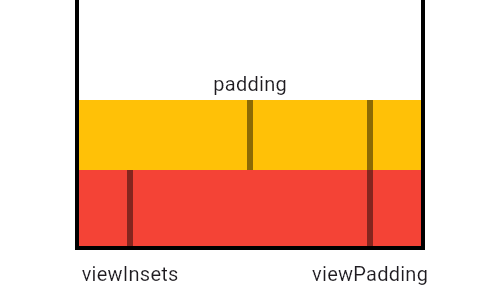
MediaQuery: Reading Device Properties Efficiently
MediaQuery is your widget's window to the device, providing screen size, orientation, and safe areas. Use it to build responsive UIs that avoid system elements like notches or the keyboard. The footgun: MediaQuery.of(context) rebuilds on any change.
Flutter's Box Constraint System: Parents Rule
In Flutter, parents tell children their size limits, not their size. A widget must obey its parent's constraints (min/max width/height), but it chooses its own size within those bounds. The footgun is trying to size a child widget against its parent's rules.
Flutter's setState(): Triggering UI Updates
setState() tells Flutter "my data changed, so rebuild the UI." It's not the change itself, but the notification that a change happened. Use it in a StatefulWidget's State class when events modify data your build() method uses.
StatefulWidget and State: Two Parts of a Whole
A StatefulWidget is an immutable blueprint, while its separate State object holds the mutable data. The widget is disposable; the state persists across rebuilds. Use this for interactive UI like forms or counters.
BuildContext: Your Widget's Address in the Tree
A BuildContext is a widget's address in the Flutter tree, letting it find ancestors like themes or navigators. It's used for Theme.of(context) or Scaffold.of(context). The key footgun: a widget's context can't find its own children, only its parents.
We are hiring for this. Every open role lists the topics its interview covers, so you can prepare for the real thing rather than guessing.
See open roles