Easy concepts in Frontend Dev, page 2

The `document` Object: Your Page's API
The document object is the root of the DOM tree, representing the entire webpage in your script. Use it to find elements (getElementById), create new ones (createElement), or read page info. The main footgun: accessing an element before it's been parsed.
CSS Color Values: From Keywords to Functions
CSS offers multiple ways to define colors, from simple names like red to functions like rgb(). Use keywords for mockups, hex for design handoffs, and HSL for intuitive manipulation. The main footgun: colors can look different across uncalibrated devices.
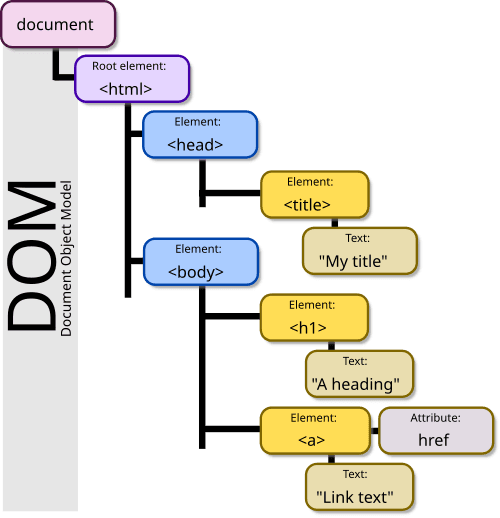
The DOM: Your HTML as a Live Object Tree
The DOM is the browser's live model of a webpage, represented as a tree of objects. JavaScript uses it to find elements, change content, and react to clicks. The footgun: DOM changes are in-memory; they don't edit the original HTML file on the server.
CSS `font`: The All-in-One Typography Shorthand
The font property is a single CSS declaration for setting multiple type styles at once, like size, weight, and family. Use it to define base typography for your site or components.
Web Storage API: Browser Key-Value Stores
Web Storage provides simple browser key-value stores: localStorage and sessionStorage. Use localStorage for data that persists across sessions, like user settings, and sessionStorage for data tied to a single tab.
CSS `background`: The All-in-One Shorthand
The CSS background property is a shortcut for styling an element's backdrop, combining color, image, and position in one line. Use it for most background tasks, from simple colors to complex layered images.
border-radius: More Than Just Rounded Corners
The border-radius property rounds an element's corners, used for everything from buttons to circular avatars. The footgun is its shorthand syntax: one value is simple, but two, three, or four values follow specific clockwise rules that are easy to mix up.
Vue Component Props: Passing Data Downstream
Think of props as a component's 'arguments.' They let a parent pass data down to a child, making it reusable. Use them to pass dynamic data like a user's name to a profile card. The footgun: never mutate a prop directly inside the child component.

Angular's input() Function: Passing Data to Components
Angular's input() function lets a parent pass data to a child, defining the child's public API. Use it to configure a component, like passing a value to a slider. The footgun: the returned signal is read-only; the child cannot modify its own input.
Svelte Props: Passing Data with `export let`
In Svelte, export let turns a variable into a prop, letting a parent component pass data down. It's how you pass a userName to a ProfileCard component. The footgun: forgetting export creates a private variable, not a prop, so data isn't received.
Vue Custom Events: Child-to-Parent Communication
Think of $emit as a child component sending a flare up to its parent. It's how children report actions upwards, reversing the top-down flow of props. Use it to trigger parent state changes, like closing a modal. The footgun: events don't bubble.
Angular @Output(): Child Components Reporting Up
An @Output() lets a child component tell its parent something happened, using an EventEmitter. It’s the standard way to handle events like button clicks that the parent needs to act on. The footgun is forgetting to actually .emit() the event.
TypeScript's `typeof`: Get a Type from a Value
TypeScript's typeof operator grabs the static type from a runtime value, like a variable. It's essential for utilities like ReturnType, letting you derive a type from a function's implementation without duplicating definitions.

React's Controlled vs. Uncontrolled Components
A controlled component is a form input whose value is driven by React state; an uncontrolled component lets the DOM manage its own state. Use controlled for instant validation or conditional logic.
CSS Flexbox: Mastering the Main and Cross Axis
Flexbox treats layout as a one-dimensional problem: either a row or a column. All alignment rules operate along a 'main axis' and a perpendicular 'cross axis'. Use it for navbars or card components.
CSS Grid: Defining a 2D Layout Container
Turn an element into graph paper with display: grid, making its children items you can place in rows and columns. It's ideal for page-level layouts or complex components. The footgun: grid properties only apply to direct children, not nested elements.
The `gap` Property: Spacing Without Margin Hacks
The gap property adds space *between* elements in a layout, not around them. Use it on Flexbox, Grid, or multi-column containers for clean, consistent gutters.
Vue's v-if vs. v-show: When to Use Which
v-if adds or removes elements from the DOM; v-show just hides them with CSS. Use v-if for conditions that rarely change (like admin access) and v-show for frequent toggles (like a dropdown menu), as it has a lower toggle cost.
Angular Structural Directives: Shape Your DOM
Structural directives shape your DOM by adding, removing, or manipulating HTML elements. Use *ngIf to show/hide a block or *ngFor to loop over a list. The footgun is forgetting the asterisk (*), which is critical syntactic sugar for a more complex template.
Vue's v-model: Two-Way Binding Made Simple
v-model creates a two-way binding that synchronizes form inputs with your JavaScript data. Use it on any form element like an input or textarea. The footgun: it ignores initial HTML attributes; your JavaScript state is always the single source of truth.
We are hiring for this. Every open role lists the topics its interview covers, so you can prepare for the real thing rather than guessing.
See open roles