Advanced everything in Frontend Dev, page 14
React Theming: Context API and CSS-in-JS
Use React's Context API to inject a theme object (colors, spacing) into your component tree for your CSS-in-JS styles. It's ideal for light/dark modes or brand skins. The footgun: this pattern fails in React Server Components, which lack context.

useDebugValue: Label Your Custom Hooks in DevTools
useDebugValue attaches a readable label to your custom hooks in React DevTools. Instead of just seeing raw state, you can display a meaningful string like "Online". The footgun is overusing it; reserve it for complex, shared library hooks.
useSyncExternalStore: Safely Read from External State
useSyncExternalStore lets your React components safely subscribe to data outside of React's state. Use it to connect to state libraries like Zustand or browser APIs. The main footgun: your getSnapshot function must return an immutable, cached value.
useDeferredValue: Keep UI Responsive During Renders
useDeferredValue keeps your UI responsive by showing a stale value while a new, expensive-to-render value is prepared in the background. Use it for search inputs filtering large lists.
useTransition: Keep Your UI Responsive During State Changes
useTransition lets you update state without blocking the UI, keeping your app responsive. Use it for slow renders like filtering large lists, while the isPending flag shows a loading state.
useImperativeHandle: Expose a Custom Ref API
useImperativeHandle exposes a custom API via a ref, letting a parent call specific methods on a child. Instead of exposing an entire DOM node, you can provide a handle with methods like reset() or focus().
useLayoutEffect: Synchronous Effects Before Browser Paint
useLayoutEffect is useEffect's synchronous twin, running its code after DOM mutations but before the browser repaints. Use it to read DOM layout and re-render to prevent visual flickers, like positioning a tooltip. Its main footgun: it blocks rendering.
React's Stale Closure Problem in Hooks
A useEffect closure captures props and state from its render. If the effect doesn't re-run, its functions can operate on old, "stale" data. This surfaces in timers or socket listeners. The footgun is omitting dependencies, which causes these subtle bugs.
React's Rule: Favor Composition Over Inheritance
Instead of extending a base component, build complex UIs by wrapping and configuring smaller ones. Use this for generic containers like dialogs or for creating specialized versions of a component.

React Refs: Memory Without Re-renders
A React ref is like a secret pocket for your component to remember information without triggering re-renders. Use it to hold values not needed for rendering, like a timer ID. The footgun: changing a ref's value won't update the UI; use state for that.

CSS Houdini: Extending the CSS Engine
CSS Houdini gives developers low-level access to the browser's rendering engine, letting you write your own CSS features. Use it to polyfill new CSS or define type-safe custom properties with @property, preventing invalid values from being silently ignored.
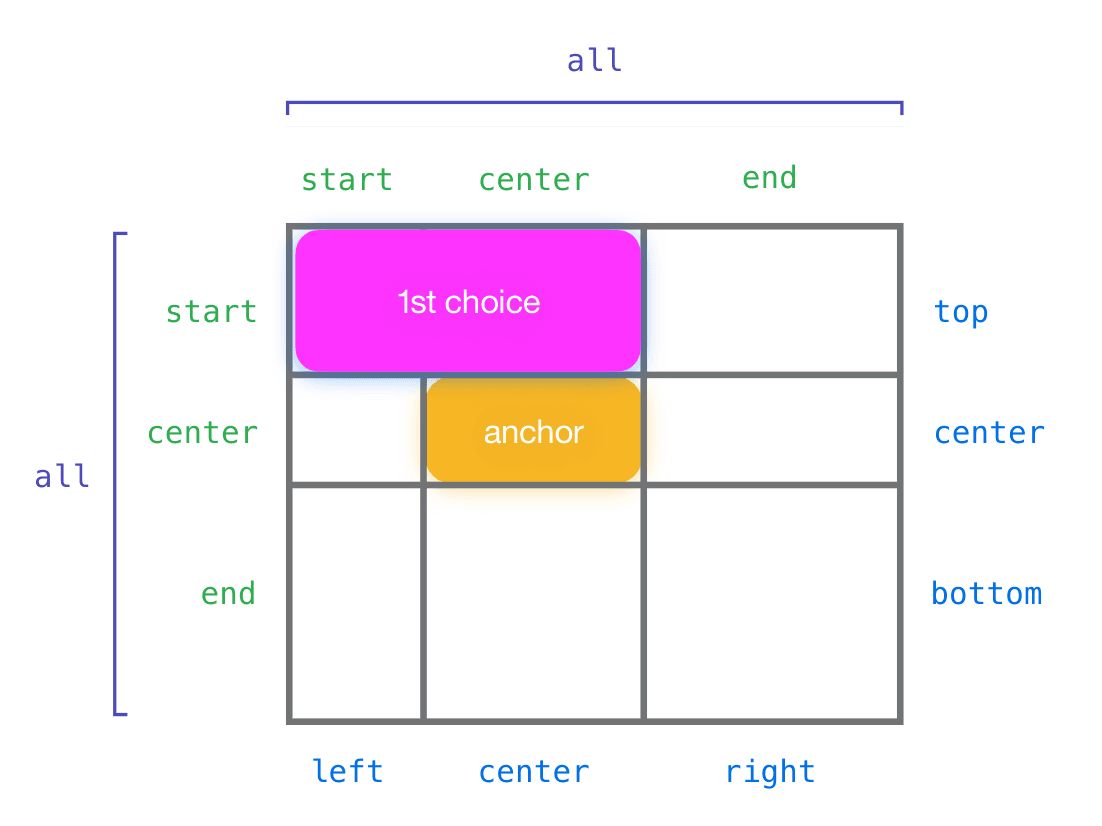
CSS Anchor Positioning: Beyond the Containing Block
CSS Anchor Positioning lets you tether an element to any other element, not just its parent. Use it for popovers or tooltips that automatically reposition to stay in view. The footgun is forgetting to explicitly name your anchor with anchor-name.
View Transitions API: Animate Between DOM States
The View Transitions API lets the browser handle complex animations between page states. It simplifies transitions in Single-Page Apps and, for the first time, enables them for Multi-Page Apps. The main footgun is forgetting it's a progressive enhancement.
Web Workers: Offload Heavy Tasks from the UI Thread
Web Workers run JavaScript on a background thread, preventing heavy tasks from freezing your UI. Use them for complex calculations or data processing that shouldn't block rendering.

The RFC Process: Formalizing Technical Decisions
An RFC (Request for Comments) is a formal document for proposing a major technical change, creating a public record of the decision. It's used for big shifts like adding a new design system component or changing a core API.
Semantic Release: Automate Versioning with Commit Messages
Semantic Release automates versioning by reading your commit messages. It decides if a change is a fix, feature, or breaking change and bumps the version for you. It's used in CI/CD to publish packages automatically.
The Accessibility Tree: The DOM for Assistive Tech
The accessibility tree is the DOM's sibling, built for assistive tech. Browsers derive it from your HTML, exposing each element's name, role (e.g., 'button'), and state (e.g., 'checked') to screen readers.
Focus Trapping: Guiding Keyboard Users, Not Caging Them
Focus trapping intentionally confines keyboard navigation to a component, like a modal. It's a feature, not a bug, when used to prevent users from interacting with the page behind an overlay.
ARIA Live Regions: Announcing Dynamic Content
ARIA live regions tell screen readers about content that changes without a page reload, like a notification banner. Use aria-live="polite" for most updates and assertive only for critical alerts.

WAI-ARIA Authoring Practices: The Cookbook for Accessible Components
Think of WAI-ARIA Authoring Practices as the official cookbook for accessible web components. It provides patterns for widgets like tabs or accordions, ensuring they work with assistive tech.
We are hiring for this. Every open role lists the topics its interview covers, so you can prepare for the real thing rather than guessing.
See open roles