Concepts in iOS & Swift, page 8

App Thinning: Ship Only What's Needed
App Thinning shrinks your app's download by delivering only the assets a specific device needs. The App Store uses Slicing for device-specific art and code, and you can use On-Demand Resources for assets downloaded after installation.

On-Demand Resources: Keep Your App Bundle Slim
On-Demand Resources (ODR) host app assets on the App Store, not in your bundle, shrinking your initial download. Use it for game levels or tutorials not needed at first launch. The OS downloads assets by "tag" when requested, but can also purge them to save.
App Store Server Notifications: Your Backend's Source of Truth
App Store Server Notifications are webhooks from Apple that tell your backend about subscription events like renewals or refunds. They are your server's source of truth for user entitlements, letting you grant or revoke access without relying on the client…
macOS App Notarization: Apple's Security Checkpoint
Notarization is an automated security screening for macOS apps. You upload your app, Apple scans it for malware, and issues a ticket to attach to it. This is mandatory for apps distributed outside the Mac App Store.
Grand Central Dispatch (GCD): Your App's Task Manager
Grand Central Dispatch (GCD) is your app's task manager, letting you run code in the background without freezing the UI. Use it to offload network requests or heavy computations, then update the UI on the main queue.
Main Thread Checker: Keep Your UI Responsive
The Main Thread Checker is an Xcode tool that catches UI updates on background threads, which cause crashes or glitches. It runs during debugging, flagging AppKit, UIKit, or SwiftUI calls made off the main thread.
Bridging Header: Mixing Objective-C and Swift
A bridging header is a translation list for Xcode, letting your new Swift code call old Objective-C code. It's essential when migrating a legacy codebase or using an Objective-C library. The footgun: it only exposes Objective-C to Swift, not vice-versa.
Selectors: Objective-C's Function Pointers in Swift
A selector is a lightweight name for a method, not a direct pointer. Swift uses it to call Objective-C code dynamically at runtime. It's common in UIKit for target-action patterns, like button taps. The footgun: forgetting @objc causes a runtime crash.
Autorelease Pools: Managing Temporary Object Memory
Think of an autorelease pool as a temporary holding pen for objects. It defers their deallocation until a code block ends. UI frameworks handle this, but you'll add one in tight loops with many temporary objects to reduce peak memory, or on background threads.
Objective-C Nullability: Bridging to Swift's Optionals
Nullability annotations are like adding ? or ! to your Objective-C pointers, telling Swift how to handle nil. They're essential in mixed codebases to bridge Objective-C's pointers to Swift's safe Optionals.
Lightweight Generics: Type Safety for Objective-C
Lightweight generics bolt type safety onto Objective-C collections like NSArray. This lets Swift see an NSArray<NSString *> as a type-safe [String] instead of [Any], preventing runtime crashes.
Swift Errors and the NSError Bridge
Swift's modern Error protocol and Objective-C's NSError are different, but Swift automatically "bridges" them. This is key when calling older Apple APIs, which throw NSErrors.
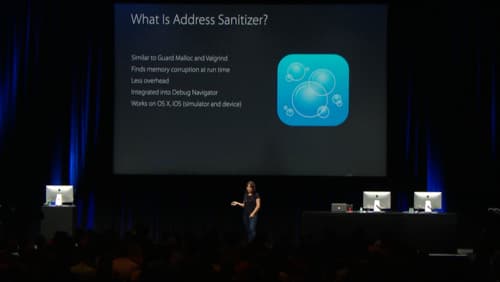
Address Sanitizer: Find Memory Bugs at Runtime
Address Sanitizer (ASan) is a runtime debugging tool that finds memory corruption bugs. Enable it in Xcode to catch buffer overflows and use-after-free errors as they happen, preventing crashes that are hard to trace back to their source.
Optimizing iOS App Launch Time
An app launch is a race against the system's watchdog timer. The OS loads your app in two phases: pre-main and main. Optimizing both is key. The biggest footgun is ignoring the pre-main phase, where bloated dynamic libraries can kill performance.
Refining Objective-C APIs for Swift with NS_SWIFT_NAME
NS_SWIFT_NAME gives Objective-C code a Swifty alias without changing the original API. Use it to modernize legacy frameworks by removing prefixes for Swift consumption.
Swift Property Wrappers: Reusable Logic for Properties
A Swift Property Wrapper is a template for a property's get/set logic, letting you reuse behaviors like data validation without boilerplate. It powers SwiftUI's @State and is great for managing UserDefaults.
The Package.swift Manifest File
Think of Package.swift as a recipe for your code, telling the Swift Package Manager (SPM) what to build, what it needs, and where it can run. You use it to define libraries, list dependencies, and set minimum OS versions.
Swift Basic Types: Value Semantics by Default
Swift's basic types are value type structs, so assignment copies, not shares, a reference. You feel this when passing Strings into functions or choosing Int over Double. The footgun is treating them as free to copy; large values cost memory and speed.
Swift Collections: Array, Set, Dictionary
Swift's three collections are different access patterns, not just different APIs. Arrays keep order, Sets enforce uniqueness, and Dictionaries map keys to values. Picking an Array for uniqueness checks turns membership from O(1) into O(n) scans.
Swift Closures: Functions with a Memory
A closure is a function carrying luggage: it captures surrounding variables and remembers them later. Use them in SwiftUI actions, async completions, and array transforms. Beware a strong reference cycle from capturing self without a capture list.
We are hiring for this. Every open role lists the topics its interview covers, so you can prepare for the real thing rather than guessing.
See open roles