Easy everything in iOS & Swift, page 3

XCTest: Apple's Built-in Testing Framework
XCTest is your built-in toolbox for writing unit, performance, and UI tests in Xcode. Use it to verify individual functions or simulate user interactions. A common footgun is writing tests that depend on each other; they must be independent to be reliable.
AVFoundation: Apple's Toolkit for Audio and Video
AVFoundation is Apple's low-level toolbox for audio and video. Use it for custom camera UIs, video editing, or complex audio playback. The main footgun is its complexity; managing sessions, inputs, and outputs on the correct threads is notoriously difficult.
MapKit: Putting Apple Maps in Your iOS App
MapKit is the toolkit for embedding Apple's interactive maps directly into your app. Use it to show user location, display points of interest, or provide directions. The footgun is rendering too many pins at once; use clustering to keep the UI responsive.
Core Location: Your App's Sense of Place
Core Location gives your app its sense of place, from a precise coordinate to a general region. It powers maps, ride-sharing, and location-based reminders. Use it for one-time fixes, continuous tracking, or geofencing.
UIBezierPath: Drawing Custom Shapes in Code
UIBezierPath is a digital pen for drawing custom shapes. You define a path with lines and curves, then fill or stroke it. It's essential for custom charts, icons, or non-rectangular views.
CALayer
CALayer is the Core Animation object that actually draws and animates a UIView's content on screen, while the view itself handles touch input, layout, and event routing on top of it.
JSONEncoder: Turning Swift Objects into JSON
JSONEncoder is your app's translator, converting Swift objects into JSON data for APIs. It's the "serialization" half of Codable. Use it to send data to a server or save objects. The footgun: mismatched keys or date formats require configuring the encoder.
JSONDecoder: Turning JSON into Swift Types
JSONDecoder is your translator for turning raw JSON data into native Swift structs or classes. It's the standard way to parse API responses, letting you work with typed, safe objects.
URLRequest: The Blueprint for a Network Call
URLRequest is the recipe for a network call, not the call itself. It bundles the URL, HTTP method, headers, and body. You hand this 'order form' to URLSession to execute. The footgun is thinking URLRequest sends the request—it only describes it.
URLSession: The Core of iOS Networking
URLSession is the engine for all network requests in Apple apps. Use it to fetch API data, download images, or upload files. The biggest footgun is blocking the main UI thread, which freezes your app; always perform network tasks asynchronously.
Swift's Codable: Effortless JSON & Data Parsing
Codable is a compiler magic trick that automatically converts Swift objects to and from formats like JSON. It's used constantly for parsing API responses or saving data to disk. The footgun: decoding fails if JSON keys don't exactly match your property names.
FileManager: Your App's Interface to the File System
FileManager is your app's librarian for the file system. Instead of using raw paths, you ask it to find, create, or delete files and directories. Always handle potential errors, as file operations can easily fail.
App Sandbox: A Digital Playpen for Your App
The App Sandbox is a digital playpen for your app, restricting it to its own files and resources. It's a core security feature on iOS and macOS, preventing apps from accessing user data or system files without explicit permission.
UserDefaults: Your App's Junk Drawer for Settings
UserDefaults is a simple key-value store for persisting small bits of data, like a dictionary that saves itself. Use it to remember user preferences like enabling dark mode or a username. The footgun: don't use it for large files or sensitive data.
TabView: SwiftUI's Built-in Tab Bar
TabView lets you show different views in the same space, switched by a tab bar. It's the standard for top-level app navigation, like switching between "Home," "Search," and "Profile." The footgun is nesting them; they are for main sections only.
Storyboard Segues: Visual UI Flow in iOS
A Storyboard Segue is a visual arrow connecting two screens in your iOS app, defining a navigation path without writing code. Use them to transition from a list to a detail view. The biggest mistake is forgetting to use prepare(for:sender:) to pass data.
UITabBarController: Your App's Main Switchboard
A UITabBarController manages a row of buttons at the bottom of the screen to switch between an app's main sections. Use it for distinct, non-sequential modes like 'Recents,' 'Contacts,' and 'Voicemail'. The footgun is using it for a step-by-step process.
UINavigationController: Stack-Based Screen Management
UINavigationController manages screens like a deck of cards: you push new ones on top and pop them off to go back. It's standard for hierarchical navigation. The footgun is manually changing the stack; always use the provided push/pop methods.
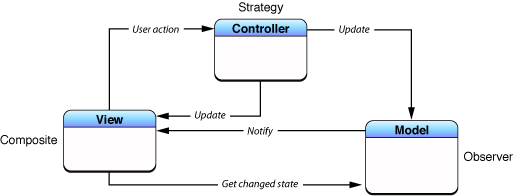
Model-View-Controller (MVC): Separating App Logic from UI
MVC organizes code by separating data (Model) from the user interface (View), using a Controller as the go-between. This is the foundational pattern for many UI frameworks, like Cocoa and UIKit. The main footgun is the "Massive View Controller."
The AppDelegate: Your App's Central Command
Think of the AppDelegate as your app's command center, receiving critical notifications from the OS. It handles core events like launch, termination, or receiving a push notification. The footgun is bloating it with logic that belongs elsewhere.
We are hiring for this. Every open role lists the topics its interview covers, so you can prepare for the real thing rather than guessing.
See open roles