Advanced concepts in Mobile Dev, page 2

Kotlin's Type-Safe Builders: Code as Data
Type-safe builders use Kotlin code to create a custom language (DSL) for building complex objects. It's like writing HTML, but the compiler validates your structure. This is common for UI layouts or server configs. The footgun is omitting @DslMarker.
The `covariant` Keyword: Loosening Type Rules
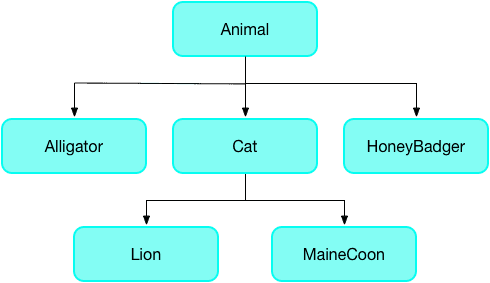
The covariant keyword tells Dart's analyzer to relax its strict rules for method overriding, letting a subclass method accept a more specific parameter type. It's often used in Flutter widgets.

iOS Provisioning Profiles: Your App's Passport
A provisioning profile is a passport for your iOS app, bundling who can run it (devices), what it can do (entitlements), and who built it (certificate). It's required for running on physical devices and is a common source of build errors.
Xcode's Time Profiler: Hunting Down Performance Bottlenecks
Time Profiler is a stopwatch for your code, sampling your app's threads to see which functions are running most often. Use it to diagnose slow UI or high battery drain by finding CPU "hot spots."
Hunt Retain Cycles with the Memory Graph Debugger
Xcode's Memory Graph Debugger is a visual map of your app's live objects and their relationships. Use it to hunt down memory leaks, especially retain cycles where objects won't deallocate.
React Native Reanimated: Off-Thread Animations
Reanimated moves animations off the busy JavaScript thread onto the native UI thread. This ensures smooth, 60-120 fps performance for gestures and transitions, even during heavy JS computation.
Android Gradle Plugin (AGP): The Engine of Your Android Build
The Android Gradle Plugin (AGP) is the specialized toolkit that teaches Gradle how to build, test, and package Android apps. It's used in every project to handle tasks like compiling resources and signing your app.
Dart's Microtask Queue vs. Event Queue
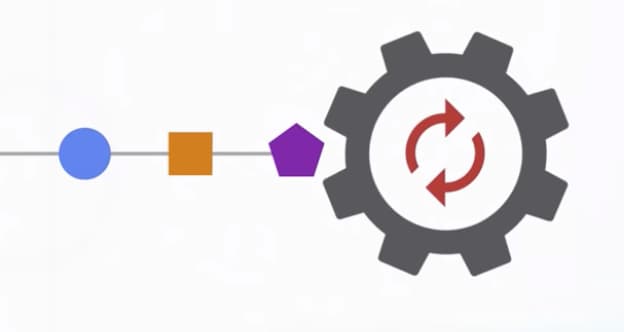
Dart's event loop prioritizes a 'microtask' queue for immediate async tasks over the main 'event' queue for I/O and user input. This ensures high-priority code runs first, but risks starving the event queue and freezing the UI if overused.

Android Studio Profiler: Find Your App's Bottlenecks
The Android Studio Profiler is your app's diagnostic dashboard, showing real-time CPU, memory, and network usage. Use it to hunt down UI jank, find memory leaks, and optimize battery-draining network calls.
Dart Streams: Single-Subscription vs. Broadcast
A single-subscription stream is a private channel for one listener; a broadcast stream is a public radio station for many. Use single-subscription for one-off data like a file download and broadcast for shared events like UI updates.
Layout Inspector: Debug Your UI Hierarchy
Layout Inspector is an X-ray for your app's UI, rendering a live 3D model of your component tree. Use it to debug visual glitches or find performance bottlenecks from deep layouts. The footgun is forgetting it has live updates to catch bugs during animations.
StreamTransformer: Building Custom Stream Operators
A StreamTransformer is a factory for custom stream operators like map or where. Use it to build reusable logic, like parsing data chunks, that can be applied to any stream.
R8: Shrinking and Obfuscating Android Code
R8 is a compile-time tool that shrinks and obfuscates your Android app. It removes unused code and renames classes to reduce APK size and deter reverse-engineering.
Dart Isolates: True Parallelism Without Shared Memory
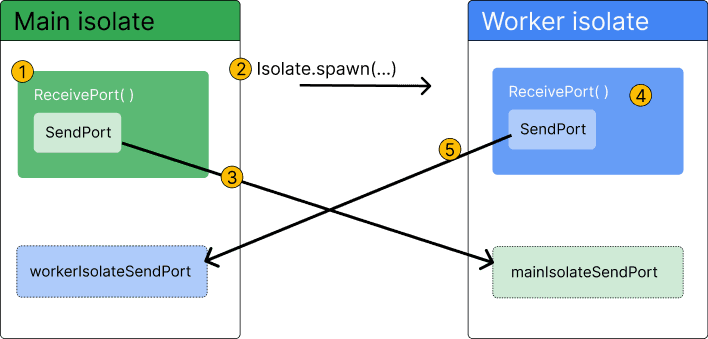
Dart isolates provide true parallelism by running code in a separate thread with its own memory. Use them to offload heavy tasks like parsing huge JSON files or complex calculations that would otherwise freeze your Flutter UI.

React Native Auth Flows: Conditional Navigators
Think of your app as having two sets of maps: one for guests, one for members. React Navigation swaps the entire map when a user logs in, not just moves them. This is the key to preventing users from back-navigating to the login screen after.
Type-Safe Navigation in React Native with TypeScript
React Navigation uses TypeScript to type-check screens and params, giving you better autocompletion. You define types for route params and augment a global navigator type so hooks like useNavigation understand your app's structure.
React Navigation State: The App's Internal Map
Think of React Navigation's state as a JS object that's the single source of truth for your app's screen history. It's essential for advanced tasks like state persistence or deep linking. The footgun: nested navigator state isn't guaranteed to exist.
The Responder Chain: Who Handles That Tap?
The Responder Chain is iOS's chain of command for events. When a user taps the screen, the event travels up a view hierarchy, asking each object, "Can you handle this?" until one accepts. Accidentally breaking this chain can silently kill event handling.
ObservableObject: Making Data Drive SwiftUI Views
ObservableObject lets your custom data classes signal SwiftUI views to refresh when data changes. Use it for reference types like a user profile or settings manager. Changes are ignored unless you mark properties with @Published, leaving your UI stale.
UIViewRepresentable: Bridging UIKit and SwiftUI
UIViewRepresentable is an adapter that lets you use battle-tested UIKit views inside your modern SwiftUI code. Use it for components like WKWebView that lack a native SwiftUI equivalent.
We are hiring for this. Every open role lists the topics its interview covers, so you can prepare for the real thing rather than guessing.
See open roles