Easy concepts in Mobile Dev, page 2

CoroutineScope: The Parent of Your Coroutines
A CoroutineScope acts as a parent to a group of coroutines, managing their lifecycles. When the parent scope is cancelled, all its children are cancelled too. It's used with builders like launch to group related work, like in an Android ViewModel.
Kotlin Flow: Asynchronous Data Streams
A Kotlin Flow is like an async Sequence, emitting multiple values over time without blocking. It's used for live data from a database or streaming network responses. The footgun: Flows are cold; the code doesn't run until a collector calls .collect().
Static Members: Belong to the Class, Not the Instance
A static member is shared across all instances of a class, belonging to the class itself. Use it for constants or utility functions that don't depend on an instance's state, like a global counter. The footgun: you cannot use this inside a static context.
Xcode Project: Your App's Blueprint and Toolbox
An Xcode project is a self-contained kit for your app, holding all files, assets, and build instructions. It's the central repository for source code, build settings, and dependencies. The footgun: moving files in Finder without telling Xcode breaks builds.
Interface Builder: Visual UI Design for iOS/macOS
Interface Builder is Xcode's visual editor for building UIs. You drag-and-drop components like buttons and screens, which are saved as .xib files. It's used to quickly lay out app screens without writing UI code.

Asset Catalogs: Your App's Smart Media Library
An Asset Catalog is a smart folder for your app's visuals, automatically serving the right version (like high-res or dark mode) for the user's device. It's the standard way to manage images, icons, and colors in Xcode.
React Native's Basic Button Component
The Button component is React Native's 'easy button' for basic user interactions. It renders a native-looking button with just a title and onPress handler. Its main footgun is its lack of styling options; for custom designs, use Pressable instead.
Android Studio: The Official Workshop for Android Apps
Think of Android Studio as the all-in-one workshop for building Android apps. It bundles a code editor, build system, and emulators to write, test, and package software for any Android device. The footgun is underestimating its resource needs.
React Native's Controlled Switch Component
The Switch component is a 'controlled' input; it doesn't manage its own state. You use it for on/off settings by telling it what to display via the value prop and updating that state in the onValueChange callback. The footgun is forgetting this link.

The Dart Event Loop: Your App's Task Manager
The event loop is Dart's single-threaded task manager. It processes one event at a time from a queue (like user taps or network responses), preventing the UI from freezing. Use async/await to avoid blocking it with long operations.

Android Project Structure: Your App's Filing Cabinet
Think of an Android project as a standardized filing cabinet. It organizes your code, images, and configuration into specific folders so the build system knows where to find everything. This is the foundation of every Android app you build or inspect.
React Native Slider: Selecting a Value from a Range
A slider is a visual control for selecting a numeric value from a range, like a volume knob. Use it for settings like brightness or price filters. The main footgun is forgetting to capture the slider's value in your app's state on value change.
Dart Futures: Chaining Async Work with .then()
A Dart Future is a promise for a value that isn't ready yet. Chain actions onto it with .then() for success and .catchError() for failure. This is key for network requests or file I/O. The footgun is forgetting .catchError(), causing silent failures.
AndroidManifest.xml: The Blueprint for Your App
AndroidManifest.xml is the blueprint for your app, telling the OS its components, permissions, and requirements before running any code. A missing declaration here is a common source of runtime crashes, as the OS simply won't see your component.
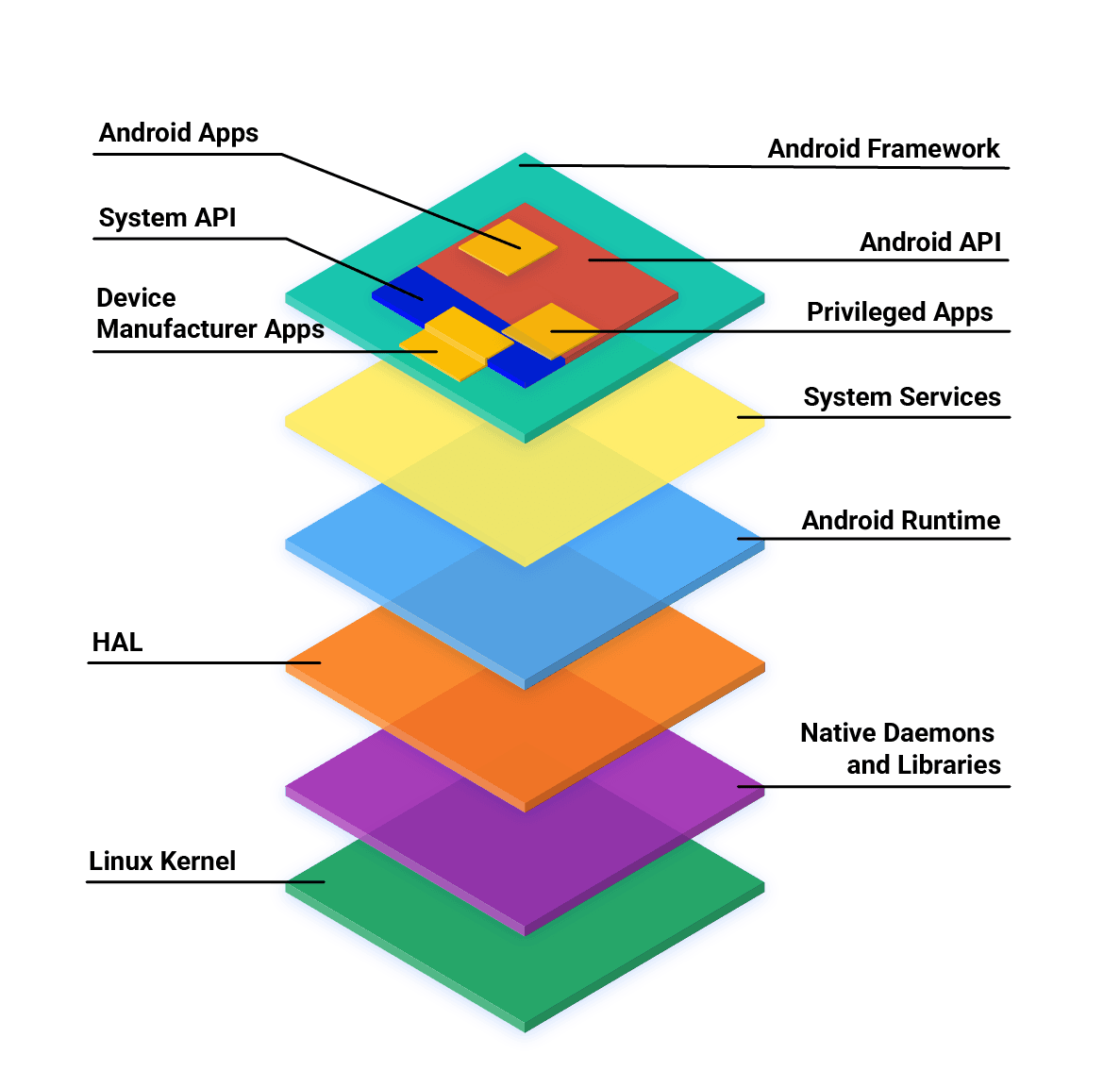
Android App Development: Core Languages and Tools
Android apps are primarily built with Kotlin, Java, and C++ using the official SDK. While other languages are possible, they often need 'glue' code to work and may have restricted API access. The main footgun is assuming any language has first-class support.
Logcat: The `tail -f` for Android Apps
Think of Logcat as tail -f for your Android app, streaming system and application messages from a device in real-time. It's your primary tool for debugging crashes, tracking execution flow, and inspecting variable values as your app runs.
UIView: The Building Block of iOS UIs
A UIView is the fundamental building block for iOS UIs. Think of it as a rectangular canvas for drawing content, handling touches, or containing other views. You use it everywhere, from simple buttons to complex layouts.

Stack Navigator: JavaScript-based Screen Transitions
Stack Navigator treats your screens like a stack of cards: push a new screen on top, pop it off to go back. It’s ideal for standard navigation flows, but its JavaScript-based implementation means you trade the performance of a native solution for…
The UIViewController Lifecycle: From Creation to On-Screen
Think of a UIViewController as an actor with cues to enter, perform, and exit. Its lifecycle methods are your script for setting up data, updating the UI, and cleaning up resources.
Drawer Navigator: Your App's Slide-Out Main Menu
A Drawer Navigator is your app's slide-out 'hamburger' menu. Use it for primary navigation between distinct sections like Home, Profile, and Settings. A common footgun is misconfiguring backBehavior, leading to non-intuitive back button actions for users.
We are hiring for this. Every open role lists the topics its interview covers, so you can prepare for the real thing rather than guessing.
See open roles