Easy concepts in Mobile Dev, page 5
Axios: A Simpler Way to Make HTTP Requests
Axios simplifies making network requests by wrapping native browser APIs in a promise-based client. Use it to GET or POST data in any JavaScript app. The main footgun is forgetting requests are asynchronous; you must use async/await to get the data.

App Sandbox: A Digital Playpen for Your App
The App Sandbox is a digital playpen for your app, restricting it to its own files and resources. It's a core security feature on iOS and macOS, preventing apps from accessing user data or system files without explicit permission.
TextEditingController: Syncing UI and Code for Text Fields
A TextEditingController is the two-way link between your code and a text field's state. Use it to read user input, set initial text, or move the cursor. A common footgun is forgetting to call dispose() on the controller, which leads to memory leaks.
FileManager: Your App's Interface to the File System
FileManager is your app's librarian for the file system. Instead of using raw paths, you ask it to find, create, or delete files and directories. Always handle potential errors, as file operations can easily fail.
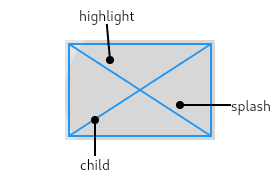
InkWell: Adding Material Splash Effects
InkWell adds a Material Design 'splash' effect to any widget on tap. Think of it as ink spreading inside the surface you touch. Use it to make non-interactive widgets like images respond to taps. The splash won't appear if an opaque widget is between it.
Swift's Codable: Effortless JSON & Data Parsing
Codable is a compiler magic trick that automatically converts Swift objects to and from formats like JSON. It's used constantly for parsing API responses or saving data to disk. The footgun: decoding fails if JSON keys don't exactly match your property names.

Android's UI Layer: Displaying Data, Handling Events
The UI layer is what users see and touch. It displays app data on screen and sends user input like taps to your business logic. It's used in every screen, from login forms to media players.
MaterialPageRoute: The Page in Your Navigator Stack
Think of Navigator as a stack of screens. MaterialPageRoute wraps your new screen widget, defining its platform-specific transition (slide on iOS, zoom on Android). You use it with Navigator.push to show a new screen.
Imperative Navigation: Pushing and Popping Screens
Think of app screens as a stack of cards. You push a new screen onto the top to show it and pop it off to go back. It's ideal for linear flows like list-to-detail. The footgun: popping the last screen closes the app.
SafeAreaView: Avoid Notches and Status Bars (Deprecated)
SafeAreaView was a component that automatically padded your UI to avoid device notches and system bars. It was a simple way to keep content visible on iOS, but it is now deprecated. The modern approach is to use the react-native-safe-area-context library.
Flutter Named Routes: Navigate with Strings, Not Widgets
Think of named routes as URL paths for your app's screens. Instead of building a screen widget on the spot, you just tell Flutter "go to '/profile'". This is ideal for centralizing navigation in large apps and for enabling deep linking.
Passing Arguments to Flutter Named Routes
Flutter named routes pass data through an arguments field instead of global variables. Use this when navigating to a route that needs an ID or configuration object. Arguments are untyped by default, so unsafe casts crash at runtime.
ActionSheetIOS: Native iOS Action Menus
ActionSheetIOS presents a native iOS menu sliding up from the bottom, offering users contextual choices. It's ideal for simple actions like "Delete" or "Save" and can also trigger the native share sheet.
URLSession: The Core of iOS Networking
URLSession is the engine for all network requests in Apple apps. Use it to fetch API data, download images, or upload files. The biggest footgun is blocking the main UI thread, which freezes your app; always perform network tasks asynchronously.
URLRequest: The Blueprint for a Network Call
URLRequest is the recipe for a network call, not the call itself. It bundles the URL, HTTP method, headers, and body. You hand this 'order form' to URLSession to execute. The footgun is thinking URLRequest sends the request—it only describes it.
Room Entity: Your Database Table as a Kotlin Class
A Room Entity is a data class that maps to a database table; each object is a row, each property a column. Use it to define your local SQLite schema in Android. The footgun: forgetting the @PrimaryKey annotation, which is required for Room to manage.
JSONDecoder: Turning JSON into Swift Types
JSONDecoder is your translator for turning raw JSON data into native Swift structs or classes. It's the standard way to parse API responses, letting you work with typed, safe objects.
Room DAO: Your App's Type-Safe SQL Interface
A Room DAO is an interface that translates your method calls into SQL queries. It's how your Android app's code talks to its local database without writing boilerplate. The footgun is putting business logic in a DAO; it should only access data.
JSONEncoder: Turning Swift Objects into JSON
JSONEncoder is your app's translator, converting Swift objects into JSON data for APIs. It's the "serialization" half of Codable. Use it to send data to a server or save objects. The footgun: mismatched keys or date formats require configuring the encoder.
Room Database: SQL Made Simple on Android
Room is an abstraction layer over SQLite that lets you work with Kotlin/Java objects, not raw SQL. It's the standard for local data persistence in Android, like caching network data.
We are hiring for this. Every open role lists the topics its interview covers, so you can prepare for the real thing rather than guessing.
See open roles