Intermediate concepts in Mobile Dev, page 3
The Gesture Responder System: Who Gets the Touch?
The Gesture Responder System is React Native's negotiation protocol that decides which component owns a touch. It's how the framework distinguishes a button tap from a scroll. The main footgun is that the deepest component wins the touch by default.

Swift Package Manager: Native Dependency Management
Swift Package Manager (SPM) is Apple's built-in librarian for your project's code dependencies. You use it to add, remove, and update third-party libraries directly in Xcode. The main footgun is that version conflicts between dependencies can break your build.
PanResponder: The Gesture State Machine
PanResponder turns raw touch events into a single, stateful gesture, like dragging an object. It's used to build draggable elements by providing a gestureState object with velocity and distance. The footgun is confusing moveX/Y with dx/dy.
Future.wait: Run Concurrent Dart Operations
Run multiple async operations concurrently and collect their results in a single list. Use it to fire off independent tasks, like multiple network requests, and wait for them all to finish. The footgun: if one future fails, you lose all results by default.
Touchable Components in React Native
TouchableOpacity and siblings wrap views to give press feedback by dimming or highlighting. Use them for simple taps on buttons or list items. They inject extra Animated.View nodes that can silently break layout, and Pressable has superseded the entire family.
Dart's Stream: Asynchronous Data Pipelines
Think of a Dart Stream as a conveyor belt for asynchronous data, delivering events over time. It's ideal for handling sequences like user input or file I/O.

Adding Build Dependencies with Gradle in Android
Gradle is the tool for adding build dependencies to your Android app. This allows you to integrate external libraries like Jetpack, Compose, or Google Play Services, which are essential for building modern applications.
RefreshControl: The Pull-to-Refresh Handler
RefreshControl adds the native "pull-to-refresh" spinner to your lists. Use it inside a ScrollView or FlatList to let users manually trigger a data update. The footgun: you must control the 'refreshing' prop manually or the spinner vanishes instantly.
StreamController: The Faucet for Your Data Stream
A StreamController is the faucet handle for your data stream. Use it to create a custom stream from any data source and push events to it. The main footgun is that a default controller only allows one listener; use StreamController.broadcast for multiple.
Android Build Variants: One Codebase, Many Apps
Think of build variants as a matrix for your app builds, combining build types (like debug/release) with product flavors (like free/paid). This lets you manage different API endpoints or features for various versions from a single codebase.
Completer: Manually Control a Future's Lifecycle
A Completer gives you a Future now but lets you decide when and how it finishes later. It's essential for converting old callback-based APIs into modern async/await code. The main footgun is trying to complete it more than once, which throws an error.
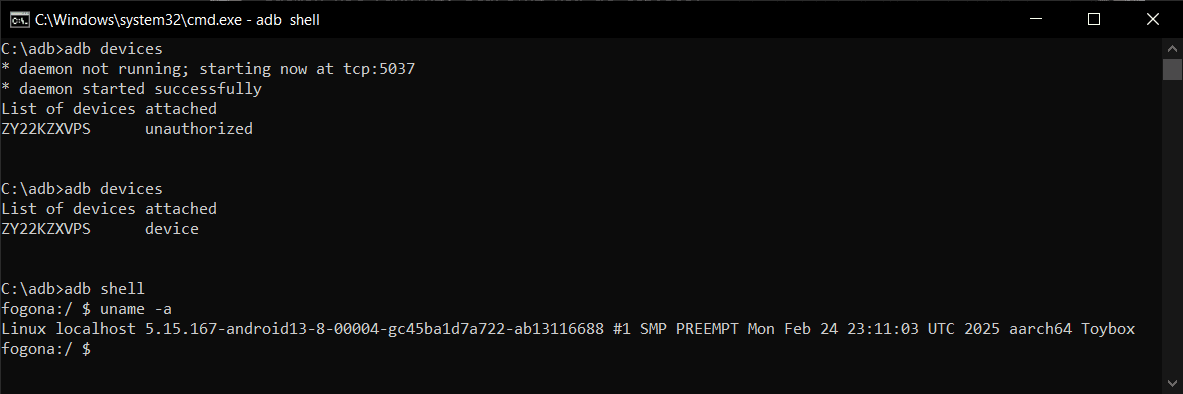
Android Debug Bridge (ADB): A Developer's Remote Control
Android Debug Bridge (ADB) is a developer's universal remote for an Android device. This command-line tool lets you install apps, view logs, and run shell commands, bypassing the UI. It's used for debugging, file transfers, and automation.

Escape Prop Drilling with React Navigation Hooks
React Navigation hooks let components control navigation without prop drilling. useNavigation gives you the navigation object to change screens, while useRoute provides data about the current screen. The footgun: they only work inside a navigator.
React Navigation: Configuring Screen Options
Treat screen options like CSS for your React Navigation screens, letting you style headers and tabs. Apply styles to a single Screen with the options prop, or to a Group of screens with screenOptions.
UITableView: The Backbone of iOS Lists
UITableView is the workhorse for displaying scrolling lists in iOS. It's used everywhere from Settings to Contacts. The footgun is forgetting to reuse cells, which causes massive memory usage and choppy scrolling, so always dequeue a reusable cell.
Nested Navigators: Building Complex UI Flows
Think of nested navigators as UI building blocks, placing one navigator (like tabs) inside a screen of another (a stack). This creates flows like a main tab bar inside a stack for modals.
UICollectionView: Grids, Stacks, and Custom Layouts
UICollectionView is a powerful tool for displaying items in customizable layouts, going far beyond a simple vertical list. Use it for photo galleries or App Store-style interfaces.
Native Stack Navigator: Native Performance, Less Customization
Native Stack Navigator uses the OS's built-in screen management for smooth, performant transitions. Use it for standard screen stacks where a native look and feel is key.
SwiftUI State and Binding: Owning vs. Sharing Data
In SwiftUI, @State is owning the data, while @Binding is borrowing a key. A view uses @State for its private source of truth, like a toggle's status, and passes a @Binding to child views so they can modify the original source.
React Navigation Lifecycle: Screens Don't Unmount
Unlike the web, React Native screens don't unmount when you navigate away; they stay mounted to preserve state. This means a standard useEffect only runs once. To run code when a screen is shown, you must listen for the focus event.
We are hiring for this. Every open role lists the topics its interview covers, so you can prepare for the real thing rather than guessing.
See open roles