Intermediate concepts in Mobile Dev, page 5
ConstraintLayout: Flexible UIs Without Nesting
ConstraintLayout positions UI elements by their relationships, like anchoring objects on a blueprint. It's ideal for responsive screens that avoid deep, slow view hierarchies.

RecyclerView: Efficiently Displaying Dynamic Lists
RecyclerView displays long lists by recycling views that scroll off-screen, like a restaurant reusing plates for new customers. It's essential for feeds or contact lists.
Android Styles and Themes: UI Consistency at Scale
A Style is a collection of attributes for a single View, like a button's font and color. A Theme is a style applied to an entire Activity or application, providing a consistent look and feel. They are essential for managing UI appearance efficiently.
Flutter's Box Constraint System: Parents Rule
In Flutter, parents tell children their size limits, not their size. A widget must obey its parent's constraints (min/max width/height), but it chooses its own size within those bounds. The footgun is trying to size a child widget against its parent's rules.
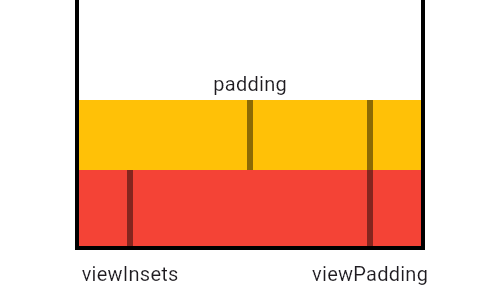
MediaQuery: Reading Device Properties Efficiently
MediaQuery is your widget's window to the device, providing screen size, orientation, and safe areas. Use it to build responsive UIs that avoid system elements like notches or the keyboard. The footgun: MediaQuery.of(context) rebuilds on any change.
LayoutBuilder: Build Widgets Based on Parent Size
LayoutBuilder lets your widget ask its parent "how much space do I have?" before deciding what to build. Use it for responsive layouts, like showing a Row on wide screens and a Column on narrow ones.
Redux: A Single Source of Truth for App State
Redux centralizes app state into a single "store." Instead of components managing state locally, they dispatch actions to a global reducer. Use it when many components share data.
Flutter's Wrap Widget: The Row That Won't Overflow
Flutter's Wrap widget is like text-wrapping for your UI. It arranges children in a row or column, automatically flowing them onto a new line when space runs out. It's perfect for dynamic lists of tags or chips.
React Redux: Connecting Components to a Global Store
React Redux connects your React UI to a global Redux state store, letting components read data and dispatch updates. It's used to avoid "prop drilling" shared state across the app.
Flutter's FittedBox: Scale Any Widget to Fit
FittedBox scales its single child to fit an allocated space, like CSS's object-fit but for any widget. It's perfect for making an icon fill a button or ensuring text fits a container. The footgun: it fails in unconstrained parents like a Row or Column.
Redux Toolkit: The Opinionated Way to Write Redux
Redux Toolkit (RTK) is the official, opinionated way to write Redux, bundling best practices to eliminate boilerplate. Use it for any new Redux app to simplify store setup and state updates.

NavigationStack: Programmatic Navigation in SwiftUI
Think of NavigationStack as a pile of views. You push new views onto the stack programmatically by appending to a path array. This is SwiftUI's modern, data-driven way to handle deep navigation, replacing the older, buggier NavigationView.
AspectRatio: Forcing a Widget's Proportions
AspectRatio forces a child widget to maintain a specific width-to-height ratio, like a 16:9 video player. Use it for image placeholders or video frames. The footgun: it fails in unconstrained parents like FittedBox; use SizedBox there instead.
Jotai for React Native: Atomic State, Native Performance
Jotai brings minimalist, atomic state management to React Native, treating state as small, independent pieces. It's ideal for sharing state without prop drilling and offers full compatibility out of the box, including persistence via atomWithStorage.
NavigationLink: Pushing Views in SwiftUI
NavigationLink is SwiftUI's declarative way to push a new view onto a navigation stack. You use it inside a NavigationStack to create drill-down UIs, like tapping a list item to see its details. The footgun is forgetting the parent NavigationStack.
NavigationSplitView: Adaptive Layouts for All Screen Sizes
NavigationSplitView is a responsive container for multi-column layouts. It shows a sidebar, content, and detail view on large screens but collapses to a stack on small ones. Use it for master-detail UIs like a mail app.
Recomposition: Smart UI Updates in Compose
Recomposition is how Compose redraws your UI. It intelligently re-runs only the functions whose state has changed, avoiding a full screen refresh. This is triggered automatically when a State object that a composable reads is updated.
Lazy Layouts: Compose's Answer to Efficient Lists
Lazy layouts in Jetpack Compose render only the list items visible on screen, avoiding memory crashes from large datasets. Use them for long lists like feeds or galleries, but remember to provide a key to prevent UI glitches when data changes.
Theming in Compose: Style from a Single Source
Theming in Compose is like a CSS stylesheet for your app. You define colors, typography, and shapes once in a central Theme composable, and it cascades down. Use it for light/dark modes and brand consistency.
Navigation in Compose
Navigation in Compose treats screens as state. You define a graph of composables, each with a string 'route', and navigate by changing the current route. It's ideal for single-activity apps.
We are hiring for this. Every open role lists the topics its interview covers, so you can prepare for the real thing rather than guessing.
See open roles