Concepts in Mobile Dev, page 10
Row and Column: Arranging Widgets Without Scrolling
Think of Row and Column as rigid containers for laying out widgets horizontally or vertically. Use them for simple, fixed layouts like button bars. The footgun: unbounded children like Text will overflow; wrap them in an Expanded widget to fill remaining…
View and ViewGroup: The Building Blocks of Android UI
A View is a single UI widget like a button; a ViewGroup is a container that arranges them. This is the fundamental structure for all Android UIs. The common footgun is creating deeply nested ViewGroups, which slows down rendering performance.

iOS Background Modes: A Hall Pass for Your App
iOS background modes are like hall passes, letting your app perform specific tasks like playing audio or tracking location after the user switches away. They're used for music players or navigation apps.
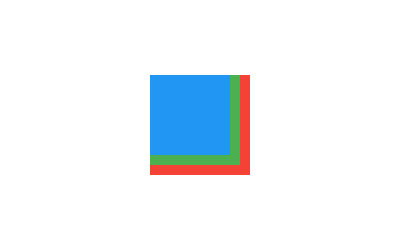
Flutter's Stack: Layering Widgets on Top of Each Other
Flutter's Stack widget lets you overlap children, like layering papers. The first child is at the bottom, the last is on top. Use it for text over images or gradient overlays. The footgun: you can only position children relative to the stack's edges.

Handling Android UI Events: Listeners and Callbacks
Think of UI event handling as setting tripwires. You attach a "listener" object to a UI element, and when a user interacts with it, your listener's code (the "callback") is triggered. This is how you make buttons and lists interactive.
VirtualizedList: The Engine Behind React Native Lists
VirtualizedList is the engine behind React Native's efficient lists, rendering only visible items to save memory. Use it when FlatList isn't flexible enough, like for immutable data. The main footgun: component state is lost when items scroll out of view.
The Singleton Pattern: One Instance to Rule Them All
A singleton ensures a class has only one instance and provides a global access point to it. It's used for shared resources like a network manager or logger. The main footgun is that overuse creates tight coupling and makes testing difficult.

Flutter's Container: The Ultimate Box Widget
Think of Container as a customizable box for your UI. It's Flutter's multi-tool for combining layout, styling, and positioning in a single widget. Use it to add padding, margins, borders, or background colors.
ConstraintLayout: Flexible UIs Without Nesting
ConstraintLayout positions UI elements by their relationships, like anchoring objects on a blueprint. It's ideal for responsive screens that avoid deep, slow view hierarchies.
Shopify FlashList: Fixing React Native's Blank Cells
FlashList is a performant drop-in replacement for React Native's FlatList. It recycles components to eliminate blank cells during fast scrolling in long lists. The footgun is assuming it fixes all performance issues, not just rendering.

The Coordinator Pattern: Untangling iOS Navigation
The Coordinator pattern makes a separate object the 'boss' of app navigation, leaving view controllers to just manage their view. This lets you reuse views in different flows without them knowing what comes next.
Expanded & Flexible: Claiming Space in Flutter Layouts
Expanded and Flexible widgets manage space in a Row or Column. Expanded is greedy, forcing its child to fill all available space. Flexible is polite, allowing its child to grow but not requiring it. Use them to prevent overflow errors.
RecyclerView: Efficiently Displaying Dynamic Lists
RecyclerView displays long lists by recycling views that scroll off-screen, like a restaurant reusing plates for new customers. It's essential for feeds or contact lists.

VIPER: Taming Massive iOS View Controllers
VIPER is a strict architectural pattern that tames "Massive View Controllers" by splitting features into five layers: View, Interactor, Presenter, Entity, and Router. It's used in large iOS apps to make business logic and navigation explicitly testable.
SingleChildScrollView: When One Widget Needs to Scroll
SingleChildScrollView is an emergency scrollbar for one widget that usually fits on screen. Use it when a layout might overflow on small devices. The footgun: it renders its entire child at once, so never use it for long lists—use ListView instead.
Android Styles and Themes: UI Consistency at Scale
A Style is a collection of attributes for a single View, like a button's font and color. A Theme is a style applied to an entire Activity or application, providing a consistent look and feel. They are essential for managing UI appearance efficiently.

Props Drilling: Passing Data Through Components
Props drilling is passing data through components that don't need it, just to get it to a deeply nested child. It's React's most direct way to share state down the component tree. The footgun: this couples intermediate components to data they never use.
iOS State Preservation: Resume Where You Left Off
Think of it as an automatic bookmark for your app's UI. When iOS terminates your app, state preservation can save the user's place, restoring the view hierarchy on next launch.
Flutter's Box Constraint System: Parents Rule
In Flutter, parents tell children their size limits, not their size. A widget must obey its parent's constraints (min/max width/height), but it chooses its own size within those bounds. The footgun is trying to size a child widget against its parent's rules.
Data Binding: Link Android UI to Data in XML
Data Binding lets you connect UI components to data sources directly in XML, eliminating manual findViewById calls. It's used to set view properties based on your ViewModel's state.
We are hiring for this. Every open role lists the topics its interview covers, so you can prepare for the real thing rather than guessing.
See open roles