Concepts in Mobile Dev, page 12
Jotai for React Native: Atomic State, Native Performance
Jotai brings minimalist, atomic state management to React Native, treating state as small, independent pieces. It's ideal for sharing state without prop drilling and offers full compatibility out of the box, including persistence via atomWithStorage.

NavigationLink: Pushing Views in SwiftUI
NavigationLink is SwiftUI's declarative way to push a new view onto a navigation stack. You use it inside a NavigationStack to create drill-down UIs, like tapping a list item to see its details. The footgun is forgetting the parent NavigationStack.
CustomSingleChildLayout: Parent-Driven Layout
CustomSingleChildLayout lets a parent widget dictate its child's size and position, ignoring the child's intrinsic size. Use it for layouts where the parent's dimensions are independent, like a custom overlay.

State in Jetpack Compose: The UI's Memory
In Compose, state is any value that can change over time. The UI is a direct function of this state; when the state updates, the UI automatically redraws (recomposes) to match. The main footgun is not "hoisting" state, which makes components hard to test.
Redux Middleware: Intercepting Actions Before Reducers
Redux middleware is like an Express middleware for your state, intercepting actions before they hit the reducer. It's used for logging, crash reporting, or async API calls. The footgun is forgetting to call next(action), which silently blocks the action.
NavigationSplitView: Adaptive Layouts for All Screen Sizes
NavigationSplitView is a responsive container for multi-column layouts. It shows a sidebar, content, and detail view on large screens but collapses to a stack on small ones. Use it for master-detail UIs like a mail app.
CustomMultiChildLayout: A Delegate for Complex Layouts
CustomMultiChildLayout gives a delegate total control to size and position multiple children. It's for complex layouts where widgets relate to each other, like a radial menu. The key footgun: the parent's size cannot depend on the sizes of its children.
Recomposition: Smart UI Updates in Compose
Recomposition is how Compose redraws your UI. It intelligently re-runs only the functions whose state has changed, avoiding a full screen refresh. This is triggered automatically when a State object that a composable reads is updated.
Redux Saga: Managing Side Effects with Generators
Redux Saga runs side effects in a separate thread-like process. It listens for Redux actions and executes complex async tasks, like API calls, keeping that logic out of your components.
Deep Linking: Go Beyond the App's Home Screen
A deep link is a URL for a specific screen inside your app, not just its front door. Use it to let users jump directly to content from emails, websites, or other apps, but be sure to handle state changes like login before redirecting.
IntrinsicHeight/Width: Sizing by 'Natural' Dimensions
IntrinsicHeight/Width tells a child widget to size itself to its "natural" dimensions, rather than expanding to fill available space. It's useful for making all items in a Row match the tallest item's height, but it's expensive and should be avoided.
Memoized Selectors: Avoid Needless Re-renders
A memoized selector caches its result, re-running only if its inputs from the Redux store change. Use it to compute derived data like a filtered list without triggering needless re-renders.
NavigationPath (SwiftUI)
NavigationPath is a type erased stack of navigation destinations that backs a SwiftUI NavigationStack, letting one path hold a mix of different hashable data types so you can push, pop and control deep, heterogeneous navigation flows programmatically.
GestureDetector: Making Any Widget Interactive
GestureDetector is an invisible wrapper that makes any widget interactive. Use it to add an onTap to a Container or custom widget. The biggest footgun: when nested, only the innermost detector's callback for a given gesture will fire.
Lazy Layouts: Compose's Answer to Efficient Lists
Lazy layouts in Jetpack Compose render only the list items visible on screen, avoiding memory crashes from large datasets. Use them for long lists like feeds or galleries, but remember to provide a key to prevent UI glitches when data changes.
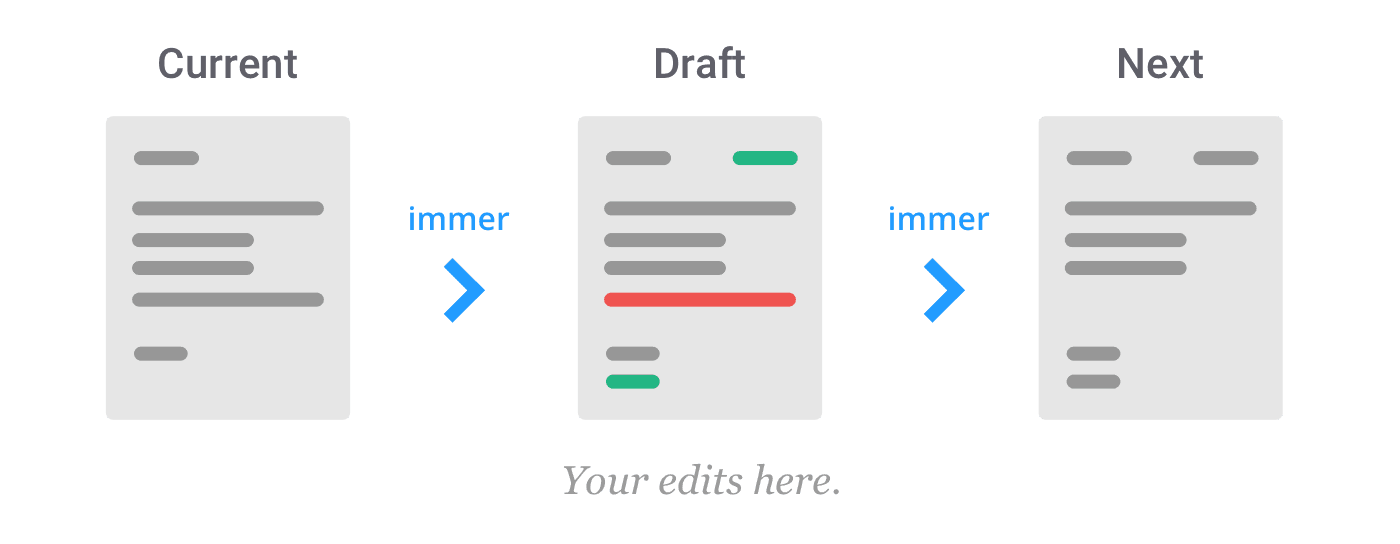
Immer: Write Mutable Code for Immutable State
Immer lets you write simple, mutable-style code to produce an immutable next state. It's essential in Redux or with React's useState to avoid complex spread operators for deep updates. The footgun: mutations are only safe inside Immer's produce function.
Custom UIViewController Transitions: Beyond the Defaults
A custom transition lets you choreograph the handoff between two screens, defining the exact animation. Use it for unique experiences like a card expanding to fill the screen.
Flutter's Three Main Material Buttons
Flutter's Material buttons signal emphasis. Use ElevatedButton for primary actions (Save), OutlinedButton for secondary (Next), and TextButton for tertiary (Cancel). The footgun is choosing a button for its looks, not its place in the action hierarchy.
Theming in Compose: Style from a Single Source
Theming in Compose is like a CSS stylesheet for your app. You define colors, typography, and shapes once in a central Theme composable, and it cascades down. Use it for light/dark modes and brand consistency.
React Native: Making Network Requests with Fetch
fetch is your app's tool for requesting server data. It's asynchronous, returning a promise for a future response. Use it for API calls like loading profiles or posting updates. The footgun: always catch errors, or they will fail silently.
We are hiring for this. Every open role lists the topics its interview covers, so you can prepare for the real thing rather than guessing.
See open roles