Intermediate everything in Mobile Dev, page 34

Handling API State with a Sealed Class Wrapper
Treat API calls as states, not just data. A sealed class wrapper (Success, Error, Loading) models these states for your UI. Use this with Retrofit to show spinners or errors without crashing. The footgun: don't scatter try-catch blocks; centralize them.
Scoped Storage: Your App's Private File Cabinet
Scoped Storage gives your app a private file cabinet on external storage, not a key to the whole building. It's the default on modern Android for saving data or accessing media. The footgun: don't use direct file paths to shared files; you must use new.

App-Specific Storage: Your App's Private Locker
Think of app-specific storage as a private locker for your app's data, automatically cleaned up on uninstall. Use it for cache, settings, or internal data. The footgun: assuming this data is permanent—it's deleted when the user uninstalls.
Room Database Migrations: Evolving Your Schema Safely
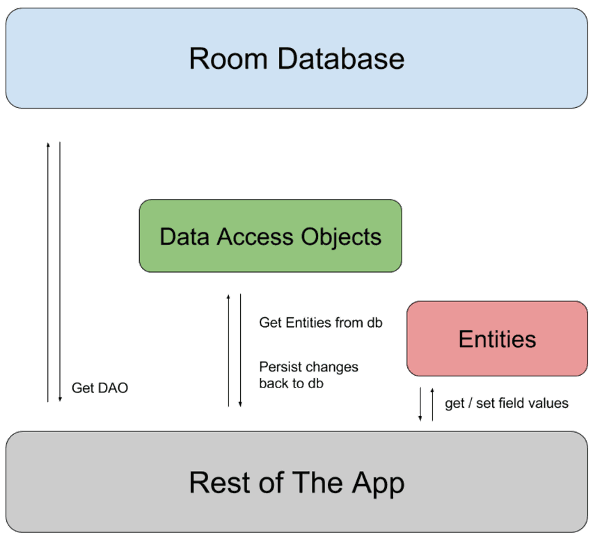
A Room migration is a renovation plan for your database. When you change your schema, you provide SQL instructions to upgrade existing user data without loss, preventing crashes on app updates. The footgun is forgetting to increment the database version.
Room Type Converters: Teach Your Database New Tricks
Room Type Converters are translators for your database, teaching it to store types it doesn't natively understand, like Date. They let you persist simple objects by converting them to primitives like Long. The footgun is faking object relations with them.
Repository Pattern: Your App's Single Source of Truth
The Repository Pattern acts as a mediator for your app's data, fetching from sources like a network or database. Use it to separate your UI from data-fetching logic, like caching. The footgun is putting business logic here; it's for data operations only.
Using Android Views in Compose (and Vice Versa)
AndroidView and ComposeView are bridges for gradual UI migration. Use them to embed classic Views in Compose screens or vice versa, like for a MapView. The footgun is managing state and lifecycles across the two different UI paradigms, which can lead to bugs.
Navigation in Compose
Navigation in Compose treats screens as state. You define a graph of composables, each with a string 'route', and navigate by changing the current route. It's ideal for single-activity apps.
Theming in Compose: Style from a Single Source
Theming in Compose is like a CSS stylesheet for your app. You define colors, typography, and shapes once in a central Theme composable, and it cascades down. Use it for light/dark modes and brand consistency.
Lazy Layouts: Compose's Answer to Efficient Lists
Lazy layouts in Jetpack Compose render only the list items visible on screen, avoiding memory crashes from large datasets. Use them for long lists like feeds or galleries, but remember to provide a key to prevent UI glitches when data changes.
Recomposition: Smart UI Updates in Compose
Recomposition is how Compose redraws your UI. It intelligently re-runs only the functions whose state has changed, avoiding a full screen refresh. This is triggered automatically when a State object that a composable reads is updated.
Android Styles and Themes: UI Consistency at Scale
A Style is a collection of attributes for a single View, like a button's font and color. A Theme is a style applied to an entire Activity or application, providing a consistent look and feel. They are essential for managing UI appearance efficiently.
RecyclerView: Efficiently Displaying Dynamic Lists
RecyclerView displays long lists by recycling views that scroll off-screen, like a restaurant reusing plates for new customers. It's essential for feeds or contact lists.
ConstraintLayout: Flexible UIs Without Nesting
ConstraintLayout positions UI elements by their relationships, like anchoring objects on a blueprint. It's ideal for responsive screens that avoid deep, slow view hierarchies.
ViewModel: Surviving Android Configuration Changes
A ViewModel acts like a durable backpack for your UI's data, surviving the destruction and recreation of an Activity during a screen rotation. It holds UI state, like user input or fetched data, preventing data loss.

Android's Task and Back Stack Explained
Think of the back stack as a stack of plates (screens). A "Task" is the entire stack for a user's workflow. The system manages this stack, but you can control it for custom navigation. The biggest footgun is misusing launch modes, which breaks back button.
LiveData: Lifecycle-Aware Data Observation
LiveData is a data holder that only notifies active UI components. It connects your ViewModel's data to your UI, preventing crashes and memory leaks by respecting the Android lifecycle.
Android ViewModel: Survive Screen Rotations
A ViewModel is a lifecycle-aware data holder that separates your UI's state from its controller. It keeps data alive during configuration changes like screen rotations, preventing data loss and repeated network calls.
Android Services: Running Work Without a UI
An Android Service is a component for long-running background tasks, even when the user isn't in your app. Use it for tasks like playing audio or syncing data.
Android Debug Bridge (ADB): A Developer's Remote Control
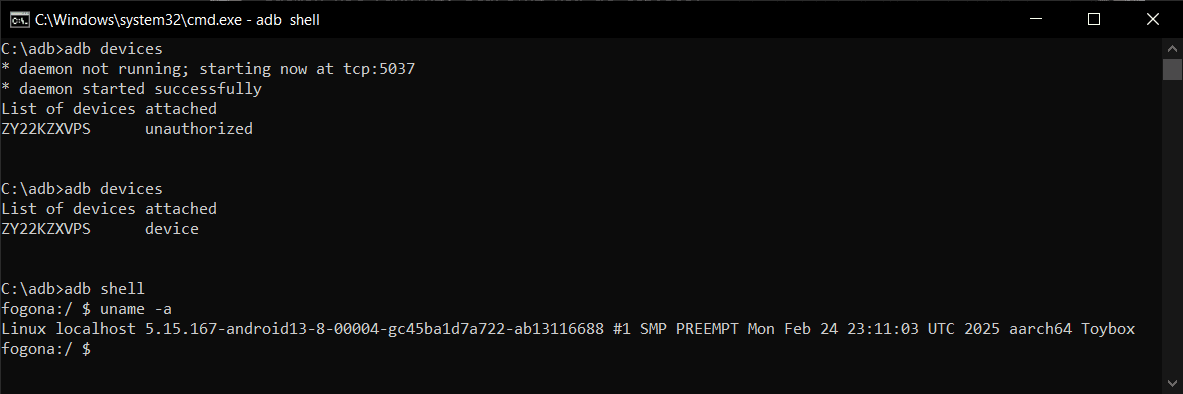
Android Debug Bridge (ADB) is a developer's universal remote for an Android device. This command-line tool lets you install apps, view logs, and run shell commands, bypassing the UI. It's used for debugging, file transfers, and automation.
We are hiring for this. Every open role lists the topics its interview covers, so you can prepare for the real thing rather than guessing.
See open roles