All bites
The whole library, newest first. Filter by what you are here for, or pick a topic if you already know.
4247 bites
Page 137

UIView: The Building Block of iOS UIs
A UIView is the fundamental building block for iOS UIs. Think of it as a rectangular canvas for drawing content, handling touches, or containing other views. You use it everywhere, from simple buttons to complex layouts.
The UIViewController Lifecycle: From Creation to On-Screen
Think of a UIViewController as an actor with cues to enter, perform, and exit. Its lifecycle methods are your script for setting up data, updating the UI, and cleaning up resources.
UIStackView: Layouts Without Manual Constraints
A UIStackView is an invisible container that arranges views in a single column or row, saving you from writing manual layout constraints. It's ideal for toolbars or forms. The main footgun is forgetting it's non-rendering—you can't set its background color.
SwiftUI's View: A Blueprint, Not a Building
A SwiftUI View is a lightweight blueprint for a piece of your UI, not the UI element itself. It's used to compose everything from a single button to an entire screen. The common mistake is treating it like a heavy UIView class; it's a cheap.
SwiftUI Stacks: Arrange Views Vertically, Horizontally, and in Layers
SwiftUI stacks are your core layout tools for arranging views. Use VStack for vertical columns, HStack for horizontal rows, and ZStack for layering. They're essential for any UI, from simple rows to complex overlays.
UITableView: The Backbone of iOS Lists
UITableView is the workhorse for displaying scrolling lists in iOS. It's used everywhere from Settings to Contacts. The footgun is forgetting to reuse cells, which causes massive memory usage and choppy scrolling, so always dequeue a reusable cell.
UICollectionView: Grids, Stacks, and Custom Layouts
UICollectionView is a powerful tool for displaying items in customizable layouts, going far beyond a simple vertical list. Use it for photo galleries or App Store-style interfaces.
SwiftUI State and Binding: Owning vs. Sharing Data
In SwiftUI, @State is owning the data, while @Binding is borrowing a key. A view uses @State for its private source of truth, like a toggle's status, and passes a @Binding to child views so they can modify the original source.
SwiftUI Modifiers: Stacking Changes on Views
Think of SwiftUI modifiers as non-destructive filters you apply to a view, creating a new, wrapped version with the change applied. You use them to add padding, set fonts, or handle taps. The footgun: modifier order matters immensely.
SwiftUI List: More Than Just a Table View
A SwiftUI List is a declarative container for scrollable rows of data, like a modern UITableView. Use it for settings, feeds, or contact lists. The footgun: never nest a List inside a ScrollView, as it breaks scrolling behavior.
UIHostingController: Bridge SwiftUI into UIKit Apps
UIHostingController is an adapter that lets you use modern SwiftUI views inside a UIKit app by wrapping them in a UIViewController. This is key for migrating apps to SwiftUI or embedding new components.
The Responder Chain: Who Handles That Tap?
The Responder Chain is iOS's chain of command for events. When a user taps the screen, the event travels up a view hierarchy, asking each object, "Can you handle this?" until one accepts. Accidentally breaking this chain can silently kill event handling.
ObservableObject: Making Data Drive SwiftUI Views
ObservableObject lets your custom data classes signal SwiftUI views to refresh when data changes. Use it for reference types like a user profile or settings manager. Changes are ignored unless you mark properties with @Published, leaving your UI stale.
UIViewRepresentable: Bridging UIKit and SwiftUI
UIViewRepresentable is an adapter that lets you use battle-tested UIKit views inside your modern SwiftUI code. Use it for components like WKWebView that lack a native SwiftUI equivalent.
iOS App States: From Launch to Suspension
An iOS app is like a person with different states of alertness: focused (Active), distracted (Inactive), or napping (Background/Suspended). This lifecycle dictates how your app behaves during interruptions.
The AppDelegate: Your App's Central Command
Think of the AppDelegate as your app's command center, receiving critical notifications from the OS. It handles core events like launch, termination, or receiving a push notification. The footgun is bloating it with logic that belongs elsewhere.
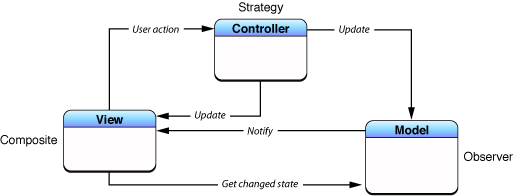
Model-View-Controller (MVC): Separating App Logic from UI
MVC organizes code by separating data (Model) from the user interface (View), using a Controller as the go-between. This is the foundational pattern for many UI frameworks, like Cocoa and UIKit. The main footgun is the "Massive View Controller."
UISceneDelegate: Managing Your App's UI Instances
Think of SceneDelegate as the lifecycle manager for a single window of your app's UI. It's essential for multi-window iPad apps, handling when a scene connects, disconnects, or changes state.

MVVM: Separate SwiftUI Logic from Layout
MVVM separates logic from layout by moving state and business logic out of your SwiftUI View into a dedicated ViewModel class. This makes your code cleaner, more organized, and easier to test.
Dependency Injection in Swift: Stop Creating, Start Receiving
Dependency Injection means objects receive their dependencies from the outside rather than creating them internally. It's used to give a view model a network client or data source, making it testable.