All bites
The whole library, newest first. Filter by what you are here for, or pick a topic if you already know.
4247 bites
Page 144
withAnimation: The Implicit Animation Transaction
withAnimation wraps state changes in a transaction, telling SwiftUI to tween affected layout automatically. Call it from button actions or view model methods to animate many views from one state flip.
Custom Rendering with draw(_:)
draw(_:) is the callback where UIKit asks your view for pixels. Override it to render custom shapes or text with Core Graphics when stock views fall short. The footgun is calling it directly or doing non-drawing work inside; use setNeedsDisplay() instead.
MatchedGeometryEffect: Shared Element Hero Transitions
MatchedGeometryEffect lets two views share one spatial identity, so a thumbnail can appear to fly into a detail sheet across view hierarchies. It only works if both views exist simultaneously during a withAnimation block; otherwise the transition snaps.
XCTestCase: One Fresh Instance Per Test
A XCTestCase subclass is a lab bench for isolated experiments. Each test method is a fresh invocation checked by the runner. The silent killer is shared mutable state on the case: without setUp, tests flake because execution order is never guaranteed.
Test Plans (XCTestPlan)
A Test Plan is an Xcode configuration file decoupling which tests run from how they run, letting one scheme execute many configurations: localizations, sanitizers, randomized order, and repetition, all without editing the scheme.
Dependency Resolution in iOS Package Managers
Dependency resolution finds one version of every library that satisfies all transitive requirements. It runs when SPM, CocoaPods, or Carthage builds your graph. The footgun is tight upper bounds; they multiply unresolvable diamond conflicts.
XCFrameworks: One Bundle for Every Apple Platform
An XCFramework is a shipping container for compiled Apple libraries: one bundle holds device, simulator, and Mac binaries so Xcode picks the right slice automatically. Use it to distribute closed-source SDKs.
@objc: Swift's Bridge to Objective-C
@objc is the bridge badge that exposes Swift code to the Objective-C runtime so UIKit selectors and KVO work. You need it for target-action and Core Data. Forget it and you get a runtime crash, not a compiler error.
Profiling iOS Memory with Instruments
Instruments X-rays your heap to catch objects that outstay their welcome. Profile image-heavy features or when jetsam kills your app. Never trust Simulator memory numbers; always validate on physical hardware.
Thread Sanitizer catches data races in Swift
Thread Sanitizer turns flaky race crashes into reproducible reports by monitoring memory accesses at runtime. Use it in Xcode to catch unsynchronized cross-thread reads and writes. It only catches races that execute during your test run, so coverage matters.
KVO: Swift's Built-In Observer Pattern
KVO lets an object subscribe to property changes on another object automatically. It shines when you need UI updates driven by model state, but forgetting to remove observers before deallocation crashes your app with an NSException.
CSS Cascade: How Browsers Resolve Style Conflicts
The CSS Cascade is a tie-breaking algorithm that decides which style rule applies when multiple rules target the same element. It resolves conflicts between browser defaults, user styles, and your CSS.

CSS Specificity: The Browser's Tie-Breaking Rule
CSS Specificity is the browser's tie-breaking system for conflicting styles. Think of it as a score: an ID is worth more than any number of classes, and a class is worth more than any number of elements. The footgun: using !important to win.
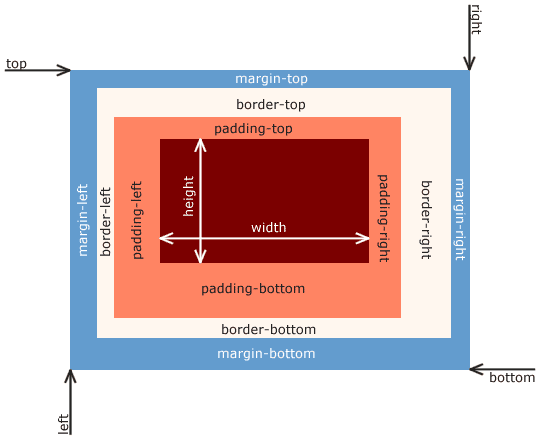
CSS Box Model: Every Element is a Box
Every HTML element is a box with layers: content, padding, border, and margin. This model dictates how elements take up space and align, forming the basis of all CSS layout. The footgun is the default sizing, which adds padding *outside* the set width.
CSS Inheritance: Styles Flow Downhill
CSS inheritance is like genetics for web elements: children inherit styles like color and font-family from their parents. This is why setting a font on <body> styles a whole page.
CSS Selectors: How to Target HTML for Styling
CSS selectors are like addresses for your HTML, telling the browser which elements to style. They're used to apply everything from colors to layouts. The main footgun is specificity: an overly specific selector can be difficult to override later.
CSS 'display': How Elements Occupy Space
The CSS display property defines an element's layout role: does it demand its own line (block) or share space (inline)? It's essential for everything from text flow to complex layouts with flex and grid.
CSS box-sizing: Predictable Element Sizing
The box-sizing property controls if padding and borders are added outside an element's width or carved out from inside. Using border-box makes layouts predictable, ensuring a width: 100px box is exactly 100px wide.
CSS Pseudo-classes: Style Elements Based on State
CSS pseudo-classes style elements based on their state, not just their HTML structure. Use them for interactive states like :hover, form validation like :invalid, or structural position like :first-child.
CSS Positioning: Taking Elements Out of Normal Flow
CSS position lets you override the default document flow. Think of it as telling an element to ignore its neighbors and listen to top/left coordinates instead. Use it for overlays, modals, and sticky headers.