All bites
The whole library, newest first. Filter by what you are here for, or pick a topic if you already know.
4247 bites
Page 186

The `document` Object: Your Page's API
The document object is the root of the DOM tree, representing the entire webpage in your script. Use it to find elements (getElementById), create new ones (createElement), or read page info. The main footgun: accessing an element before it's been parsed.
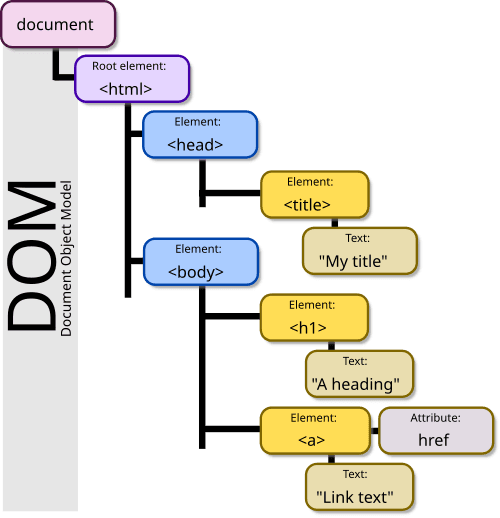
The DOM: Your HTML as a Live Object Tree
The DOM is the browser's live model of a webpage, represented as a tree of objects. JavaScript uses it to find elements, change content, and react to clicks. The footgun: DOM changes are in-memory; they don't edit the original HTML file on the server.
Web Storage API: Browser Key-Value Stores
Web Storage provides simple browser key-value stores: localStorage and sessionStorage. Use localStorage for data that persists across sessions, like user settings, and sessionStorage for data tied to a single tab.
DOM Manipulation: Treating Your Webpage Like a Live Object
The DOM is a live tree of your webpage's HTML. DOM manipulation is how JavaScript changes that tree—adding, removing, or updating elements. This is key for all interactive web development. The footgun: direct, frequent manipulation is slow.
DOM Traversal: Navigating the HTML Tree
DOM traversal is navigating a family tree of HTML nodes. You move between elements using properties like parentNode and nextSibling. This is key for finding elements relative to a known start point.
Browser Object Model: The Browser's Unruly API
The Browser Object Model (BOM) is the collection of non-standard APIs browsers expose for interacting with the browser window. Unlike the standardized DOM, its implementation is up to each vendor, creating a major cross-browser compatibility footgun.
Event Bubbling vs. Capturing: The DOM's Two-Way Street
An event fired on a nested element travels in two phases: first down from the root (capturing), then back up (bubbling). This is how all DOM events work, like clicks.
The JavaScript Event Loop: Asynchronicity on a Single Thread
The event loop is a queue that lets single-threaded JavaScript handle asynchronous tasks without blocking. It processes callbacks from Web APIs like fetch or setTimeout one at a time. The footgun: setTimeout(fn, 0) doesn't run instantly, just next.
Smooth Animations with requestAnimationFrame
Sync your code to the browser's repaint cycle for smooth, efficient animations with requestAnimationFrame. Use it for any visual change over time, like moving an element or running a game loop.
History API: Change URLs Without Page Reloads
The History API lets you manipulate browser session history, enabling single-page app (SPA) routing without full page reloads. It's used to create "virtual" pages by changing the URL and state.
TypeScript's `typeof`: Get a Type from a Value
TypeScript's typeof operator grabs the static type from a runtime value, like a variable. It's essential for utilities like ReturnType, letting you derive a type from a function's implementation without duplicating definitions.
TypeScript: How Type Guards Narrow Union Types
Type guards are runtime checks that teach TypeScript about your types, allowing it to 'narrow' a broad union type. This lets you use type-specific methods safely. Without a guard, TypeScript will error because it can't guarantee the type is correct.
TypeScript Index Signatures: Typing Dynamic Keys
An index signature is a blueprint for a dictionary, letting you type objects where you don't know property names ahead of time, but you know their values' type. Use it for configs or caches.
keyof: A Union Type of an Object's Keys
keyof is like Object.keys() for the type system, creating a union type of an object's property names. It's used to write generic functions that safely access properties on unknown objects.
TypeScript Utility Types: Don't Reinvent the Type
Utility types are pre-built functions for your types, transforming them without manual effort. Use Partial<T> for update functions or Readonly<T> for immutable objects.
The `never` Type: A Value That Should Never Exist
The never type represents a value that should never occur. It's used for functions that always throw an error or for exhaustive checks in switch statements to signal impossible states. The footgun is confusing it with void, which means 'returns nothing'.
Conditional Types: Ternary Logic for Your Types
Conditional types are like a ternary operator for your type system, choosing a type based on a condition (T extends U ? X : Y). They're used with generics to make a function's return type depend on its input, avoiding cumbersome function overloads.
TypeScript: Build New String Types with Template Literals
Template literal types are a factory for new string types, built from existing string literals and unions. They are perfect for generating permutations, like creating 'propChanged' event names from an object's keys.
TypeScript: Typing Function Inputs and Outputs
Think of function types as a contract defining what data goes in and what comes out. This is core to TypeScript, ensuring functions are called correctly. The footgun is relying on return type inference, which can hide bugs if logic changes unexpectedly.
TypeScript Classes: Blueprints for Typed Objects
A TypeScript class is a blueprint for creating objects, adding type safety to JavaScript's object-oriented patterns. Use them for core data structures like a User. The main footgun is forgetting to initialize properties, which strict mode flags as an error.