All bites
The whole library, newest first. Filter by what you are here for, or pick a topic if you already know.
4247 bites
Page 99
Vue Computed Properties: Derived Values for Cleaner Templates
A Vue computed property is a reactive 'formula' that derives its value from other data. Use it to move complex logic out of your templates, keeping them clean and readable.
Svelte Stores: State for Async Streams & Legacy Apps
Svelte Stores are objects for sharing reactive state. While Svelte 5's runes ($state) are now preferred for simple state sharing, stores remain ideal for complex async streams or when you need manual control over updates.

ngOnChanges: Reacting to Input Property Changes
The ngOnChanges hook is a property watcher for child components, firing when a parent changes an @Input() value. It's used to trigger logic when specific data changes.
Vue Watchers: Running Code on State Changes
Vue watchers are tripwires for your data. When a specific piece of state changes, a watcher executes code, like fetching data from an API. Use them for side effects, not for deriving new values. The footgun is using a watcher where a computed property would.

Pinia: Vue State Management That Feels Like Components
Pinia makes global Vue state feel like a component's local data. Create small, independent, type-safe stores for sharing data like user sessions or settings, avoiding complex prop drilling.
Svelte Derived Stores: Reactive Values from Other Stores
A Svelte derived store is like a spreadsheet formula for your state. It listens to other stores and automatically computes a new value whenever they change. The footgun is trying to write to it—it's read-only; you must update its sources instead.
Vue Scoped CSS: Keep Your Styles Local
Vue's Scoped CSS prevents styles from leaking out of a component. It adds a unique data attribute to your component's HTML and rewrites CSS to target it, ensuring styles only apply locally.
Svelte Scoped Styles: CSS That Can't Leak
Svelte styles are like house rules; they only apply inside that component and don't affect the neighbors. This is the default for any <style> tag in a .svelte file, preventing CSS conflicts.
Angular Component Styles: Scoped by Default
Angular styles are scoped to their component by default, preventing one component's styles from accidentally breaking another. This lets you build reusable UI pieces without style conflicts. The footgun is using ::ng-deep, which breaks this isolation.

Shadow DOM: Encapsulating Styles and Structure
Shadow DOM walls off a component's HTML and CSS from the rest of the page. Like a browser's <video> player, its internal controls are isolated, preventing your site's CSS from breaking them.
Angular Template-Driven Forms: Logic in the HTML
Angular Template-Driven Forms put form logic directly in your HTML template. Using two-way data binding with [(ngModel)], they're great for simple scenarios like login or contact forms.
Component v-model: Two-Way Binding with defineModel
v-model on a component creates a two-way binding, letting a parent and child share and update data. The defineModel() macro is the modern way to enable this for custom form inputs. The footgun is that a default value can de-sync parent/child state.
Angular's Built-in Form Validators
Angular's built-in validators are pre-made rules for your forms. Use them to easily check for required fields, min/max length, and valid email formats. The footgun is confusing required for text inputs with requiredTrue, which is only for checkboxes.
Angular's Reactive Form Classes: FormControl, FormGroup, FormArray
Reactive forms build a data model in your code, not the template. Use FormControl for one input, FormGroup for a set of fields like a login form, and FormArray for dynamic lists. The main footgun is forgetting to import ReactiveFormsModule.
SvelteKit Form Actions: Server-Side Logic for Forms
SvelteKit Form Actions link HTML forms directly to server-side code, handling submissions without client-side boilerplate. They're perfect for logins or registrations and work without JavaScript.
VeeValidate: Vue Forms Without the Boilerplate
VeeValidate manages the entire lifecycle of a Vue form—tracking values, validation, and submissions—so you don't write the state boilerplate. Use it for simple contact forms or complex wizards, especially with async validation. The footgun is mixing its APIs.
Angular Custom Validators: Beyond Built-in Rules
Custom validators let you define your own business logic for form inputs. Use them to check for unique usernames via an API or enforce complex password rules. The main footgun is forgetting async validators must return an Observable or Promise.

Zod: TypeScript-First Schema Validation
Zod creates a single source of truth for your data's shape, providing both runtime validation and static TypeScript type inference from one definition. Use it to parse API inputs or form data, ensuring data is correct and typed.
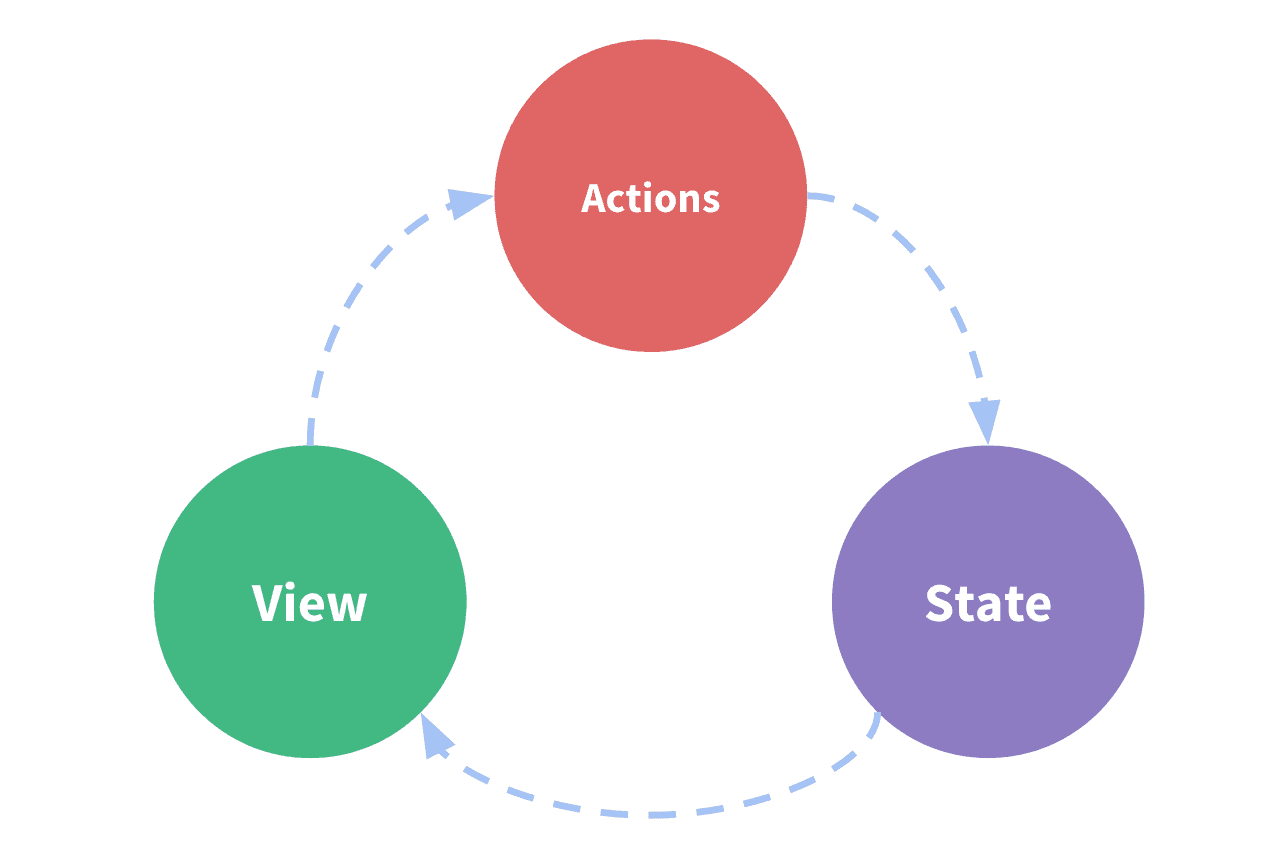
Vuex: A Central Store for Your App's State
Vuex acts as a global warehouse for your app's shared data, letting any component access state without complex prop-drilling. It's for large apps where components need to sync up. The footgun: For new projects, use Pinia, Vue's new official state library.
Using Angular Services for Simple State Management
An Angular service acts like a central data store. Components subscribe to it for data, rather than owning state, keeping data consistent across views. It's ideal for sharing user info or cart contents.