All bites
The whole library, newest first. Filter by what you are here for, or pick a topic if you already know.
8667 bites
Page 317

UserDefaults: Your App's Junk Drawer for Settings
UserDefaults is a simple key-value store for persisting small bits of data, like a dictionary that saves itself. Use it to remember user preferences like enabling dark mode or a username. The footgun: don't use it for large files or sensitive data.
Custom UIViewController Transitions: Beyond the Defaults
A custom transition lets you choreograph the handoff between two screens, defining the exact animation. Use it for unique experiences like a card expanding to fill the screen.
NavigationPath (SwiftUI)
NavigationPath is a type erased stack of navigation destinations that backs a SwiftUI NavigationStack, letting one path hold a mix of different hashable data types so you can push, pop and control deep, heterogeneous navigation flows programmatically.
Deep Linking: Go Beyond the App's Home Screen
A deep link is a URL for a specific screen inside your app, not just its front door. Use it to let users jump directly to content from emails, websites, or other apps, but be sure to handle state changes like login before redirecting.
NavigationSplitView: Adaptive Layouts for All Screen Sizes
NavigationSplitView is a responsive container for multi-column layouts. It shows a sidebar, content, and detail view on large screens but collapses to a stack on small ones. Use it for master-detail UIs like a mail app.
NavigationLink: Pushing Views in SwiftUI
NavigationLink is SwiftUI's declarative way to push a new view onto a navigation stack. You use it inside a NavigationStack to create drill-down UIs, like tapping a list item to see its details. The footgun is forgetting the parent NavigationStack.
NavigationStack: Programmatic Navigation in SwiftUI
Think of NavigationStack as a pile of views. You push new views onto the stack programmatically by appending to a path array. This is SwiftUI's modern, data-driven way to handle deep navigation, replacing the older, buggier NavigationView.
TabView: SwiftUI's Built-in Tab Bar
TabView lets you show different views in the same space, switched by a tab bar. It's the standard for top-level app navigation, like switching between "Home," "Search," and "Profile." The footgun is nesting them; they are for main sections only.
Storyboard Segues: Visual UI Flow in iOS
A Storyboard Segue is a visual arrow connecting two screens in your iOS app, defining a navigation path without writing code. Use them to transition from a list to a detail view. The biggest mistake is forgetting to use prepare(for:sender:) to pass data.
UITabBarController: Your App's Main Switchboard
A UITabBarController manages a row of buttons at the bottom of the screen to switch between an app's main sections. Use it for distinct, non-sequential modes like 'Recents,' 'Contacts,' and 'Voicemail'. The footgun is using it for a step-by-step process.
UINavigationController: Stack-Based Screen Management
UINavigationController manages screens like a deck of cards: you push new ones on top and pop them off to go back. It's standard for hierarchical navigation. The footgun is manually changing the stack; always use the provided push/pop methods.
iOS State Preservation: Resume Where You Left Off
Think of it as an automatic bookmark for your app's UI. When iOS terminates your app, state preservation can save the user's place, restoring the view hierarchy on next launch.

VIPER: Taming Massive iOS View Controllers
VIPER is a strict architectural pattern that tames "Massive View Controllers" by splitting features into five layers: View, Interactor, Presenter, Entity, and Router. It's used in large iOS apps to make business logic and navigation explicitly testable.

The Coordinator Pattern: Untangling iOS Navigation
The Coordinator pattern makes a separate object the 'boss' of app navigation, leaving view controllers to just manage their view. This lets you reuse views in different flows without them knowing what comes next.
The Singleton Pattern: One Instance to Rule Them All
A singleton ensures a class has only one instance and provides a global access point to it. It's used for shared resources like a network manager or logger. The main footgun is that overuse creates tight coupling and makes testing difficult.
iOS Background Modes: A Hall Pass for Your App
iOS background modes are like hall passes, letting your app perform specific tasks like playing audio or tracking location after the user switches away. They're used for music players or navigation apps.
Dependency Injection in Swift: Stop Creating, Start Receiving
Dependency Injection means objects receive their dependencies from the outside rather than creating them internally. It's used to give a view model a network client or data source, making it testable.

MVVM: Separate SwiftUI Logic from Layout
MVVM separates logic from layout by moving state and business logic out of your SwiftUI View into a dedicated ViewModel class. This makes your code cleaner, more organized, and easier to test.
UISceneDelegate: Managing Your App's UI Instances
Think of SceneDelegate as the lifecycle manager for a single window of your app's UI. It's essential for multi-window iPad apps, handling when a scene connects, disconnects, or changes state.
Model-View-Controller (MVC): Separating App Logic from UI
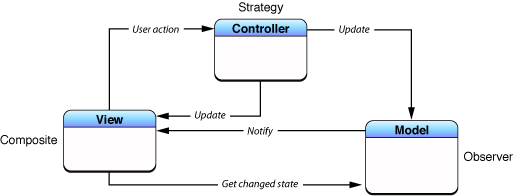
MVC organizes code by separating data (Model) from the user interface (View), using a Controller as the go-between. This is the foundational pattern for many UI frameworks, like Cocoa and UIKit. The main footgun is the "Massive View Controller."