Dev Containers: Your Dev Environment as Code
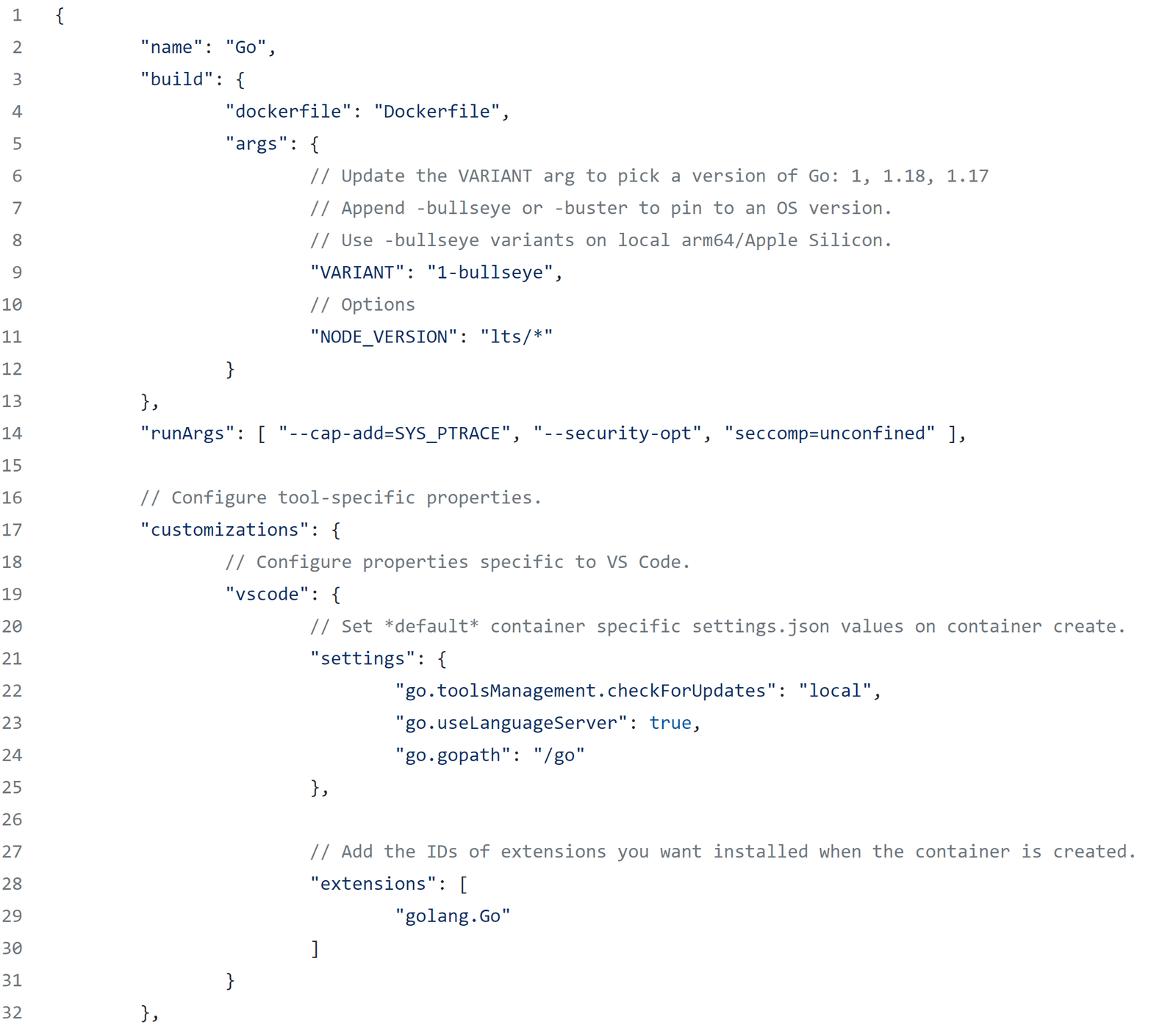
A dev container packages your entire development environment—tools, libraries, and settings—into a single, portable container. Use it to standardize team environments, simplify onboarding, and ensure consistency between local dev and CI.
Why it exists
To solve the 'it works on my machine' problem and the tedious process of setting up development environments. It codifies the tools, runtimes, and configurations a project needs, ensuring every developer and CI pipeline works with the exact same setup.
The mental model
A dev container is a pre-configured, portable office-in-a-box for your code. Instead of each developer manually installing the right versions of Node.js, Python, linters, and editor extensions, you define the entire environment once in a configuration file. Anyone can then launch this exact environment with one command.
How it works
It's an open specification, not a single product. You add a .devcontainer folder with a devcontainer.json file to your project. This file points to a container image (e.g., from Docker Hub) and specifies development-specific settings: tools to install via 'Features,' editor extensions to enable, ports to forward, and environment variables. Supporting tools like VS Code or JetBrains IDEs read this file, build and start the container, and connect your editor to the environment running inside it.
When to use it
Use dev containers when a project has specific runtime or tool dependencies, when onboarding new developers quickly is a priority, or when you need to guarantee your local setup mirrors your continuous integration (CI) environment. They are excellent for projects with complex build requirements or those using multiple programming languages.
When not to use it
For very simple projects with no external dependencies (like a basic static website), a dev container may be overkill. It also introduces a dependency on a container runtime like Docker, which can be a hurdle for developers completely new to containers.
One canonical example
A web app requires Python 3.11, PostgreSQL, and specific VS Code extensions. The devcontainer.json defines a base Python 3.11 image, uses a 'Feature' to install and run PostgreSQL, and lists the required Python and database extensions. A new developer opens the project, clicks 'Reopen in Container,' and their full, isolated environment is ready in minutes, code and all.
Interview question
What is the primary benefit of using a Dev Container for a software project?
- a.To reduce the computational resources required by development tools on a local machine.
- b.To facilitate the direct deployment of code changes from a developer's machine to production.
- c.To enable developers to work offline without needing an internet connection for dependencies.
- d.To guarantee a consistent and standardized development environment across all team members and CI/CD pipelines.Correct
Why? this is the answer
Dev Containers are designed to solve the 'it works on my machine' problem by ensuring every developer and CI pipeline uses the exact same pre-configured environment. While containers are used for deployment, dev containers specifically focus on standardizing the development setup, not direct production deployment.
Just read this? Test yourself on what you have been reading.
Read the original → containers.dev
- #containers
- #devops
- #ide
- #environment management
Put your scrolling time to good use
Learn one idea, try a quiz and save useful cards for revision. Tezvyn makes it easy to learn and stay current in your tech field, a few minutes at a time.
The iPhone app is on the way
We are building it. Until it lands, nothing here is held back from you: every interview card, your saved cards, streaks and the job board all work in Safari, plus hundreds of free practice quizzes of thirty questions each. Sign in and it all carries over to the app the day it arrives.
Want it as an icon? Tap Share at the bottom of Safari, then Add to Home Screen. It opens full screen and the cards you have read stay available offline.
We are hiring for this. Open roles that interview on containers — each one lists the topics its interview covers.
See open roles