Search
Find a bite, explore a topic or look for a role.
Results for “React”
Bites 747

Explain Jetpack Compose recomposition, its triggers, and optimizations.
This tests grasp of Compose's reactive model. A strong answer defines recomposition as recomputing composables when state changes, notes State triggers it, and explains Compose skips unchanged subtrees via smart tracking.

Module Federation: The Multi-Framework "Hydra"
Module Federation can unite micro frontends from different frameworks (e.g., Angular, React) in one app. This is a last resort for migrations or integrating legacy code, not a standard pattern, as it increases complexity and bundle size.
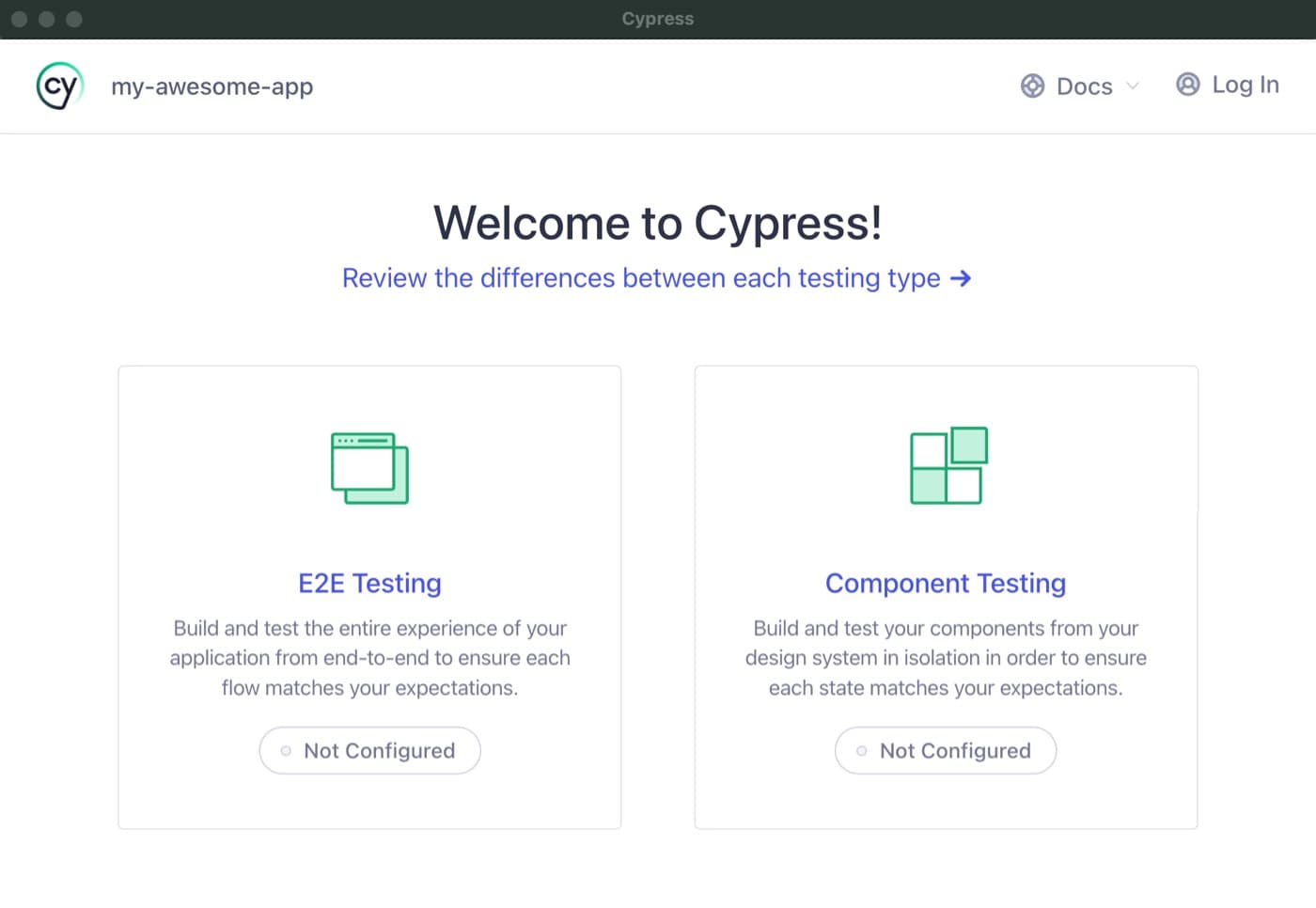
Cypress Component Testing: Test in a Real Browser
Cypress component testing mounts your UI components in a real browser, not a simulated DOM, so you test them exactly as users see them. Use it for faster feedback on individual React, Vue, or Angular components.
Svelte Stores: State for Async Streams & Legacy Apps
Svelte Stores are objects for sharing reactive state. While Svelte 5's runes ($state) are now preferred for simple state sharing, stores remain ideal for complex async streams or when you need manual control over updates.

Angular Component Lifecycle Hooks
Angular's lifecycle hooks are callbacks for a component's life events: creation, updates, and destruction. Use ngOnInit for one-time setup after inputs are ready, and ngOnChanges to react to input changes. The footgun: don't use the constructor for setup.

Scaffolding a Vite Project with `create-vite`
Use create-vite to instantly generate a new web project with your chosen framework. It's the fastest way to start a Vue, React, or Svelte app without manual setup. The footgun is forgetting you can pass a --template flag to skip interactive prompts.
Why Svelte Skips the Virtual DOM
Svelte skips the Virtual DOM, treating it as runtime overhead. It acts as a compiler, generating precise JavaScript to update the DOM directly. This avoids the 'diffing' step of frameworks like React, leading to smaller bundles and faster updates.
Figma Constraints: Building Responsive Layouts
Constraints are rules for how layers react when their frame is resized. Use them to build responsive designs, like pinning a logo to the top-left or stretching a background. The footgun: Constraints don't work on groups or inside Auto Layout frames.
Building Custom Figma Widgets with the Widget API
Build interactive objects on the Figma canvas using a React-like API. The Widget API uses components, functions, and hooks to create tools like polls or timers. The footgun is forgetting useSyncedState, which breaks your widget in multiplayer sessions.
Figma Codegen: Turn Designs into Framework-Specific Code
Figma codegen plugins are custom translators for Dev Mode, turning designs into framework-specific code. Use them to generate React components or extract i18n strings.

The `popstate` Event: Handling Browser History Navigation
The popstate event lets your app react to browser back/forward clicks. It's key for SPAs to update views without a full reload. The main footgun: the event fires before the document is fully updated, so your handler might read a stale DOM.
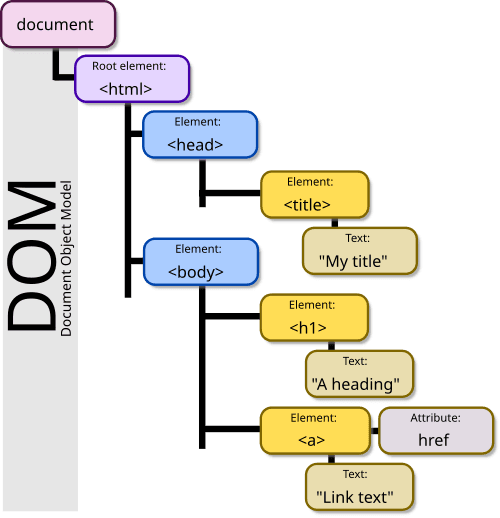
The DOM: Your HTML as a Live Object Tree
The DOM is the browser's live model of a webpage, represented as a tree of objects. JavaScript uses it to find elements, change content, and react to clicks. The footgun: DOM changes are in-memory; they don't edit the original HTML file on the server.
The useSearchParams Hook for URL Queries
The useSearchParams hook gives your client component read-only access to the URL's query string. Use it to build UIs that react to URL changes, like filtering a list or displaying search results.
MDX in Next.js: Markdown with Superpowers
MDX lets you write in Markdown and embed interactive React components directly inside your content. Use it for blogs or docs that need more than static text, like interactive charts or code demos.

Jest: The 'Batteries-Included' JavaScript Test Runner
Jest is a "batteries-included" JavaScript testing framework, bundling a runner, assertions, and mocking tools. It's a default for React apps but works for any JS project. The footgun is thinking it's only for React; it's a general-purpose tool.

Measure Component Render Costs with <Profiler>
React's <Profiler> is a stopwatch for your components, measuring render times programmatically. Wrap any UI tree to log detailed performance metrics on every update, helping you pinpoint slow renders. The footgun: It's disabled in production by default.
Emotion: Component-Scoped Styles in JavaScript
Emotion lets you write CSS directly in your JavaScript, keeping styles and logic colocated. It's ideal for dynamic, component-scoped styles in React that avoid global conflicts.
useDebugValue: Label Your Custom Hooks in DevTools
useDebugValue attaches a readable label to your custom hooks in React DevTools. Instead of just seeing raw state, you can display a meaningful string like "Online". The footgun is overusing it; reserve it for complex, shared library hooks.
useSyncExternalStore: Safely Read from External State
useSyncExternalStore lets your React components safely subscribe to data outside of React's state. Use it to connect to state libraries like Zustand or browser APIs. The main footgun: your getSnapshot function must return an immutable, cached value.

Conditional Rendering: Show UI Based on State
React uses plain JavaScript to decide what UI to show, which is essential for displaying loading states, errors, or user-specific content. The footgun: count && <Component /> will render a "0" if count is 0, not nothing.