Concepts in CI/CD & Automation, page 3
Software Performance Testing: How a System Behaves Under Stress
Performance testing answers 'how does it work under load?' It simulates user traffic to measure a system's responsiveness, stability, and resource use. The footgun is testing unrealistic scenarios instead of finding real-world breaking points.
Mutation Testing: A Fire Drill for Your Test Suite
Mutation testing is a fire drill for your test suite. It deliberately injects small bugs ('mutants') into your code to see if your tests fail as expected. This ensures tests validate behavior, not just execute lines.
DAST: Probing a Running App for Security Flaws
DAST acts like an automated pen-tester, attacking your running application from the outside to find flaws without seeing the code. It's used in CI/CD to catch common web vulnerabilities. The footgun: DAST can't see the code, so it misses business logic errors.
Test Data Management (TDM): Stop Flaky Tests
Test Data Management (TDM) treats test data like code: versioned, managed, and reliably provisioned to ensure consistent, meaningful tests. This is crucial in CI/CD pipelines where automated tests require repeatable data states.
Package Manifest: Your Project's List of Ingredients
A package manifest is your project's recipe, listing all dependencies and build scripts. Package managers use it to install the right libraries. The footgun is forgetting that the manifest (e.g., package.json) and the lockfile work together for consistency.
Semantic Versioning: A Three-Part Numbering System
Semantic Versioning (SemVer) is a widely used convention for assigning software versions. It uses a three-part Major.Minor.Patch number to create unique identifiers for software states.
Docker Registry: A Library for Your Images
A Docker Registry is like GitHub, but for Docker images. It's a centralized storage system where you push and pull images, enabling sharing and deployment. The biggest footgun is using the :latest tag, which can lead to unpredictable builds.
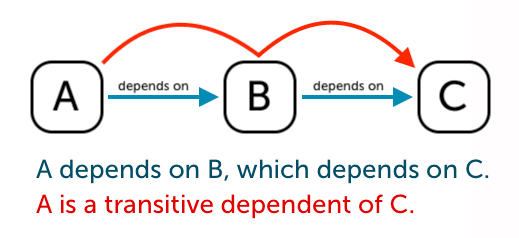
Transitive Dependencies: The Hidden Baggage in Your Code
Think of transitive dependencies as your dependency's dependencies. You add one library, but it pulls in others you didn't explicitly ask for. This happens in any project using a package manager.
Maven Coordinates (GAV): The Address of Your Code
Maven Coordinates (GAV) are like a postal address for a software library. You use them in a pom.xml to declare your project's identity and specify its dependencies.
Package Lock Files: Ensuring Reproducible Builds
A package lock file is a snapshot of your dependency tree, ensuring everyone on your team and your CI server installs the exact same package versions. It's crucial for preventing "works on my machine" bugs.
Maven SNAPSHOTs: Versions for Active Development
A SNAPSHOT version tells Maven 'this is a work-in-progress,' allowing newer builds to replace it without a version bump. Use it in CI for active development so dependent projects get the latest changes.

Software Bill of Materials (SBOM): An Ingredient List for Your Code
An SBOM is a nutrition label for your code, listing every library and dependency. It's crucial for security audits and managing supply chain risk, letting you instantly find systems affected by a new vulnerability.
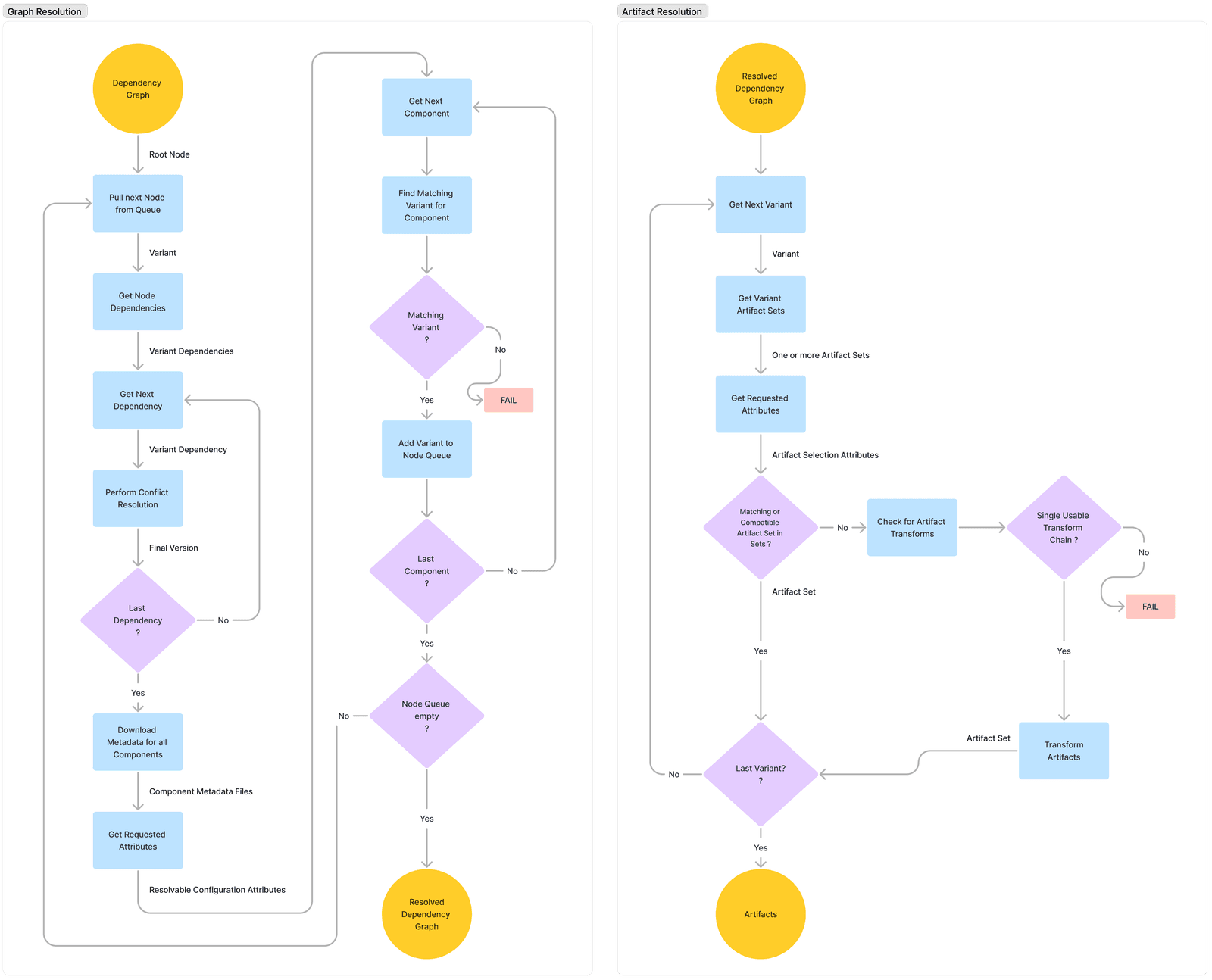
Dependency Conflict: When Your Dependencies Disagree
A dependency conflict occurs when two of your project's dependencies require different, incompatible versions of a shared library. This is common in any project with a dependency graph, forcing your build tool to pick one version, which can introduce subtle…
Artifact Promotion: Build Once, Deploy Everywhere
Artifact promotion means you build software once, then deploy that exact same package to every environment. This prevents "it worked in staging" failures caused by rebuilds pulling different dependencies. The footgun is rebuilding per environment.
Artifact Vulnerability Scanning: A Background Check for Code
Artifact vulnerability scanning is a background check for your software's dependencies, catching known security issues before they ship. It's a key CI/CD step, automatically scanning Docker images against databases of known CVEs. The footgun is alert fatigue.
Jenkinsfile: Your CI/CD Pipeline as Code
A Jenkinsfile is a text file that defines your entire CI/CD pipeline as code, living in your source control. It automates build, test, and deploy steps. The main footgun is confusing its two syntaxes: Declarative is simpler, while Scripted offers more power.

Pipeline Triggers: The 'If This, Then That' of CI/CD
Pipeline triggers are the "if this, then that" for automation. They kick off builds on a code push (CI), run tests for a pull request (PR), or execute jobs on a schedule. The footgun: many systems enable triggers on all branches by default, causing unwanted.
CI/CD Pipelines: How Stages and Jobs Orchestrate Work
Think of a CI/CD pipeline as an assembly line. Stages are sequential stations (Build, Test, Deploy), while jobs are the parallel tasks at each station. This model automates software delivery. The footgun: a single failed job halts the entire line by default.
Conditional Pipeline Execution: Run Jobs Only When Needed
Think of conditional execution as if statements for your CI/CD pipeline, letting you run or skip jobs based on specific triggers. Use it to run tests on merge requests or deploy only from main.
Secrets Management in CI/CD Pipelines
Treat secrets like temporary keys, not permanent passwords. Your CI/CD pipeline should fetch them just-in-time from a central vault, never storing them in code. The biggest footgun is storing secrets as long-lived environment variables in the CI tool itself.
We are hiring for this. Every open role lists the topics its interview covers, so you can prepare for the real thing rather than guessing.
See open roles