Easy everything in Cloud Platforms, page 4
Securing Cloud Database Endpoints
Treat your database endpoint like a public API, even if it's "internal." A Zero Trust approach verifies every connection request, granting access based on identity and context, not network location. This prevents unauthorized data access, a top cloud threat.
Managed Databases: Let the Cloud Handle Ops
A managed database is like leasing a car with a full-service plan instead of fixing it yourself; you trade control for convenience. This is the model for AWS RDS or GCP Cloud SQL.
Encryption in Transit: Protecting Data on the Move
Encryption in transit acts like a locked box for data moving across a network. It secures everything from website connections (HTTPS) to data moving between services inside a cloud network.
Multi-Factor Authentication (MFA): Defense in Depth for Logins
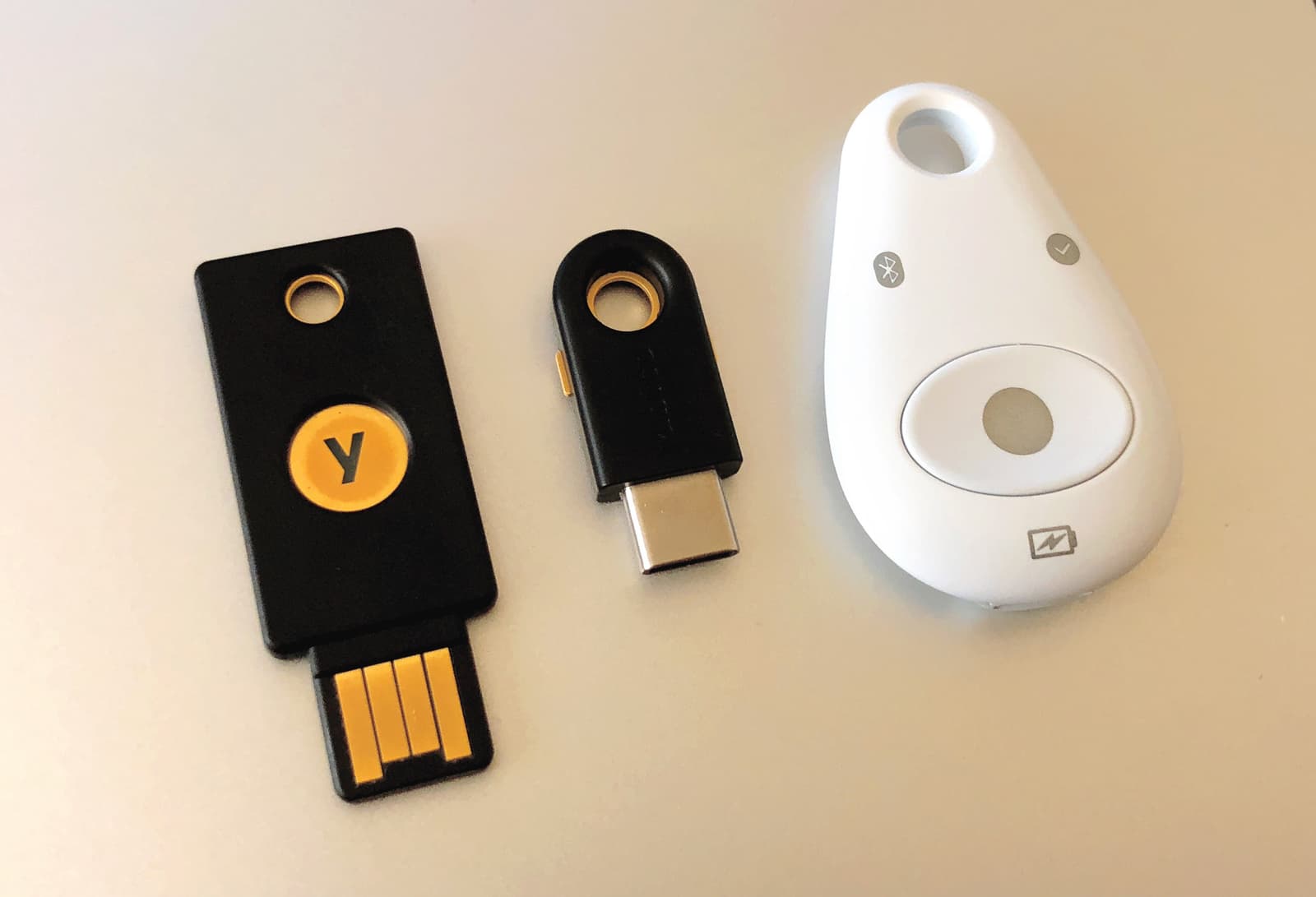
MFA adds a second layer of security on top of your password, like needing a key and a secret handshake. It's crucial for protecting sensitive accounts like email and banking from attackers who have stolen your password.

RBAC: Manage Permissions with Roles, Not Users
RBAC manages permissions by assigning users to roles (e.g., "editor"), not by giving permissions directly. This simplifies security in large systems like AWS IAM. The footgun is creating overly broad roles that grant excessive, unintended access.
Content Delivery Network (CDN): Serving Content from the Edge
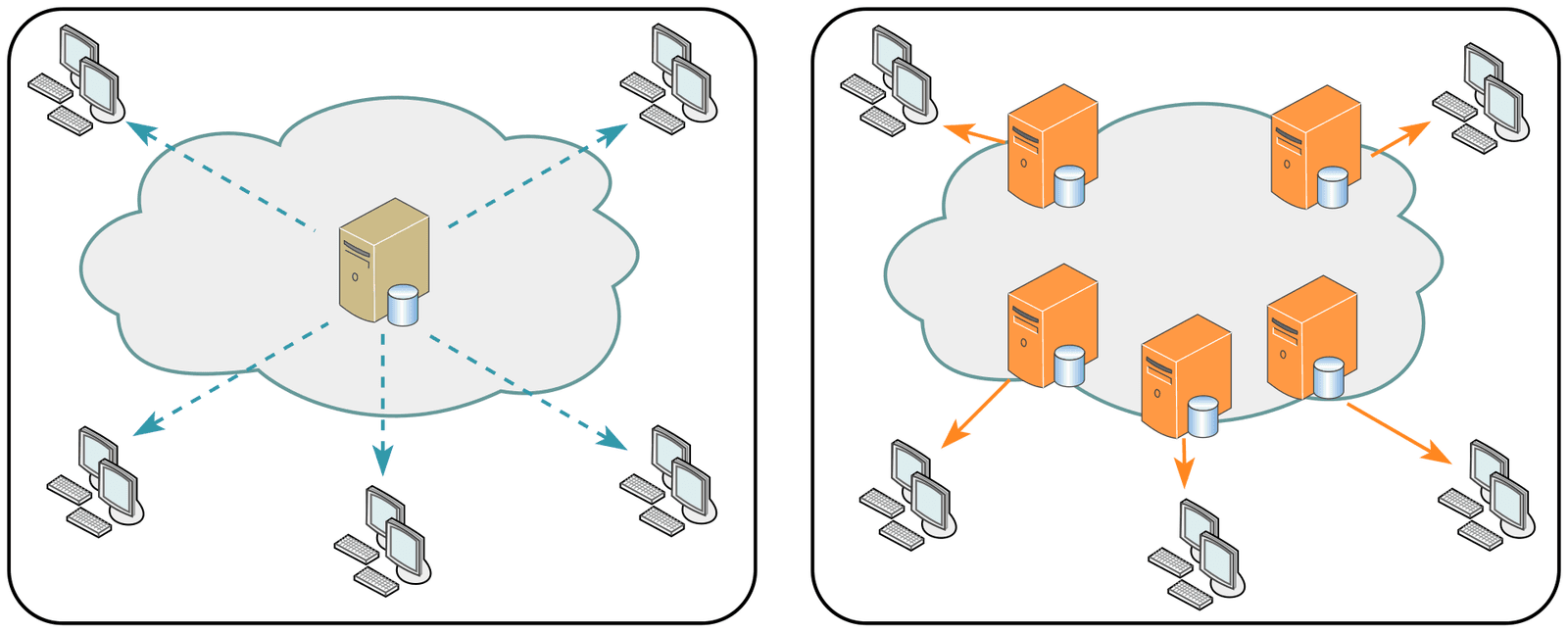
A CDN is like a global chain of convenience stores for your website's assets. It caches copies closer to users for faster delivery, speeding up images, CSS, and video. The footgun: accidentally caching private user data and serving it to everyone.
Security Groups: Stateful Firewalls for Your Cloud Resources
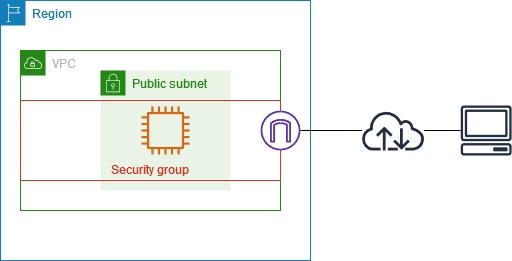
A security group is a stateful firewall for your cloud resources, like a bouncer with an allow-list. Use it to let a web server accept traffic or a database talk to app servers. The footgun: opening SSH to the entire internet (0.0.0.0/0).
Cloud Subnets: Your Virtual Network's Neighborhoods
Think of a subnet as a neighborhood in your virtual network (VPC), giving a block of IP addresses to a group of resources. Use them to isolate web servers from databases or apply specific firewall rules.
CIDR: Flexible IP Address Blocks
CIDR groups IP addresses into flexible blocks, replacing rigid A/B/C classes. You use it to define network ranges like 10.0.0.0/16 for a VPC. The footgun: a smaller slash number like /16 means a *larger* network than a bigger number like /24.

VPC: Your Private Slice of the Public Cloud
A Virtual Private Cloud (VPC) is your private, fenced-off section of a public cloud. You use it to launch resources like servers and databases in a logically isolated network, controlling all traffic.
Cloud File Storage: A Shared Drive on the Internet
Think of cloud file storage as a shared network drive, but managed by a provider and accessible over the internet. It's for shared content, user home directories, and apps needing a traditional file system.
Block Storage: Your Virtual Hard Drive in the Cloud
Think of block storage as a raw hard drive in the cloud. It's the foundation for virtual machine disks (like AWS EBS) and databases that need direct control over their storage. The footgun is treating it like a web-accessible file share; it's a raw device.
Object Storage: Data Without a File Hierarchy
Object storage is like a valet system for data. You get a unique ID for a self-contained 'blob' of data and metadata, instead of navigating a file path. It's the backbone of cloud storage (like S3) for images and backups. The footgun: objects are immutable.
Cloud Instances: Renting Servers on Demand
Think of a cloud instance as renting a virtual computer. Instead of buying hardware, you launch a pre-configured virtual machine to run your applications, paying only for what you use. This is ideal for applications that need to scale up or down with demand.
Machine Images: The Blueprint for Your Servers
A machine image is a server blueprint, packaging an OS and software into a template for launching identical virtual machines. It's used for auto-scaling and creating consistent environments.
Virtual Machine (VM): A Computer Inside a Computer
A Virtual Machine (VM) is a complete computer simulated in software, letting you run multiple isolated operating systems on a single physical machine. This is how cloud providers rent out server space.
SaaS: Renting Software Instead of Owning It
Think of SaaS as renting software. You pay a subscription to use an app online, and the provider handles all maintenance. This model offers scalability and cost-effectiveness, but the footgun is forgetting you don't own the software or control the update…
Platform as a Service (PaaS): Focus on Code, Not Infrastructure
PaaS is like a managed workshop for your code; you just bring your application, and the platform handles the servers, OS, and runtime. It's used to quickly deploy web apps without managing infrastructure. The footgun is inflexibility and vendor lock-in.
Infrastructure as a Service (IaaS): Renting the Data Center
IaaS is like renting raw computing hardware—servers, storage, and networking—without owning the physical data center. It's used for workloads needing maximum control, but the footgun is you're still responsible for managing the OS and all software.

Private Cloud: Cloud Computing on Your Terms
A private cloud offers cloud benefits like self-service and scalability on dedicated hardware. It's used for sensitive data or regulatory compliance. The footgun: it's not just a data center; it requires a full cloud software stack for automation.
We are hiring for this. Every open role lists the topics its interview covers, so you can prepare for the real thing rather than guessing.
See open roles