Advanced everything in CSS & Design Systems, page 3

The RFC Process: Formalizing Technical Decisions
An RFC (Request for Comments) is a formal document for proposing a major technical change, creating a public record of the decision. It's used for big shifts like adding a new design system component or changing a core API.
Semantic Release: Automate Versioning with Commit Messages
Semantic Release automates versioning by reading your commit messages. It decides if a change is a fix, feature, or breaking change and bumps the version for you. It's used in CI/CD to publish packages automatically.

The Accessibility Tree: The DOM for Assistive Tech
The accessibility tree is the DOM's sibling, built for assistive tech. Browsers derive it from your HTML, exposing each element's name, role (e.g., 'button'), and state (e.g., 'checked') to screen readers.
Focus Trapping: Guiding Keyboard Users, Not Caging Them
Focus trapping intentionally confines keyboard navigation to a component, like a modal. It's a feature, not a bug, when used to prevent users from interacting with the page behind an overlay.
ARIA Live Regions: Announcing Dynamic Content
ARIA live regions tell screen readers about content that changes without a page reload, like a notification banner. Use aria-live="polite" for most updates and assertive only for critical alerts.
WAI-ARIA Authoring Practices: The Cookbook for Accessible Components
Think of WAI-ARIA Authoring Practices as the official cookbook for accessible web components. It provides patterns for widgets like tabs or accordions, ensuring they work with assistive tech.
ElementInternals: Making Custom Elements Form-Friendly
ElementInternals lets your custom elements act like native form inputs, integrating with validation, submission, and labels. Use it for custom inputs in a design system. The footgun: forgetting to call setFormValue() means its state won't be submitted.

Constructable Stylesheets: Share Styles, Not Bloat
Create and share CSS in JavaScript without duplication. Constructable Stylesheets are ideal for theming multiple Shadow DOM components from a single source; updates to the sheet propagate to all consumers. A key footgun: @import rules are ignored.
Form-Associated Custom Elements: Your Own Inputs
Make your custom elements behave like native inputs within a <form>. This lets them carry a value, be validated, and submit with the form. Use it for custom widgets like tag inputs. The footgun: its state won't submit if you don't call setFormValue().
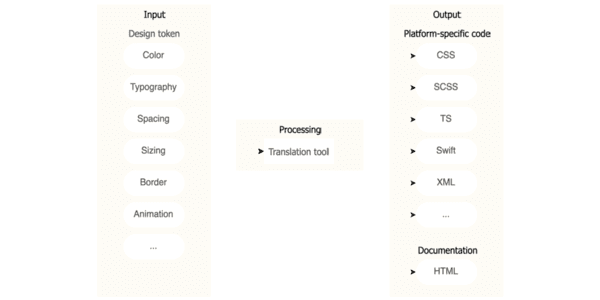
Design Tokens: Automating UI with a Build Pipeline
Think of design tokens as design decisions stored as data. A build pipeline consumes this data to auto-generate code for multiple platforms, ensuring consistency. The footgun is exposing all raw 'option' tokens instead of curated 'decision' tokens.
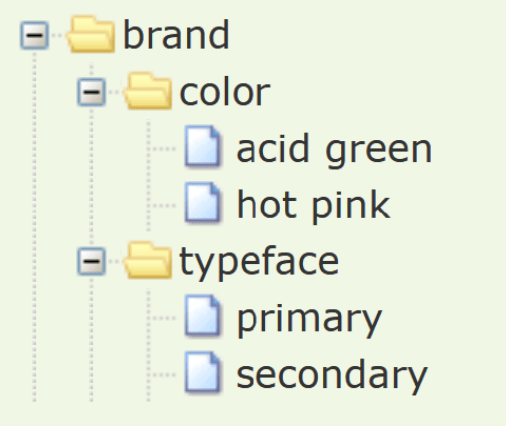
W3C Design Tokens: A JSON Standard for Design Systems
The W3C Design Tokens format is a universal translator for your design system's variables. It's a standard JSON structure that lets design tools and codebases speak the same language for colors and spacing.
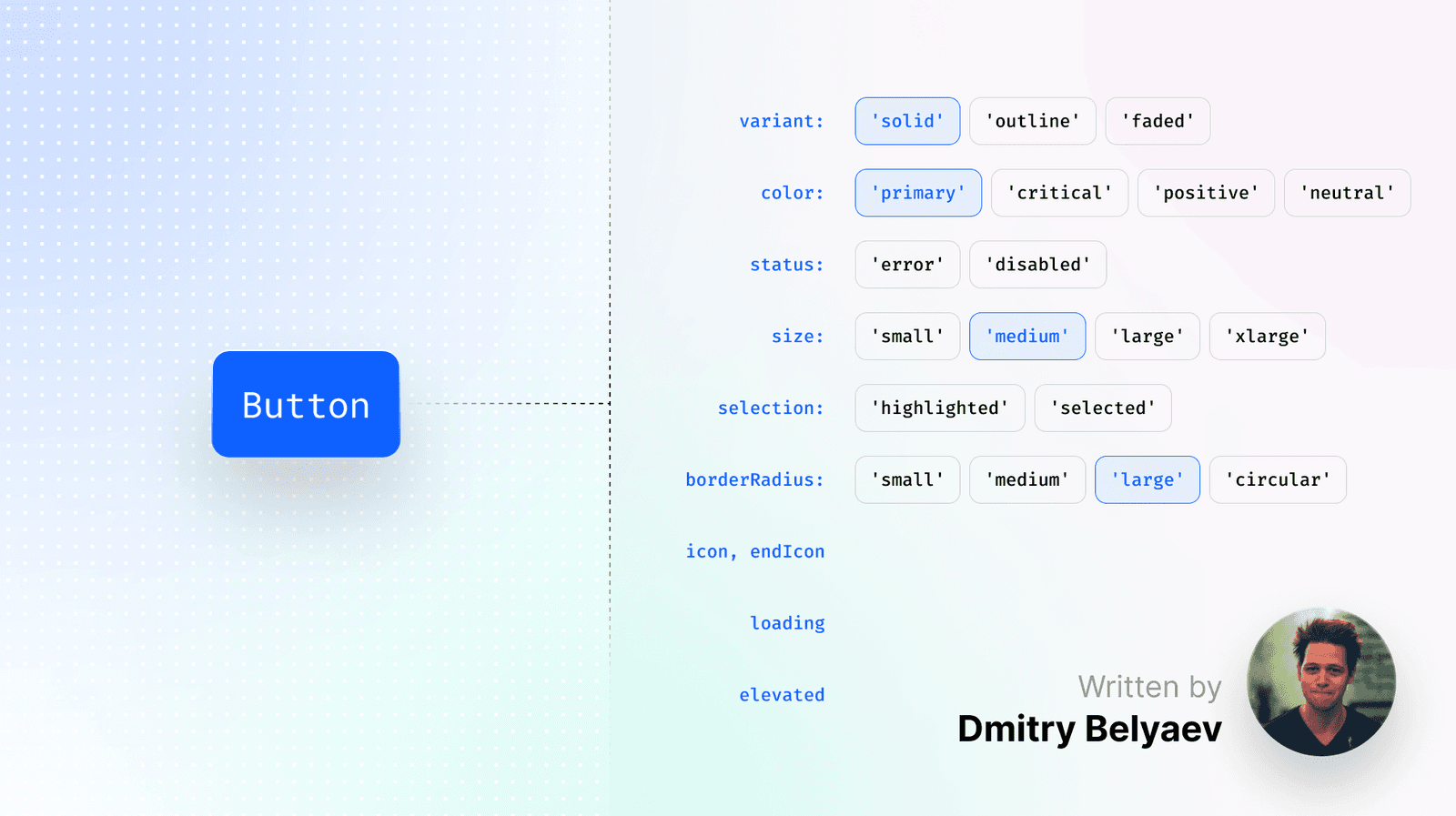
Designing Durable Component APIs
The best component API is often no API. Design from the user's perspective by first writing the ideal usage snippet, a "dream-driven" approach. This ensures intuitive components that boost design system adoption.
Sass Built-in Modules: Namespaced Power Tools
Think of Sass built-in modules as namespaced toolkits for color, math, and more. You explicitly import what you need, like using sass:color for theming. The footgun is relying on old global functions, which ties you to legacy Sass implementations.
Sass Functions: Reusable Logic for Your Styles
Sass functions are like JavaScript functions for your CSS, letting you compute and return a single value. Use them to centralize complex logic, like generating a color palette. The footgun: don't use functions for side-effects; that's what mixins are for.
CSS Cascade Layers: Control Your Cascade
Cascade Layers are explicit buckets for your CSS, letting you control which styles win without fighting specificity. Use them to predictably layer resets, component libraries, and utilities.

Design Tokens: A Standardized Language for Your UI
Design tokens are named variables for your UI's visual properties, stored in a central format like JSON. They enable consistent branding and theming across platforms (web, iOS) and tools (Figma, code).

Critical CSS: Render Above-the-Fold Content Instantly
Critical CSS accelerates rendering by inlining styles for above-the-fold content directly in the HTML. This lets the browser paint the visible page immediately, while the full stylesheet loads asynchronously.
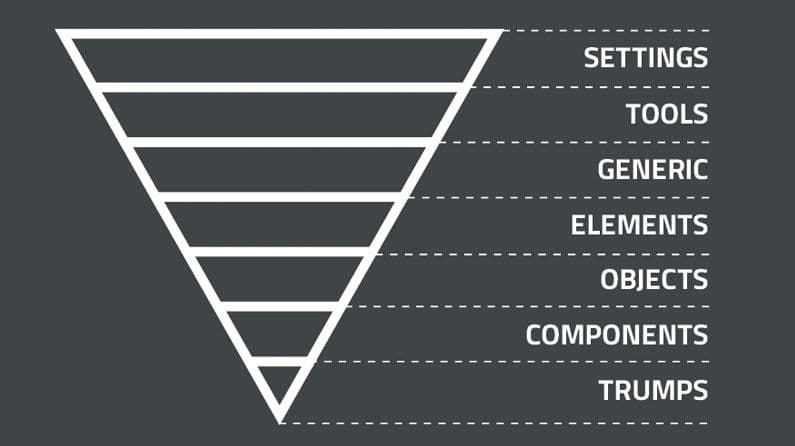
ITCSS: Structuring CSS from General to Specific
ITCSS organizes CSS from generic to specific, like an inverted triangle. It's for large projects to prevent specificity wars and make code predictable. The main footgun is not enforcing the layer order, which leads back to styling chaos and defeats the system.
Scroll-driven Animations: Animate on Scroll, Not Time
Scroll-driven animations link an animation's progress to a scrollbar's position, not a clock. This is great for progress bars that fill as you scroll or elements that fade in as they enter the viewport. The main pitfall is confusing timeline types.
CSS Motion Path: Animate on a Curve
Think of offset-path as drawing a track for an element to follow. Use it for non-linear UI animations, like an icon following a curve. The footgun: the path itself doesn't cause motion; you must also animate offset-distance to move the element.
We are hiring for this. Every open role lists the topics its interview covers, so you can prepare for the real thing rather than guessing.
See open roles