Everything in CSS & Design Systems, page 12
Sass Mixins: Reusable Style Functions
Think of a Sass mixin as a function for CSS. It bundles style declarations you can reuse, avoiding repetitive code. Use it for common patterns like button styles or clearing floats. The footgun: mixins copy code everywhere, which can bloat your final CSS.
Autoprefixer: Stop Memorizing CSS Vendor Prefixes
Autoprefixer lets you write modern CSS and automatically adds vendor prefixes like -webkit- during your build. It's a standard part of frontend toolchains, ensuring styles work across browsers.

CSS Minification: Smaller Files, Faster Sites
CSS minification vacuum-packs your stylesheets, removing whitespace, comments, and unused code to shrink file size. This automated build step improves performance by reducing network transfer size.
Sass Nesting: Write CSS That Mirrors Your HTML
Sass nesting lets you structure your styles like your HTML, avoiding repetitive selectors. Use it for components with clear parent-child relationships, like a navbar's list items. The footgun is over-nesting, which creates bloated, overly-specific CSS.
Sass Variables: Compile-Time Constants for CSS
Think of Sass variables as compile-time constants for your styles. You define a value once (e.g., $brand-color) and reuse it, ensuring consistency. They're perfect for theming colors and fonts.
CSS Cascade Layers: Control Your Cascade
Cascade Layers are explicit buckets for your CSS, letting you control which styles win without fighting specificity. Use them to predictably layer resets, component libraries, and utilities.

Design Tokens: A Standardized Language for Your UI
Design tokens are named variables for your UI's visual properties, stored in a central format like JSON. They enable consistent branding and theming across platforms (web, iOS) and tools (Figma, code).

Critical CSS: Render Above-the-Fold Content Instantly
Critical CSS accelerates rendering by inlining styles for above-the-fold content directly in the HTML. This lets the browser paint the visible page immediately, while the full stylesheet loads asynchronously.
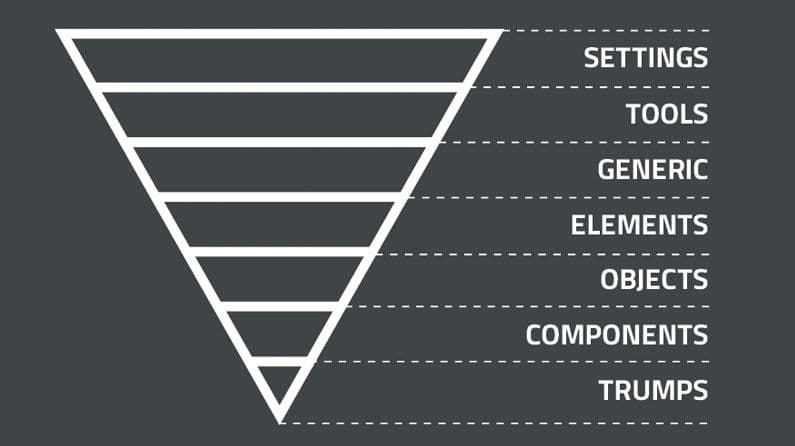
ITCSS: Structuring CSS from General to Specific
ITCSS organizes CSS from generic to specific, like an inverted triangle. It's for large projects to prevent specificity wars and make code predictable. The main footgun is not enforcing the layer order, which leads back to styling chaos and defeats the system.
Scoped CSS: Styling Components Without the Cascade Mess
@scope fences off your CSS, applying styles only within a specific part of the DOM. This lets you style a component without your rules leaking out or clashing with global styles.

Tailwind CSS: Styling Directly in Your HTML
Tailwind CSS lets you build designs by composing utility classes like flex and pt-4 directly in your HTML. This avoids context-switching for rapid UI development. The main footgun is creating verbose, unreadable markup if not managed well.
Styled Components: CSS-in-JS as Components
Think of your styles as React components. Styled Components uses JavaScript template literals to write CSS in your JS, creating components with encapsulated styles. It's ideal for building design systems where styles change based on props.
CSS Modules: Local Scope for Your Styles
CSS Modules treat your styles like local variables. Instead of a global stylesheet, each CSS file is scoped to the component that imports it, preventing name collisions in component-based apps.
SMACSS: A Naming Convention for CSS Scalability
SMACSS organizes CSS into five categories to prevent spaghetti code. It's a naming convention and thought process, not a library you install. It's used in large codebases where teams need a shared vocabulary for styling components.
Utility-First CSS: Style Directly in Your Markup
Utility-first CSS styles elements with many small, single-purpose classes directly in your HTML. It's used for rapid prototyping and component-based systems. The footgun is creating verbose, repetitive markup by not extracting common patterns into components.
CSS Custom Properties: Variables for Your Stylesheet
CSS Custom Properties are variables for your stylesheet. Define a value like --primary-color once on :root and reuse it with var(), making global theme changes easy. The main footgun: they only work for property values, not names or selectors.
OOCSS: Reusable Styles for Maintainable CSS
Treat CSS styles like building blocks. Object-Oriented CSS (OOCSS) separates an element's visual 'skin' (colors, borders) from its 'structure' (width, height). This lets you create reusable classes, reducing duplication for faster, maintainable stylesheets.
Scroll-driven Animations: Animate on Scroll, Not Time
Scroll-driven animations link an animation's progress to a scrollbar's position, not a clock. This is great for progress bars that fill as you scroll or elements that fade in as they enter the viewport. The main pitfall is confusing timeline types.
CSS Motion Path: Animate on a Curve
Think of offset-path as drawing a track for an element to follow. Use it for non-linear UI animations, like an icon following a curve. The footgun: the path itself doesn't cause motion; you must also animate offset-distance to move the element.
CSS transform-style: Let Children Live in 3D Space
The transform-style property decides if an element's children are flattened onto its 2D plane or share a 3D space. Use preserve-3d to create nested 3D objects. Beware: properties like opacity < 1 or overflow will break the 3D context and flatten it.
We are hiring for this. Every open role lists the topics its interview covers, so you can prepare for the real thing rather than guessing.
See open roles