Everything in CSS & Design Systems, page 10
Pre-commit Hooks: Your Code's Quality Gatekeeper
Think of a pre-commit hook as a bouncer for your codebase. It's a script that runs before Git finalizes a commit, checking your changes against project rules. Use it to automatically lint code, run formatters, or check for secrets before they enter history.
Doc Site Generators: Content-First Websites
A doc site generator turns your Markdown files into a complete, searchable website. Use it for project docs or blogs to focus on writing, not web dev. The footgun is thinking they're only for docs; many are powerful static site generators.
Component Scaffolding: Automate Boilerplate, Enforce Consistency
Component scaffolding automates creating files from templates, ensuring new components start with the correct structure. Instead of copy-pasting, run a command to generate the component, its styles, and tests.

The Accessibility Tree: The DOM for Assistive Tech
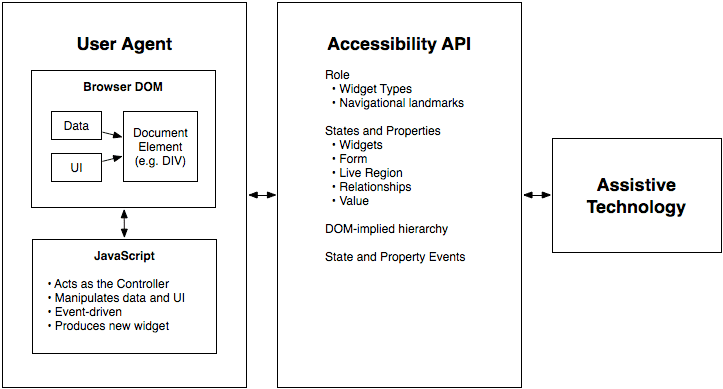
The accessibility tree is the DOM's sibling, built for assistive tech. Browsers derive it from your HTML, exposing each element's name, role (e.g., 'button'), and state (e.g., 'checked') to screen readers.
Focus Trapping: Guiding Keyboard Users, Not Caging Them
Focus trapping intentionally confines keyboard navigation to a component, like a modal. It's a feature, not a bug, when used to prevent users from interacting with the page behind an overlay.
ARIA Live Regions: Announcing Dynamic Content
ARIA live regions tell screen readers about content that changes without a page reload, like a notification banner. Use aria-live="polite" for most updates and assertive only for critical alerts.
WAI-ARIA Authoring Practices: The Cookbook for Accessible Components
Think of WAI-ARIA Authoring Practices as the official cookbook for accessible web components. It provides patterns for widgets like tabs or accordions, ensuring they work with assistive tech.
CSS :focus-visible: Smart Focus for Accessibility
:focus-visible is a smart focus ring that only appears when needed, like during keyboard navigation. This lets you style accessible focus indicators for keyboard users without showing an outline on every mouse click.
Accessible Name Computation: The UI Naming Algorithm
Browsers follow a strict algorithm to find a name for UI elements to announce to screen readers. It runs on every interactive element, creating the data source for assistive tech.
WAI-ARIA Roles: Semantics for Custom Components
WAI-ARIA roles are job titles for HTML elements, telling assistive tech what a generic <div> is meant to be, like a tab or button. Use them for custom UI components that lack a native HTML equivalent.
tabindex: Control Element Focus and Tab Order
The tabindex attribute lets you control an element's keyboard focus. Use tabindex="0" to make custom components tabbable in document order, or tabindex="-1" to make an element focusable only by script, like for a modal.
Build Accessible Animations with `prefers-reduced-motion`
prefers-reduced-motion lets you respect a user's system-wide request to minimize animations. Use this CSS media query to replace potentially jarring effects like zooms or parallax with simpler fades, preventing discomfort for users with vestibular disorders.

Semantic HTML: Describe Meaning, Not Just Looks
Semantic HTML uses tags that describe the content's role (e.g., <article>), not just its appearance. This helps screen readers and search engines understand your page, improving accessibility and SEO. The footgun is using <div> for everything.
ElementInternals: Making Custom Elements Form-Friendly
ElementInternals lets your custom elements act like native form inputs, integrating with validation, submission, and labels. Use it for custom inputs in a design system. The footgun: forgetting to call setFormValue() means its state won't be submitted.

Constructable Stylesheets: Share Styles, Not Bloat
Create and share CSS in JavaScript without duplication. Constructable Stylesheets are ideal for theming multiple Shadow DOM components from a single source; updates to the sheet propagate to all consumers. A key footgun: @import rules are ignored.
Form-Associated Custom Elements: Your Own Inputs
Make your custom elements behave like native inputs within a <form>. This lets them carry a value, be validated, and submit with the form. Use it for custom widgets like tag inputs. The footgun: its state won't submit if you don't call setFormValue().

Storybook: A Workshop for UI Components
Storybook is a workshop for UI components, letting you build and test them in isolation without running your entire app. It's used to develop component libraries, document design systems, and test hard-to-reach states.
CSS ::part(): Style Inside a Web Component's Shadow DOM
The ::part() pseudo-element lets you style specific elements inside a web component's Shadow DOM. It's a contract allowing consumers to theme designated "parts" of a component without breaking encapsulation. The main footgun: it only styles one level deep.
::slotted(): Style Content Passed into Web Components
The ::slotted() pseudo-element lets a Web Component style external content passed into its slots. It's how a component's internal CSS can style the "light DOM" elements it receives.
CSS :host: Style a Web Component from Within
The :host pseudo-class lets a web component style itself from the inside out. Use it inside a shadow DOM to apply styles to the host custom element, making components self-contained. The key footgun: it only works inside a shadow DOM; it has no effect in.
We are hiring for this. Every open role lists the topics its interview covers, so you can prepare for the real thing rather than guessing.
See open roles