Easy everything in DevOps & Cloud, page 15
The Twelve-Factor App: Store Config in the Environment
Your app's code is the blueprint; its config is the specific address and utility hookups. Store config—database URLs, API keys—in environment variables, not in the code. The footgun is hardcoding secrets, making your code base impossible to open-source safely.
Configuration Files: Separating Code from Settings
A config file separates a program's behavior from its code, allowing you to change settings like database URLs without recompiling. They're used for API keys, feature flags, and environment-specific values. The footgun is committing secrets to version control.
Environment Variables: Configuration Outside Code
Environment variables are settings passed to your app from the outside world, letting you change behavior without touching code. Use them for API keys or database URLs. The biggest footgun is committing secrets to version control instead of using variables.
Vagrant: Your Dev Environment as Code
Vagrant is a scriptable remote for virtual machines, defining a dev environment in one text file. It ensures teams have identical, isolated setups, solving "it works on my machine" problems.
AWS CloudFormation: Your AWS Infrastructure as a Blueprint
AWS CloudFormation is your infrastructure's blueprint. Declare AWS resources in a YAML/JSON file, and AWS builds it. This is perfect for creating repeatable, version-controlled environments.
Terraform: Manage Infrastructure as Code
Terraform lets you define cloud infrastructure—servers, databases, networks—in a text file, like a blueprint. It reads this file and builds everything for you, making setups on AWS, GCP, or Azure repeatable.

Pipeline Triggers: The 'If This, Then That' of CI/CD
Pipeline triggers are the "if this, then that" for automation. They kick off builds on a code push (CI), run tests for a pull request (PR), or execute jobs on a schedule. The footgun: many systems enable triggers on all branches by default, causing unwanted.
Jenkinsfile: Your CI/CD Pipeline as Code
A Jenkinsfile is a text file that defines your entire CI/CD pipeline as code, living in your source control. It automates build, test, and deploy steps. The main footgun is confusing its two syntaxes: Declarative is simpler, while Scripted offers more power.
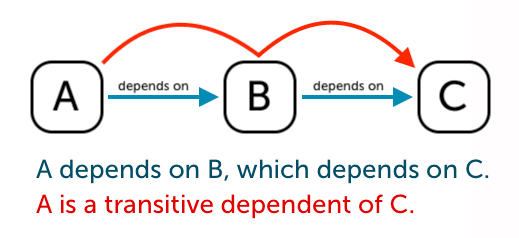
Transitive Dependencies: The Hidden Baggage in Your Code
Think of transitive dependencies as your dependency's dependencies. You add one library, but it pulls in others you didn't explicitly ask for. This happens in any project using a package manager.
Docker Registry: A Library for Your Images
A Docker Registry is like GitHub, but for Docker images. It's a centralized storage system where you push and pull images, enabling sharing and deployment. The biggest footgun is using the :latest tag, which can lead to unpredictable builds.
Semantic Versioning: A Three-Part Numbering System
Semantic Versioning (SemVer) is a widely used convention for assigning software versions. It uses a three-part Major.Minor.Patch number to create unique identifiers for software states.
Package Manifest: Your Project's List of Ingredients
A package manifest is your project's recipe, listing all dependencies and build scripts. Package managers use it to install the right libraries. The footgun is forgetting that the manifest (e.g., package.json) and the lockfile work together for consistency.
Smoke Testing: Is This Build Even Worth Testing?
Smoke testing asks: 'Is this build so broken it's not even worth testing?' It's a quick, shallow check of critical functions, run on every new build before more exhaustive QA. The footgun is thinking a passed smoke test means the build is bug-free.
Integration Testing: Do Your Components Play Well Together?
Integration testing verifies that different software modules, like an API and a database, work correctly together. It's used to catch bugs in the interactions between components, such as data format mismatches. The footgun is writing slow, brittle tests.
Unit Testing: Verifying Code's Smallest Parts
Think of unit tests as checking each Lego brick for defects before building the castle. They confirm your smallest code pieces, like a single function, behave correctly in isolation.
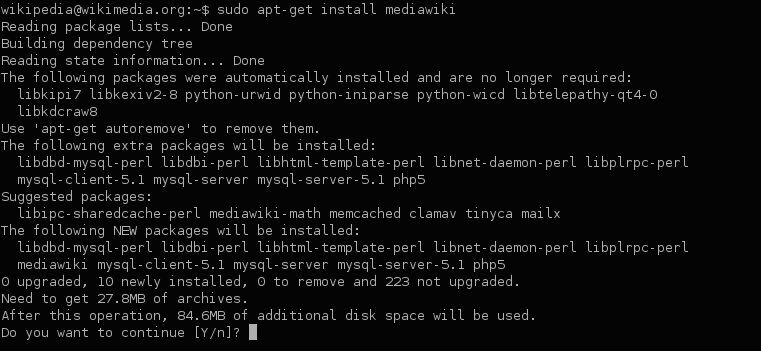
Build Dependency Management: Your Project's Recipe
Dependency management is your project's recipe, ensuring everyone uses the same library versions. It's used everywhere from web apps pulling React via npm to Java services using Maven.
Make: The Original Task Runner
Make automates tasks by following a recipe in a makefile. It intelligently runs only the necessary steps by checking dependencies, saving time during builds. While common for compiling code, it can run any shell command.
Build Artifact: The Packaged Output of a CI Run
A build artifact is the packaged result of a CI run, like a compiled binary or a zipped web app. Pipelines use artifacts to pass this output between stages, from building to testing and deploying.
Git Branch: A Lightweight Pointer, Not a Full Copy
A Git branch is a lightweight pointer to a commit, not a heavy copy of your code. This makes creating and switching branches nearly instant. Use them to isolate new features or bug fixes. The footgun is forgetting a branch is local until you push.
.gitignore: Telling Git What to Ignore
A .gitignore file is a deny-list for your repository, telling Git which files and directories to intentionally leave untracked. Use it to keep build artifacts, log files, and local configs out of your commit history.
We are hiring for this. Every open role lists the topics its interview covers, so you can prepare for the real thing rather than guessing.
See open roles