Everything in Flutter & Dart, page 14
Expanded & Flexible: Claiming Space in Flutter Layouts
Expanded and Flexible widgets manage space in a Row or Column. Expanded is greedy, forcing its child to fill all available space. Flexible is polite, allowing its child to grow but not requiring it. Use them to prevent overflow errors.

Flutter's Container: The Ultimate Box Widget
Think of Container as a customizable box for your UI. It's Flutter's multi-tool for combining layout, styling, and positioning in a single widget. Use it to add padding, margins, borders, or background colors.
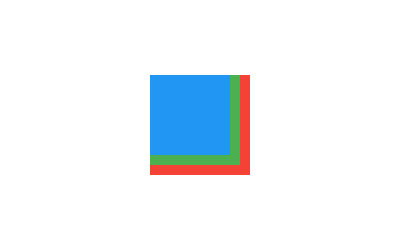
Flutter's Stack: Layering Widgets on Top of Each Other
Flutter's Stack widget lets you overlap children, like layering papers. The first child is at the bottom, the last is on top. Use it for text over images or gradient overlays. The footgun: you can only position children relative to the stack's edges.
Row and Column: Arranging Widgets Without Scrolling
Think of Row and Column as rigid containers for laying out widgets horizontally or vertically. Use them for simple, fixed layouts like button bars. The footgun: unbounded children like Text will overflow; wrap them in an Expanded widget to fill remaining…
Flutter's Three Trees: Widget, Element, and RenderObject
Flutter separates UI into three trees. Widgets are cheap blueprints. Elements are the stateful managers that persist across frames. RenderObjects do the expensive layout and painting. Understanding this separation is key to mastering Flutter's performance.
InheritedWidget: Propagate Data Down the Tree
InheritedWidget provides data to any descendant that asks, avoiding prop drilling. It's the basis for Theme.of(context) and other ambient state. The common footgun is calling .of(context) from a context that's an ancestor, not a descendant, of the widget.
Flutter's State Lifecycle: From Creation to Disposal
A Flutter State object outlives its widget configuration. The framework manages its journey from creation (initState) to permanent removal (dispose), calling methods like build along the way. This governs all StatefulWidgets.
Flutter's setState(): Triggering UI Updates
setState() tells Flutter "my data changed, so rebuild the UI." It's not the change itself, but the notification that a change happened. Use it in a StatefulWidget's State class when events modify data your build() method uses.
StatefulWidget and State: Two Parts of a Whole
A StatefulWidget is an immutable blueprint, while its separate State object holds the mutable data. The widget is disposable; the state persists across rebuilds. Use this for interactive UI like forms or counters.
BuildContext: Your Widget's Address in the Tree
A BuildContext is a widget's address in the Flutter tree, letting it find ancestors like themes or navigators. It's used for Theme.of(context) or Scaffold.of(context). The key footgun: a widget's context can't find its own children, only its parents.
Flutter's build(): Why It Lives on State, Not the Widget
Flutter's build() method turns state into UI. It's on the State object, not the StatefulWidget, to ensure it always paints with the latest data. The framework calls it on init, after setState(), or when dependencies change.
StatelessWidget: Flutter's Immutable UI Blueprint
A StatelessWidget is a 'frozen' UI blueprint, built once with its configuration and never changing its own state. Use it for static UI like icons or text labels. The footgun is using it for UI that must react to internal data changes.
Flutter Widgets: Everything is a Widget
Think of Flutter UIs as LEGOs. Every element, from a button to the padding around it, is a self-contained 'widget' you compose to build your screen. This applies to layout, text, and even alignment.
runApp(): The Entry Point to Your Flutter UI
runApp() is the starting gun for your Flutter UI, taking your root widget and painting it to the screen. It's the first function called in main(). A common misconception is that calling it again is a slow restart; it actually just updates the UI efficiently.
Declarative UI: Describe the 'What', Not the 'How'
Declarative UI means you describe your desired UI for a given state, and the framework figures out how to display it. It's the core of modern frameworks like Flutter. The footgun is manually changing UI instead of updating the state that drives it.
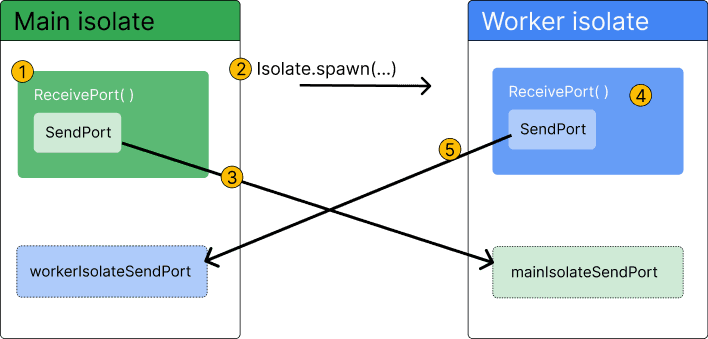
Dart Isolates: True Parallelism Without Shared Memory
Dart isolates provide true parallelism by running code in a separate thread with its own memory. Use them to offload heavy tasks like parsing huge JSON files or complex calculations that would otherwise freeze your Flutter UI.
StreamTransformer: Building Custom Stream Operators
A StreamTransformer is a factory for custom stream operators like map or where. Use it to build reusable logic, like parsing data chunks, that can be applied to any stream.
Dart Streams: Single-Subscription vs. Broadcast
A single-subscription stream is a private channel for one listener; a broadcast stream is a public radio station for many. Use single-subscription for one-off data like a file download and broadcast for shared events like UI updates.
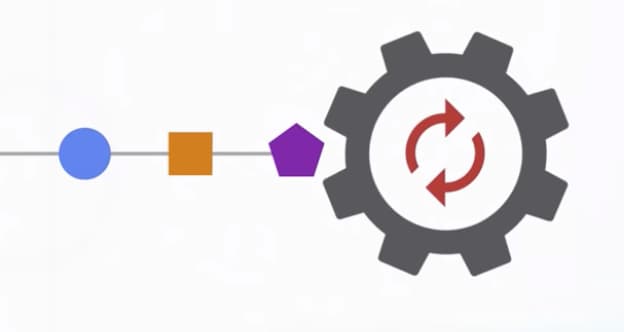
Dart's Microtask Queue vs. Event Queue
Dart's event loop prioritizes a 'microtask' queue for immediate async tasks over the main 'event' queue for I/O and user input. This ensures high-priority code runs first, but risks starving the event queue and freezing the UI if overused.
Completer: Manually Control a Future's Lifecycle
A Completer gives you a Future now but lets you decide when and how it finishes later. It's essential for converting old callback-based APIs into modern async/await code. The main footgun is trying to complete it more than once, which throws an error.
We are hiring for this. Every open role lists the topics its interview covers, so you can prepare for the real thing rather than guessing.
See open roles