Intermediate concepts in Frontend Dev, page 9

tabindex: Control Element Focus and Tab Order
The tabindex attribute lets you control an element's keyboard focus. Use tabindex="0" to make custom components tabbable in document order, or tabindex="-1" to make an element focusable only by script, like for a modal.
Worker postMessage: The Structured Clone Pipe
Worker postMessage moves data between threads via structured cloning. Use it to offload heavy work without blocking the UI. The message argument is mandatory, so omitting it is an error and you must pass null when there is no data.
Svelte Testing Library: Test Components Like a User
Test Svelte components like a user would use them. Svelte Testing Library interacts with the rendered DOM, not internal state, to verify behavior. This avoids brittle tests tied to implementation.
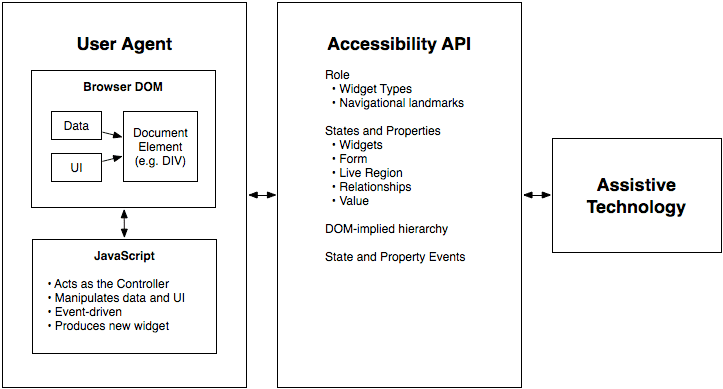
WAI-ARIA Roles: Semantics for Custom Components
WAI-ARIA roles are job titles for HTML elements, telling assistive tech what a generic <div> is meant to be, like a tab or button. Use them for custom UI components that lack a native HTML equivalent.

Vitest Mocking: Isolating Code with `vi.mock`
Vitest's vi.mock replaces a module with a fake version, isolating your code for tests. This is key for preventing real network or database calls. The footgun: calls are "hoisted" to the top of the file, running before other code and breaking variable access.
The Service Worker Lifecycle: Register, Install, Activate
A service worker is a background proxy that lets your app work offline. Its lifecycle—register, install, activate—governs how it takes control of pages. The biggest footgun: a new worker waits for old clients to close before activating, delaying updates.

Angular's TestBed: A Sandbox for Component Testing
Angular's TestBed creates a mini-app just for your test, letting you check how a component renders and behaves with mock dependencies. It's for testing component-template interactions in isolation.
Intercept Network Requests with the `fetch` Event
The fetch event turns your Service Worker into a programmable network proxy. Use it to intercept outgoing requests to serve assets from a cache for offline support or to synthesize custom responses.
Accessible Name Computation: The UI Naming Algorithm
Browsers follow a strict algorithm to find a name for UI elements to announce to screen readers. It runs on every interactive element, creating the data source for assistive tech.
Playwright: E2E Tests That Aren't Flaky
Playwright makes E2E tests reliable by automatically waiting for UI elements to be ready. Use it to test critical user journeys across Chrome, Firefox, and WebKit. The footgun is using brittle CSS selectors instead of user-facing locators like getByRole.
CSS :focus-visible: Smart Focus for Accessibility
:focus-visible is a smart focus ring that only appears when needed, like during keyboard navigation. This lets you style accessible focus indicators for keyboard users without showing an outline on every mouse click.
Angular Ivy: The Tree-Shakable Compiler
Angular's Ivy engine compiles components like separate puzzle pieces, making apps smaller and faster. This enables effective tree-shaking for smaller bundles and faster rebuilds.
Configuring the Angular Compiler (ngc)
The Angular Compiler (ngc) transforms your templates into optimized JavaScript ahead-of-time. You tune it in tsconfig.json to create smaller production builds or publish reusable libraries.
Vue's <script setup>: Less Boilerplate, More Performance
Vue's <script setup> is compile-time sugar that automatically exposes variables and functions to your template, cutting boilerplate. It yields more succinct, performant components with better type-safety.
Monorepo: Managing Multiple Projects in One Repository
A monorepo puts multiple projects into one repository, creating a single source of truth. It's great for design systems, allowing atomic updates to shared components and consuming apps.
Next.js Middleware: Your App's Edge Bouncer
Think of Next.js Middleware as a bouncer at your app's door. It runs code on the edge before a request is processed, letting you redirect, rewrite, or block it. The main footgun is forgetting it runs in a limited Edge Runtime, not a full Node.js.
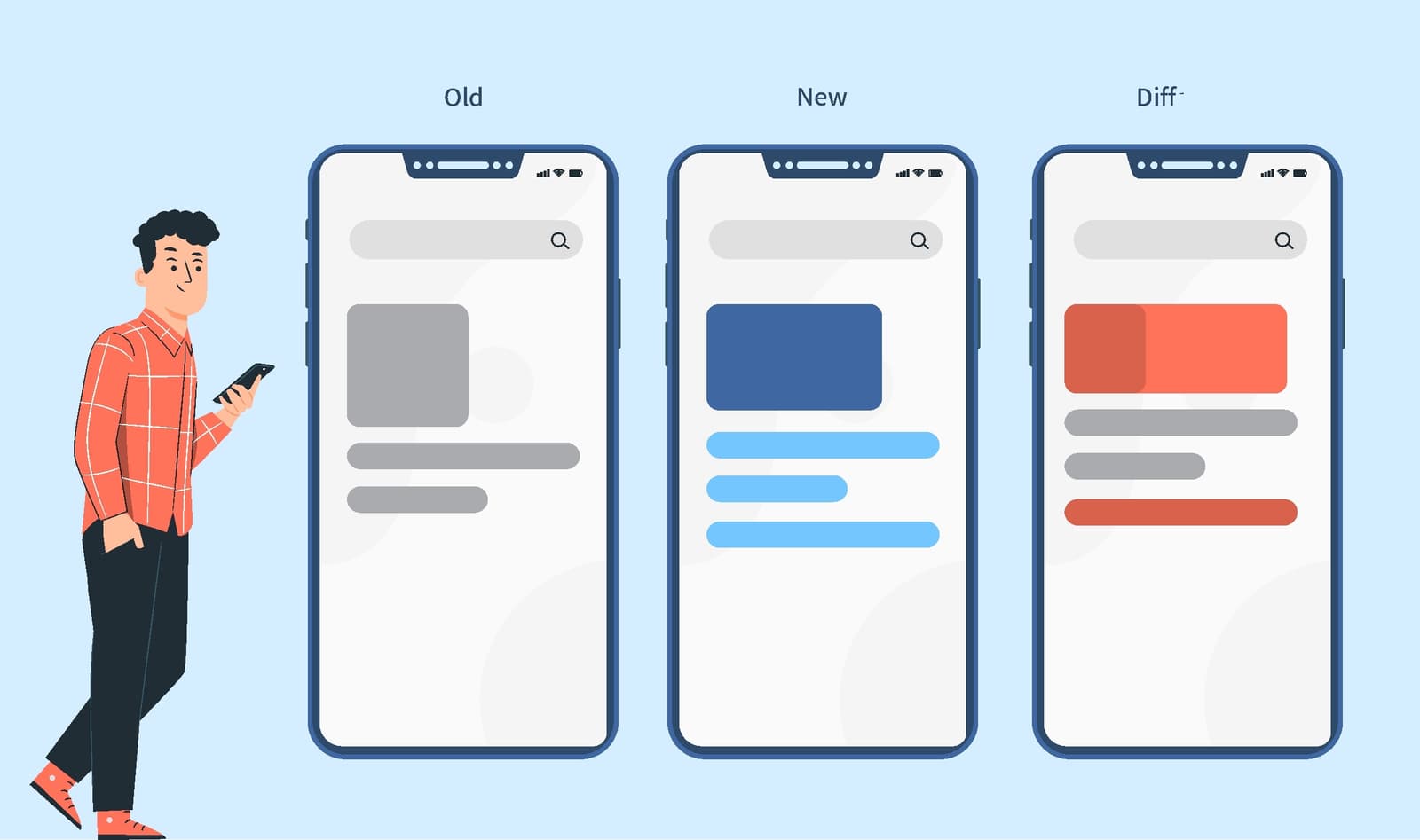
Visual Regression Testing: Spot the Difference for UIs
Visual regression testing is like an automated 'spot the difference' for your UI, catching visual bugs functional tests miss. It's used in CI/CD to compare screenshots before and after a code change.
WebGL Rendering Context: Your GPU's API on Canvas
The WebGL rendering context is your JavaScript's command center for drawing on a <canvas> with the GPU. You use it for 3D games or complex data visualizations. The context can be lost, so always check isContextLost() before rendering a new frame.
Next.js i18n Routing: URLs for a Global Audience
Next.js i18n routing maps locales to URLs, like /en/about or /es/acerca-de. It's not just text translation; it's building a site structure for each language. This improves SEO and user experience.
Design System Build Pipeline: Automating UI Consistency
A design system pipeline treats UI rules like code, syncing design tokens from a single source of truth (like Figma) to your codebase. It prevents drift between design and code, but the biggest footgun is not starting one, leading to manual, error-prone…
We are hiring for this. Every open role lists the topics its interview covers, so you can prepare for the real thing rather than guessing.
See open roles