Concepts in Frontend Dev, page 3
SvelteKit: From Zero to Dev Server
Spin up a new SvelteKit app with npx sv create. This command scaffolds a project, prompting you to add tools like TypeScript. Then, npm run dev starts your dev server. The key footgun: forgetting to install dependencies before starting the server.
Literal Types: Be More Specific Than `string`
Literal types specify the *exact* value a variable must hold, not just its general type like string. They're great for creating fixed option sets with unions, like type Status = "pending" | "complete".

React Refs: Memory Without Re-renders
A React ref is like a secret pocket for your component to remember information without triggering re-renders. Use it to hold values not needed for rendering, like a timer ID. The footgun: changing a ref's value won't update the UI; use state for that.

CSS Stacking Contexts: The Z-Axis Explained
A CSS stacking context is like a self-contained group of layers. Elements inside only compete for z-index with siblings in that same group. They're created by properties like position with z-index, opacity, or transform.

Vite's HMR API: Manually Controlling Hot Reloads
Vite's HMR API lets a module handle code changes without a full reload. While frameworks usually manage this, you can use it for custom tooling. The footgun: forgetting to wrap HMR code in if (import.meta.hot) will crash your production build.
React's Rule: Favor Composition Over Inheritance
Instead of extending a base component, build complex UIs by wrapping and configuring smaller ones. Use this for generic containers like dialogs or for creating specialized versions of a component.
Block Formatting Context: Taming Floats and Margins
A Block Formatting Context (BFC) is a mini-layout sandbox on your page, isolating its contents. Use it to contain child floats that would otherwise overflow their parent, or to stop adjacent elements from collapsing their margins.
Vite Config: The Control Panel for Your Build
Think of vite.config.js as a dynamic script, not a static file. It lets you programmatically change your build based on context, like serving for development versus building for production.
The `window` Object: Your Browser's Global Scope
Think of the window object as the global stage for your JavaScript. It represents the browser tab and holds all global variables and APIs like fetch and setTimeout. You use it constantly, often implicitly.
CSS Containing Block: The Box That Defines Your Box
An element's size and position are calculated relative to its containing block, not always its direct parent. This determines how percentage widths are resolved and provides the reference for position: absolute.
SvelteKit Adapters: Bridge Your App to Production
A SvelteKit adapter is a power plug for your app, making your universal build fit a specific deployment target like Vercel or a Node server. You configure it based on your host, like adapter-static for static sites. The footgun is forgetting one entirely.
The `document` Object: Your Page's API
The document object is the root of the DOM tree, representing the entire webpage in your script. Use it to find elements (getElementById), create new ones (createElement), or read page info. The main footgun: accessing an element before it's been parsed.
CSS Color Values: From Keywords to Functions
CSS offers multiple ways to define colors, from simple names like red to functions like rgb(). Use keywords for mockups, hex for design handoffs, and HSL for intuitive manipulation. The main footgun: colors can look different across uncalibrated devices.
Vite's Plugin System: Extending Dev and Build
Vite's plugin system extends its dev server and build process, leveraging Rollup's mature ecosystem. Use it to add framework support or handle custom assets. The footgun is forgetting to control execution order with enforce, causing compatibility issues.
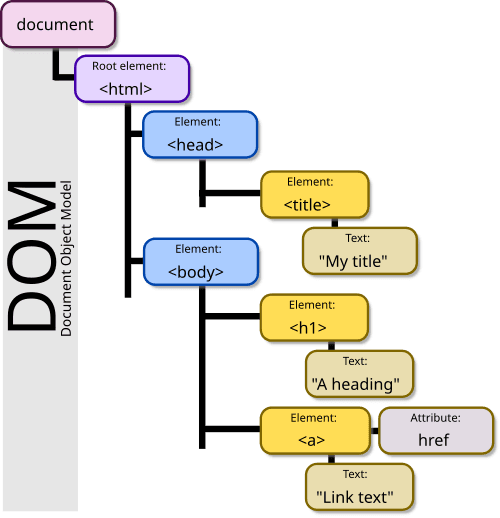
The DOM: Your HTML as a Live Object Tree
The DOM is the browser's live model of a webpage, represented as a tree of objects. JavaScript uses it to find elements, change content, and react to clicks. The footgun: DOM changes are in-memory; they don't edit the original HTML file on the server.
CSS `font`: The All-in-One Typography Shorthand
The font property is a single CSS declaration for setting multiple type styles at once, like size, weight, and family. Use it to define base typography for your site or components.
Vite's Low-Level SSR API
Vite's SSR API lets you run Vite as a middleware inside your own Node.js server, giving you full control over rendering. It's for building custom SSR solutions, often with Express. The footgun: most apps should use a higher-level SSR plugin, not this API.
Web Storage API: Browser Key-Value Stores
Web Storage provides simple browser key-value stores: localStorage and sessionStorage. Use localStorage for data that persists across sessions, like user settings, and sessionStorage for data tied to a single tab.
CSS `background`: The All-in-One Shorthand
The CSS background property is a shortcut for styling an element's backdrop, combining color, image, and position in one line. Use it for most background tasks, from simple colors to complex layered images.
SvelteKit Hooks: Intercepting Requests and Events
SvelteKit Hooks are like middleware, letting you intercept requests and events to run app-wide logic. Use them for tasks like authentication checks, initializing DB clients, or custom routing.
We are hiring for this. Every open role lists the topics its interview covers, so you can prepare for the real thing rather than guessing.
See open roles