Everything in iOS & Swift, page 10

Archiving an iOS App for Distribution
Archiving an app bundles your code and assets into a distributable package. It's the final step before sending your app to beta testers on TestFlight or submitting it to the App Store.
App Store Connect: Your App's Mission Control
Think of App Store Connect as your app's mission control. It’s the web portal for managing your app's lifecycle after coding, from uploading builds and running TestFlight betas to submitting for final review.
Apple Developer: The Official Resource Hub
Think of Apple Developer as the official command center for building on Apple platforms. It's the central website for the tools, APIs, and technical resources you need to write software for iOS, macOS, watchOS, and more.
Custom Frameworks: Best Practices for Sharing Code
A custom framework is a private toolkit, bundling shared code and resources for use across multiple apps. Use them for common logic in an app suite, but always prefix public symbols to avoid name collisions and static link errors.
Swift Library Evolution: Shipping Break-Proof Frameworks
Library Evolution lets you update a Swift framework without breaking apps that use it, even if they don't recompile. It's crucial for shipping binary SDKs. The footgun is that many seemingly safe changes, like adding a struct property, are binary-breaking by…
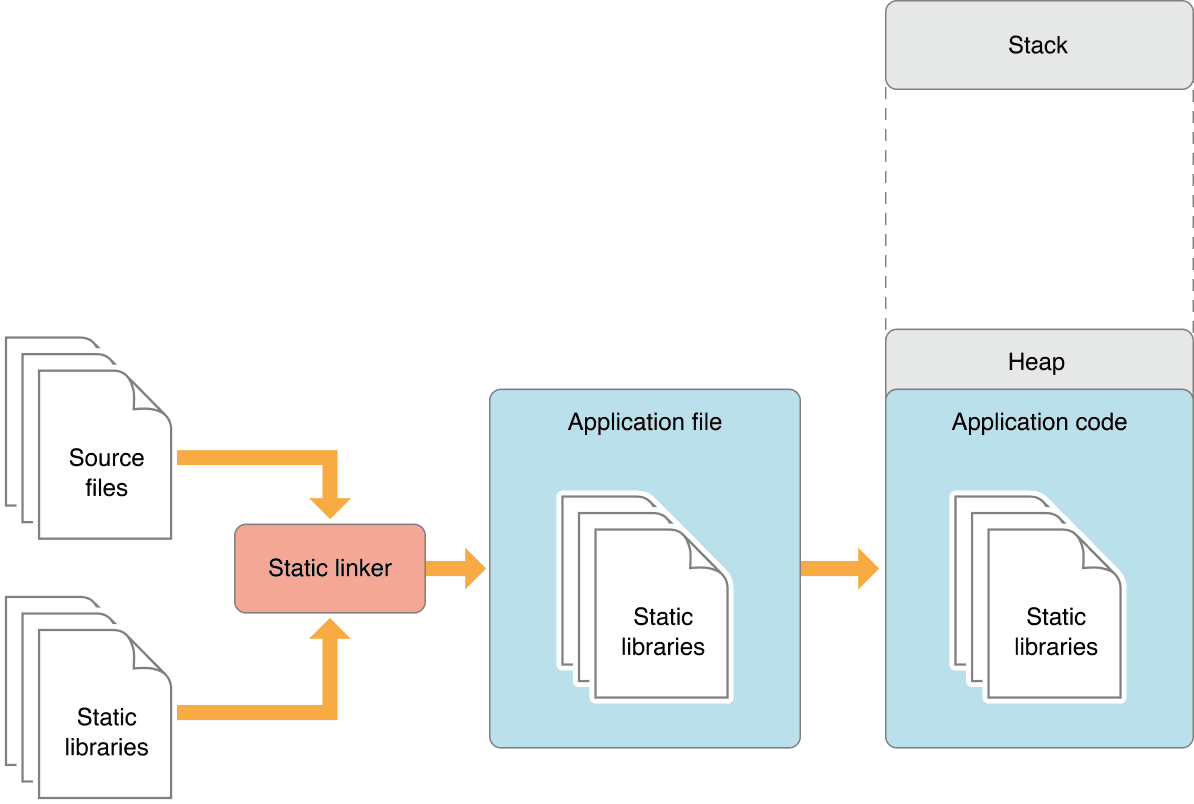
Static vs. Dynamic Linking: Code Size vs. Flexibility
Static linking bakes library code into your app, creating a large but self-contained executable. Dynamic linking loads libraries at runtime, saving space. This choice impacts app size, launch time, and updates.
Swift Package Resources: Bundling Assets with Code
A Swift Package resource bundle is like a fanny pack for your code, letting you package assets like images and data files directly with your library. This makes your package self-contained.
Carthage: A Decentralized iOS Dependency Manager
Carthage is a dependency manager that prioritizes developer control. It compiles dependencies into binary frameworks but leaves final integration to you, avoiding automatic changes to your Xcode project.
Framework Target
A Framework target in Xcode builds a reusable bundle of compiled code and public interfaces, separate from an app target, so an app, a widget, or an extension can share the same code without duplicating it.
Xcode Workspaces: Managing Multiple Related Projects
An Xcode Workspace is a container for multiple related projects, letting them share code and resources. Use it when building an app with its own frameworks or when managing dependencies like CocoaPods.
CocoaPods: Managing Dependencies in Apple Projects
CocoaPods manages third-party libraries in your Swift/Objective-C projects. You list dependencies in a Podfile, run pod install, and it handles the rest. The biggest footgun: always open the .xcworkspace, not the .xcodeproj file after installing.
Snapshot Testing: Catch Unintended UI Changes
Snapshot testing compares your UI to a saved 'golden' image, failing if pixels differ. It's a visual diff for your views, catching unintended regressions in layout or style. The main footgun is forgetting to re-record snapshots after intentional UI changes.

XCUITest Page Object Model: Tame Your UI Tests
The Page Object Model treats each app screen as an object, separating test logic from UI interaction. In XCUITest, this creates stable tests for complex apps. The biggest footgun is forgetting synchronization—always wait for views to load before interacting.
measure: Baseline and Compare Code Performance
measure in XCTest establishes a performance baseline for a block of code and fails tests if it regresses. It tracks critical algorithm speed, running the code ten times for a stable average. The footgun is ignoring the baseline: you must set it first.
Xcode Code Coverage: Measuring Test Effectiveness
Code coverage isn't a grade, but a map of untested code. Use it in Xcode to find gaps in your logic before shipping. The footgun: high coverage doesn't mean your tests are good, just that the lines were executed, potentially missing key assertions.
Testing Async Code with XCTestExpectation
XCTestExpectation is a stopwatch for your tests, pausing them to wait for asynchronous work like a network call to finish. Use it for testing code with completion handlers. The footgun is forgetting to fulfill() the expectation, causing a timeout failure.
XCUIElementQuery: The Blueprint for Finding UI Elements
An XCUIElementQuery is a recipe for finding UI, not the element itself. It describes a search that runs only when you interact with the result. Use it in XCUITest to locate views for automated tests. The footgun: thinking a query finds an element on creation.
XCUITest: Automating Your App's User Interface
XCUITest is like a robot user for your app, tapping buttons and verifying what's on screen. It automates testing of critical flows like login or checkout to prevent regressions.
Mocking: Faking Dependencies in Unit Tests
A mock is a stunt double for a real object in your unit tests, letting you control its behavior. Use it to fake dependencies like network clients for fast, predictable tests. The footgun: over-mocking can create tests that pass but miss real integration bugs.
Test-Driven Development: Write the Test First
TDD flips the script: write a failing test before the feature code, forcing a testable design. It's ideal for new Swift components with clear requirements, ensuring every line of code serves a purpose.
We are hiring for this. Every open role lists the topics its interview covers, so you can prepare for the real thing rather than guessing.
See open roles