Easy concepts in Mobile Dev, page 3

UIStackView: Layouts Without Manual Constraints
A UIStackView is an invisible container that arranges views in a single column or row, saving you from writing manual layout constraints. It's ideal for toolbars or forms. The main footgun is forgetting it's non-rendering—you can't set its background color.

Passing Data to Routes in React Native
Think of it like passing arguments to a function. When you navigate to a new screen, you give it the data it needs, like a product ID. This is key for master-detail views. The footgun: only pass JSON-serializable data to avoid breaking state persistence.
SwiftUI's View: A Blueprint, Not a Building
A SwiftUI View is a lightweight blueprint for a piece of your UI, not the UI element itself. It's used to compose everything from a single button to an entire screen. The common mistake is treating it like a heavy UIView class; it's a cheap.
SwiftUI Stacks: Arrange Views Vertically, Horizontally, and in Layers
SwiftUI stacks are your core layout tools for arranging views. Use VStack for vertical columns, HStack for horizontal rows, and ZStack for layering. They're essential for any UI, from simple rows to complex overlays.
Android Activity: A Single Screen in Your App
An Android Activity is the window for a single screen in your app where users interact with your UI. The OS manages a "back stack" of Activities; starting a new screen pushes one on, and pressing back pops it off.
Declarative UI: Describe the 'What', Not the 'How'
Declarative UI means you describe your desired UI for a given state, and the framework figures out how to display it. It's the core of modern frameworks like Flutter. The footgun is manually changing UI instead of updating the state that drives it.

Android Intents: The App's Messaging System
An Intent is a message requesting an action from another app component. It's the 'glue' that lets you start new screens, launch background services, or ask other apps to open a URL.
runApp(): The Entry Point to Your Flutter UI
runApp() is the starting gun for your Flutter UI, taking your root widget and painting it to the screen. It's the first function called in main(). A common misconception is that calling it again is a slow restart; it actually just updates the UI efficiently.

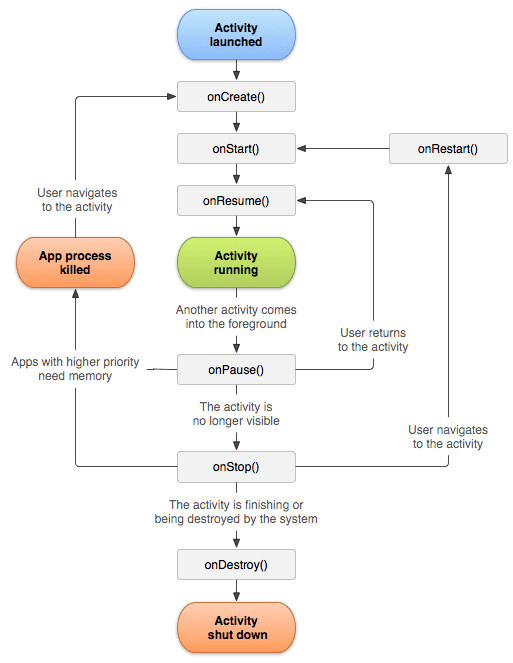
Android's Activity Lifecycle: A Screen's Journey
Think of an Activity's lifecycle as a stage play's script. Methods like onCreate() and onPause() are cues for your app screen to set up, appear, or hide. This manages state during interruptions like phone calls.
Flutter Widgets: Everything is a Widget
Think of Flutter UIs as LEGOs. Every element, from a button to the padding around it, is a self-contained 'widget' you compose to build your screen. This applies to layout, text, and even alignment.
Broadcast Receiver: Responding to System-Wide Events
A Broadcast Receiver is your app's antenna for system-wide announcements. It listens for events like network changes or low battery. The main footgun is performing long tasks here; the system will kill it. Offload work to WorkManager.
StatelessWidget: Flutter's Immutable UI Blueprint
A StatelessWidget is a 'frozen' UI blueprint, built once with its configuration and never changing its own state. Use it for static UI like icons or text labels. The footgun is using it for UI that must react to internal data changes.
FlatList: Performant Virtualized Lists in React Native
FlatList is a "window" over your data, only rendering visible items to save memory and keep scrolling smooth. It's ideal for long lists like feeds or contacts. The main footgun: if items don't update, you forgot to pass changing state to the extraData prop.
SectionList: Displaying Grouped Data Efficiently
SectionList renders long lists grouped into sections, like a contact list. It virtualizes content, rendering only visible items to save memory. A common footgun: it won't re-render on external state changes unless you pass that state via the extraData prop.
iOS App States: From Launch to Suspension
An iOS app is like a person with different states of alertness: focused (Active), distracted (Inactive), or napping (Background/Suspended). This lifecycle dictates how your app behaves during interruptions.
The AppDelegate: Your App's Central Command
Think of the AppDelegate as your app's command center, receiving critical notifications from the OS. It handles core events like launch, termination, or receiving a push notification. The footgun is bloating it with logic that belongs elsewhere.
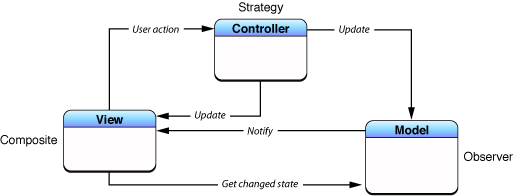
Model-View-Controller (MVC): Separating App Logic from UI
MVC organizes code by separating data (Model) from the user interface (View), using a Controller as the go-between. This is the foundational pattern for many UI frameworks, like Cocoa and UIKit. The main footgun is the "Massive View Controller."
Row and Column: Arranging Widgets Without Scrolling
Think of Row and Column as rigid containers for laying out widgets horizontally or vertically. Use them for simple, fixed layouts like button bars. The footgun: unbounded children like Text will overflow; wrap them in an Expanded widget to fill remaining…
View and ViewGroup: The Building Blocks of Android UI
A View is a single UI widget like a button; a ViewGroup is a container that arranges them. This is the fundamental structure for all Android UIs. The common footgun is creating deeply nested ViewGroups, which slows down rendering performance.
Flutter's Stack: Layering Widgets on Top of Each Other
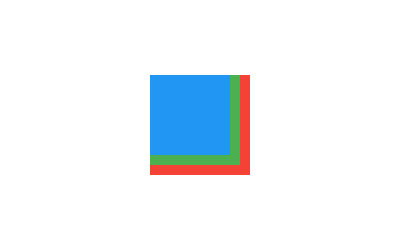
Flutter's Stack widget lets you overlap children, like layering papers. The first child is at the bottom, the last is on top. Use it for text over images or gradient overlays. The footgun: you can only position children relative to the stack's edges.
We are hiring for this. Every open role lists the topics its interview covers, so you can prepare for the real thing rather than guessing.
See open roles