Concepts in Mobile Dev, page 11

React Context API: Avoid Prop Drilling
React Context is like a global announcement system for a component tree, letting distant children access data without passing it through every intermediate component. Use it for app-wide state like themes or user authentication.

UINavigationController: Stack-Based Screen Management
UINavigationController manages screens like a deck of cards: you push new ones on top and pop them off to go back. It's standard for hierarchical navigation. The footgun is manually changing the stack; always use the provided push/pop methods.
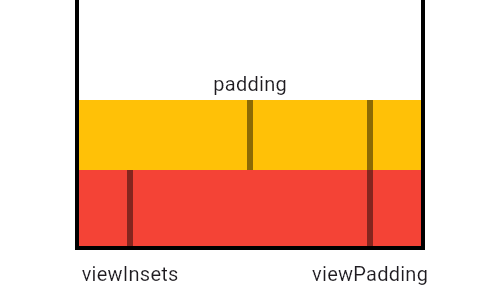
MediaQuery: Reading Device Properties Efficiently
MediaQuery is your widget's window to the device, providing screen size, orientation, and safe areas. Use it to build responsive UIs that avoid system elements like notches or the keyboard. The footgun: MediaQuery.of(context) rebuilds on any change.
MotionLayout: Animate Layouts with States, Not Code
MotionLayout animates layouts by describing start and end states in XML, letting the system handle the transition. Use it for complex UI choreography, like a collapsing toolbar, or to link animation progress to a user's swipe.
useReducer: Manage Complex State with Predictable Actions
useReducer centralizes complex state logic. Instead of setting state directly, you "dispatch" actions describing what happened. It's ideal for state with many sub-values or when the next state depends on the previous one.
UITabBarController: Your App's Main Switchboard
A UITabBarController manages a row of buttons at the bottom of the screen to switch between an app's main sections. Use it for distinct, non-sequential modes like 'Recents,' 'Contacts,' and 'Voicemail'. The footgun is using it for a step-by-step process.
LayoutBuilder: Build Widgets Based on Parent Size
LayoutBuilder lets your widget ask its parent "how much space do I have?" before deciding what to build. Use it for responsive layouts, like showing a Row on wide screens and a Column on narrow ones.

Android View Animation: A Blueprint for Motion
Think of Android's view-based animations as a pre-written score. You define the animation (the "score") in an XML file, then apply it to a View (the "instrument") in your code. This is used for animating properties like alpha or translation on UI elements.
Redux: A Single Source of Truth for App State
Redux centralizes app state into a single "store." Instead of components managing state locally, they dispatch actions to a global reducer. Use it when many components share data.
Storyboard Segues: Visual UI Flow in iOS
A Storyboard Segue is a visual arrow connecting two screens in your iOS app, defining a navigation path without writing code. Use them to transition from a list to a detail view. The biggest mistake is forgetting to use prepare(for:sender:) to pass data.
Flutter's Wrap Widget: The Row That Won't Overflow
Flutter's Wrap widget is like text-wrapping for your UI. It arranges children in a row or column, automatically flowing them onto a new line when space runs out. It's perfect for dynamic lists of tags or chips.
Composable Functions: Building UI with Kotlin Functions
Composable functions are Kotlin functions that describe your UI. Instead of creating View objects, you call functions like Text to build a UI tree. They are the core of Jetpack Compose for building Android UIs declaratively.
React Redux: Connecting Components to a Global Store
React Redux connects your React UI to a global Redux state store, letting components read data and dispatch updates. It's used to avoid "prop drilling" shared state across the app.
TabView: SwiftUI's Built-in Tab Bar
TabView lets you show different views in the same space, switched by a tab bar. It's the standard for top-level app navigation, like switching between "Home," "Search," and "Profile." The footgun is nesting them; they are for main sections only.
Flutter's FittedBox: Scale Any Widget to Fit
FittedBox scales its single child to fit an allocated space, like CSS's object-fit but for any widget. It's perfect for making an icon fill a button or ensuring text fits a container. The footgun: it fails in unconstrained parents like a Row or Column.
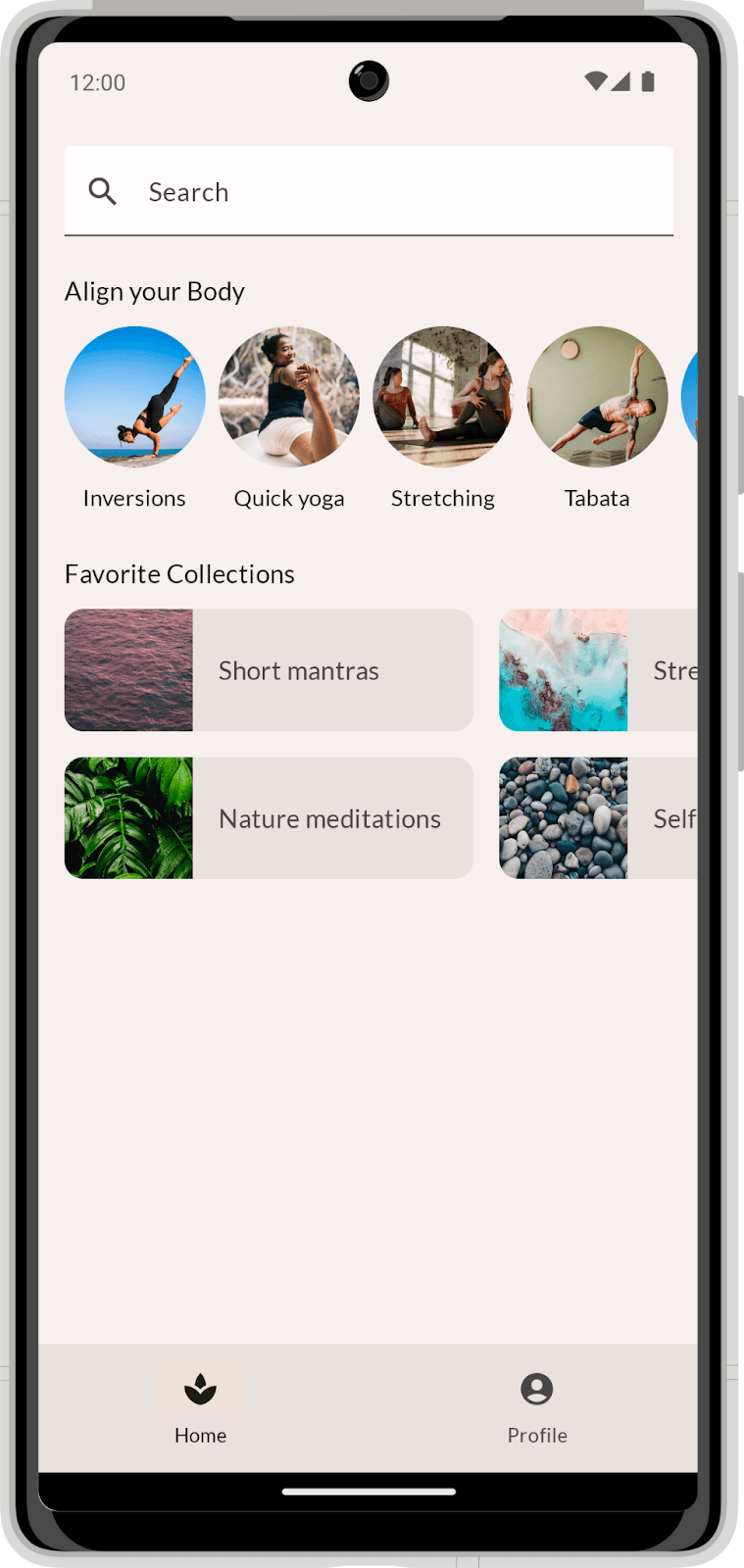
Compose Layouts: Build UI by Describing It
Describe your UI, and Compose draws it. Use Column and Row to position elements, then augment them with modifiers. The footgun is coding before you've broken the visual design into reusable parts, leading to a tangled mess.
Redux Toolkit: The Opinionated Way to Write Redux
Redux Toolkit (RTK) is the official, opinionated way to write Redux, bundling best practices to eliminate boilerplate. Use it for any new Redux app to simplify store setup and state updates.
NavigationStack: Programmatic Navigation in SwiftUI
Think of NavigationStack as a pile of views. You push new views onto the stack programmatically by appending to a path array. This is SwiftUI's modern, data-driven way to handle deep navigation, replacing the older, buggier NavigationView.
AspectRatio: Forcing a Widget's Proportions
AspectRatio forces a child widget to maintain a specific width-to-height ratio, like a 16:9 video player. Use it for image placeholders or video frames. The footgun: it fails in unconstrained parents like FittedBox; use SizedBox there instead.
Jetpack Compose Modifiers: Styling Your UI
Think of Modifiers as a chain of instructions that style and add behavior to your UI components. They're used for everything from setting padding and size to handling clicks.
We are hiring for this. Every open role lists the topics its interview covers, so you can prepare for the real thing rather than guessing.
See open roles