Concepts in Mobile Dev, page 13

UserDefaults: Your App's Junk Drawer for Settings
UserDefaults is a simple key-value store for persisting small bits of data, like a dictionary that saves itself. Use it to remember user preferences like enabling dark mode or a username. The footgun: don't use it for large files or sensitive data.
Flutter's TextField: Capturing User Input
Flutter's TextField is the standard widget for user text input. Use it for search bars or login forms, and manage its state with a TextEditingController for full control. The biggest footgun is forgetting to dispose its controller, causing memory leaks.

Navigation in Compose
Navigation in Compose treats screens as state. You define a graph of composables, each with a string 'route', and navigate by changing the current route. It's ideal for single-activity apps.
Axios: A Simpler Way to Make HTTP Requests
Axios simplifies making network requests by wrapping native browser APIs in a promise-based client. Use it to GET or POST data in any JavaScript app. The main footgun is forgetting requests are asynchronous; you must use async/await to get the data.
App Sandbox: A Digital Playpen for Your App
The App Sandbox is a digital playpen for your app, restricting it to its own files and resources. It's a core security feature on iOS and macOS, preventing apps from accessing user data or system files without explicit permission.
TextEditingController: Syncing UI and Code for Text Fields
A TextEditingController is the two-way link between your code and a text field's state. Use it to read user input, set initial text, or move the cursor. A common footgun is forgetting to call dispose() on the controller, which leads to memory leaks.
Using Android Views in Compose (and Vice Versa)
AndroidView and ComposeView are bridges for gradual UI migration. Use them to embed classic Views in Compose screens or vice versa, like for a MapView. The footgun is managing state and lifecycles across the two different UI paradigms, which can lead to bugs.
FileManager: Your App's Interface to the File System
FileManager is your app's librarian for the file system. Instead of using raw paths, you ask it to find, create, or delete files and directories. Always handle potential errors, as file operations can easily fail.
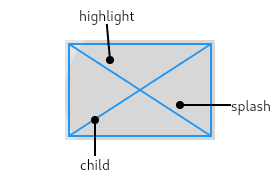
InkWell: Adding Material Splash Effects
InkWell adds a Material Design 'splash' effect to any widget on tap. Think of it as ink spreading inside the surface you touch. Use it to make non-interactive widgets like images respond to taps. The splash won't appear if an opaque widget is between it.
Compose Side-Effects: Escaping the Pure Function
Compose functions should be pure, but apps must interact with the world. Side-effect APIs are controlled escape hatches to run non-UI code, like network calls or showing Toasts, from within a composable's lifecycle. The footgun is calling this logic directly.

TanStack Query: Manage Server State, Not Client State
TanStack Query treats server data as a cache, not local state. It automates fetching, caching, and background updates to keep your React Native app in sync with your backend.
Swift's Codable: Effortless JSON & Data Parsing
Codable is a compiler magic trick that automatically converts Swift objects to and from formats like JSON. It's used constantly for parsing API responses or saving data to disk. The footgun: decoding fails if JSON keys don't exactly match your property names.
Flutter's Form Widget: Grouping and Validating Input
A Flutter Form acts as a supervisor for multiple input fields, letting you validate and save them all at once. Use it for login screens or user profiles. The footgun is forgetting the GlobalKey, which makes it impossible to trigger validation.
CompositionLocal: Implicitly Pass Data Down the UI Tree
CompositionLocal is like CSS inheritance for your UI tree, letting you pass data down implicitly without parameter drilling. It's ideal for ambient data like theming or localization. The footgun is overusing it, which makes components harder to test.
Axios Interceptors: Middleware for Your API Calls
Axios Interceptors are like middleware for your API calls, letting you globally modify requests before they're sent or responses before they're handled. Use them to inject auth tokens or log activity. The footgun: request interceptors run last-in-first-out.
Keychain Services: A Secure Vault for Small Secrets
Think of Keychain as a system-managed safe deposit box for small secrets like passwords or tokens. It's the go-to for storing API keys or user credentials securely. The main footgun is its clunky C-style API, leading most developers to use a wrapper.
Compose UI Testing: Find Nodes, Assert State, Perform Actions
Compose UI tests treat your UI as a node tree. You find nodes by properties (like text or a test tag), assert their state (e.g., 'is displayed'), and perform actions like clicks. Use it to verify composables react correctly to state changes or user input.

FormData: The Right Way to Upload Files
FormData is your digital envelope for file uploads. It packages files and text into a multipart/form-data payload for fetch. Use it in React Native to upload images or videos. The footgun: don't set the Content-Type header yourself; fetch handles it.
Core Data: An Object Graph, Not Just a Database
Core Data isn't just a database wrapper; it's an object graph manager that can persist data. Use it for complex model layers in iOS/macOS apps, especially for caching or document-based work. The footgun is treating it like a simple ORM.
FocusNode: Programmatically Managing Widget Focus
A FocusNode is your handle to a widget's focus state, letting you programmatically request focus or listen for changes. It's essential for forms, like moving focus from one TextField to the next.
We are hiring for this. Every open role lists the topics its interview covers, so you can prepare for the real thing rather than guessing.
See open roles