Concepts in Mobile Dev, page 28
CI/CD for Flutter: Automate Your Builds and Releases
CI/CD for Flutter is a safety net that automatically builds, tests, and deploys your app. Use it to catch bugs early and ship updates to app stores without manual steps.

Play Asset Delivery: Beyond the APK Size Limit
Think of Play Asset Delivery as Google Play managing a CDN for your game's large assets, letting you bypass the initial download size limit. It delivers textures and levels at install, right after, or on-demand. The footgun is assuming delivery succeeds.
Android ViewManager: Bridging Native UI to React Native
A ViewManager is a factory for native Android UI. It tells React Native how to create and update a native view from JavaScript, bridging the gap between JS and native platform widgets. It's used for custom or third-party UI.

Objective-C Nullability: Bridging to Swift's Optionals
Nullability annotations are like adding ? or ! to your Objective-C pointers, telling Swift how to handle nil. They're essential in mixed codebases to bridge Objective-C's pointers to Swift's safe Optionals.
ViewBinding: Say Goodbye to findViewById
ViewBinding generates a type-safe class from your XML layout, giving you direct, non-null access to views with IDs. It's a compile-time safe replacement for findViewById used in Activities and Fragments. If a view is missing, you forgot to give it an ID.
React Native Codegen: Bridging JS and Native
React Native's Codegen auto-generates the boilerplate 'glue code' connecting your JavaScript specs to native implementations. It's essential for building Turbo Modules and Fabric Components.
Lightweight Generics: Type Safety for Objective-C
Lightweight generics bolt type safety onto Objective-C collections like NSArray. This lets Swift see an NSArray<NSString *> as a type-safe [String] instead of [Any], preventing runtime crashes.
Flutter Web Renderers: HTML vs. CanvasKit
Flutter on the web draws your UI using one of two engines: HTML or CanvasKit. The HTML renderer uses standard web elements for compatibility, while CanvasKit uses a high-performance canvas for graphical fidelity.
VectorDrawable: Scalable Graphics for Android
A VectorDrawable is like an SVG for your app, defining images with math, not pixels. Use it for icons that need to look sharp on any screen without bloating your APK. The footgun: complex vectors can be slower to render than a comparable bitmap.
React Native's New Architecture Interop Layer
The Interop Layer is a compatibility bridge, letting legacy native modules run in React Native's New Architecture without a full rewrite. Library maintainers must ensure compatibility for users on RN 0.74+. The footgun: remove partial Codegen specs.
Swift Errors and the NSError Bridge
Swift's modern Error protocol and Objective-C's NSError are different, but Swift automatically "bridges" them. This is key when calling older Apple APIs, which throw NSErrors.
Flutter Desktop App Packaging: From Code to Executable
Flutter desktop packaging bundles your Dart code into a native executable for users. Instead of just running flutter run, you use platform-specific build commands to create a distributable file, like a .app on macOS or an .exe on Windows.
ConstraintLayout in Compose
ConstraintLayout in Compose lets you position elements relative to each other and to guidelines using constraints, the same model as the View system's ConstraintLayout. It solves layouts that would otherwise need deeply nested Row and Column combinations.

useSyncExternalStore: For Synchronous External State
useSyncExternalStore lets React safely read from external data sources without UI tearing. It's for integrating non-React state, like from Redux or browser APIs, ensuring consistent reads during concurrent rendering.
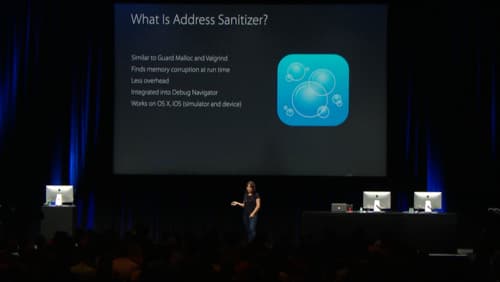
Address Sanitizer: Find Memory Bugs at Runtime
Address Sanitizer (ASan) is a runtime debugging tool that finds memory corruption bugs. Enable it in Xcode to catch buffer overflows and use-after-free errors as they happen, preventing crashes that are hard to trace back to their source.
Android Navigation Graph: A Map for Your UI
Think of the Navigation Graph as a visual map of your app's screens. It centralizes all navigation logic in one XML file, defining destinations (screens) and actions (paths between them), simplifying transitions and deep linking.
React Native's Bridgeless Mode
Bridgeless Mode replaces React Native's legacy message queue with direct calls between JavaScript and native code. This improves performance by removing the serialization bottleneck for UI rendering and native module calls.
Optimizing iOS App Launch Time
An app launch is a race against the system's watchdog timer. The OS loads your app in two phases: pre-main and main. Optimizing both is key. The biggest footgun is ignoring the pre-main phase, where bloated dynamic libraries can kill performance.
Flutter Code Obfuscation: Hiding Your Logic
Obfuscation makes your compiled Dart code harder to reverse-engineer by renaming symbols to be unreadable. Use it in production builds to protect sensitive logic, but always save the symbol map file to decipher crash reports later.
NavController: The Single Source of Truth for App Navigation
NavController is the central API for managing screen transitions. Think of it as an air traffic controller for your UI, directing users between destinations. It's the core of Jetpack Navigation, handling clicks that lead to new screens.
We are hiring for this. Every open role lists the topics its interview covers, so you can prepare for the real thing rather than guessing.
See open roles