Concepts in Mobile Dev, page 6

iOS Provisioning Profiles: Your App's Passport
A provisioning profile is a passport for your iOS app, bundling who can run it (devices), what it can do (entitlements), and who built it (certificate). It's required for running on physical devices and is a common source of build errors.
Future.wait: Run Concurrent Dart Operations
Run multiple async operations concurrently and collect their results in a single list. Use it to fire off independent tasks, like multiple network requests, and wait for them all to finish. The footgun: if one future fails, you lose all results by default.

Logcat: The `tail -f` for Android Apps
Think of Logcat as tail -f for your Android app, streaming system and application messages from a device in real-time. It's your primary tool for debugging crashes, tracking execution flow, and inspecting variable values as your app runs.
Touchable Components in React Native
TouchableOpacity and siblings wrap views to give press feedback by dimming or highlighting. Use them for simple taps on buttons or list items. They inject extra Animated.View nodes that can silently break layout, and Pressable has superseded the entire family.
Xcode's Time Profiler: Hunting Down Performance Bottlenecks
Time Profiler is a stopwatch for your code, sampling your app's threads to see which functions are running most often. Use it to diagnose slow UI or high battery drain by finding CPU "hot spots."
Dart's Stream: Asynchronous Data Pipelines
Think of a Dart Stream as a conveyor belt for asynchronous data, delivering events over time. It's ideal for handling sequences like user input or file I/O.
Adding Build Dependencies with Gradle in Android
Gradle is the tool for adding build dependencies to your Android app. This allows you to integrate external libraries like Jetpack, Compose, or Google Play Services, which are essential for building modern applications.
RefreshControl: The Pull-to-Refresh Handler
RefreshControl adds the native "pull-to-refresh" spinner to your lists. Use it inside a ScrollView or FlatList to let users manually trigger a data update. The footgun: you must control the 'refreshing' prop manually or the spinner vanishes instantly.
Hunt Retain Cycles with the Memory Graph Debugger
Xcode's Memory Graph Debugger is a visual map of your app's live objects and their relationships. Use it to hunt down memory leaks, especially retain cycles where objects won't deallocate.
StreamController: The Faucet for Your Data Stream
A StreamController is the faucet handle for your data stream. Use it to create a custom stream from any data source and push events to it. The main footgun is that a default controller only allows one listener; use StreamController.broadcast for multiple.
Android Build Variants: One Codebase, Many Apps
Think of build variants as a matrix for your app builds, combining build types (like debug/release) with product flavors (like free/paid). This lets you manage different API endpoints or features for various versions from a single codebase.
React Native Reanimated: Off-Thread Animations
Reanimated moves animations off the busy JavaScript thread onto the native UI thread. This ensures smooth, 60-120 fps performance for gestures and transitions, even during heavy JS computation.
UIView: The Building Block of iOS UIs
A UIView is the fundamental building block for iOS UIs. Think of it as a rectangular canvas for drawing content, handling touches, or containing other views. You use it everywhere, from simple buttons to complex layouts.
Completer: Manually Control a Future's Lifecycle
A Completer gives you a Future now but lets you decide when and how it finishes later. It's essential for converting old callback-based APIs into modern async/await code. The main footgun is trying to complete it more than once, which throws an error.
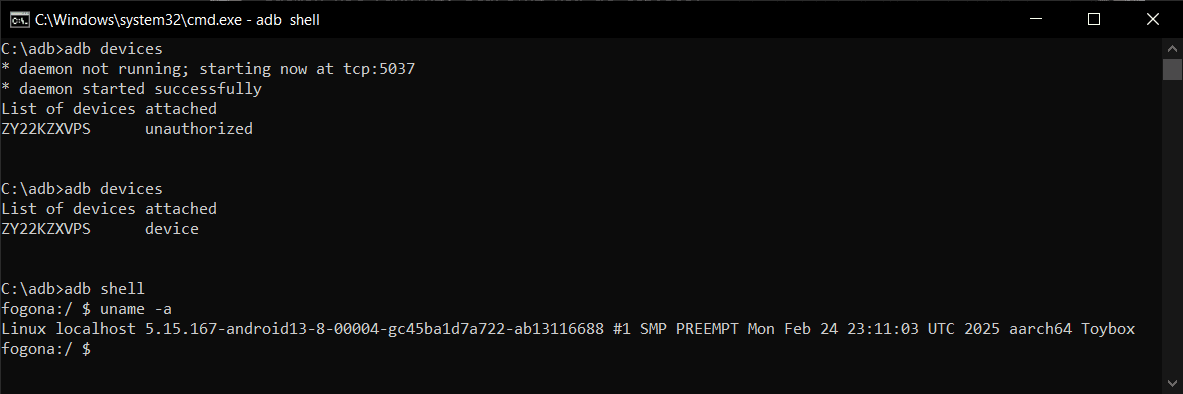
Android Debug Bridge (ADB): A Developer's Remote Control
Android Debug Bridge (ADB) is a developer's universal remote for an Android device. This command-line tool lets you install apps, view logs, and run shell commands, bypassing the UI. It's used for debugging, file transfers, and automation.

Stack Navigator: JavaScript-based Screen Transitions
Stack Navigator treats your screens like a stack of cards: push a new screen on top, pop it off to go back. It’s ideal for standard navigation flows, but its JavaScript-based implementation means you trade the performance of a native solution for…
The UIViewController Lifecycle: From Creation to On-Screen
Think of a UIViewController as an actor with cues to enter, perform, and exit. Its lifecycle methods are your script for setting up data, updating the UI, and cleaning up resources.
Android Gradle Plugin (AGP): The Engine of Your Android Build
The Android Gradle Plugin (AGP) is the specialized toolkit that teaches Gradle how to build, test, and package Android apps. It's used in every project to handle tasks like compiling resources and signing your app.
Drawer Navigator: Your App's Slide-Out Main Menu
A Drawer Navigator is your app's slide-out 'hamburger' menu. Use it for primary navigation between distinct sections like Home, Profile, and Settings. A common footgun is misconfiguring backBehavior, leading to non-intuitive back button actions for users.
UIStackView: Layouts Without Manual Constraints
A UIStackView is an invisible container that arranges views in a single column or row, saving you from writing manual layout constraints. It's ideal for toolbars or forms. The main footgun is forgetting it's non-rendering—you can't set its background color.
We are hiring for this. Every open role lists the topics its interview covers, so you can prepare for the real thing rather than guessing.
See open roles