Concepts in Mobile Dev, page 9

LiveData: Lifecycle-Aware Data Observation
LiveData is a data holder that only notifies active UI components. It connects your ViewModel's data to your UI, preventing crashes and memory leaks by respecting the Android lifecycle.
SectionList: Displaying Grouped Data Efficiently
SectionList renders long lists grouped into sections, like a contact list. It virtualizes content, rendering only visible items to save memory. A common footgun: it won't re-render on external state changes unless you pass that state via the extraData prop.

UIViewRepresentable: Bridging UIKit and SwiftUI
UIViewRepresentable is an adapter that lets you use battle-tested UIKit views inside your modern SwiftUI code. Use it for components like WKWebView that lack a native SwiftUI equivalent.
StatefulWidget and State: Two Parts of a Whole
A StatefulWidget is an immutable blueprint, while its separate State object holds the mutable data. The widget is disposable; the state persists across rebuilds. Use this for interactive UI like forms or counters.

Android's Task and Back Stack Explained
Think of the back stack as a stack of plates (screens). A "Task" is the entire stack for a user's workflow. The system manages this stack, but you can control it for custom navigation. The biggest footgun is misusing launch modes, which breaks back button.
iOS App States: From Launch to Suspension
An iOS app is like a person with different states of alertness: focused (Active), distracted (Inactive), or napping (Background/Suspended). This lifecycle dictates how your app behaves during interruptions.
Flutter's setState(): Triggering UI Updates
setState() tells Flutter "my data changed, so rebuild the UI." It's not the change itself, but the notification that a change happened. Use it in a StatefulWidget's State class when events modify data your build() method uses.
ViewModel: Surviving Android Configuration Changes
A ViewModel acts like a durable backpack for your UI's data, surviving the destruction and recreation of an Activity during a screen rotation. It holds UI state, like user input or fetched data, preventing data loss.
The AppDelegate: Your App's Central Command
Think of the AppDelegate as your app's command center, receiving critical notifications from the OS. It handles core events like launch, termination, or receiving a push notification. The footgun is bloating it with logic that belongs elsewhere.
Flutter's State Lifecycle: From Creation to Disposal
A Flutter State object outlives its widget configuration. The framework manages its journey from creation (initState) to permanent removal (dispose), calling methods like build along the way. This governs all StatefulWidgets.
React Native: Infinite Scroll with onEndReached
The onEndReached prop is a callback that fires when you scroll near a list's end, letting you fetch more data. Use it in FlatList for feeds or catalogs. The main footgun: it can fire multiple times, so use a loading flag to prevent redundant API.
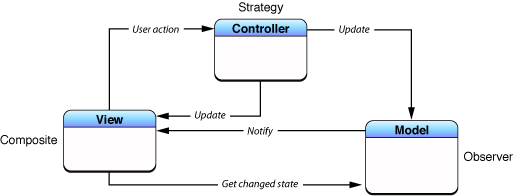
Model-View-Controller (MVC): Separating App Logic from UI
MVC organizes code by separating data (Model) from the user interface (View), using a Controller as the go-between. This is the foundational pattern for many UI frameworks, like Cocoa and UIKit. The main footgun is the "Massive View Controller."
Android Foreground Services: Work the User Can See
A foreground service tells Android, "Don't kill this process; the user knows it's running." It's a contract for long-running work made visible by a persistent notification, used for music playback or navigation.
Memoizing List Items with `React.memo`
Wrap list items in React.memo to prevent them from re-rendering when their props are unchanged. In a FlatList, this stops items from re-rendering just because the list scrolled, keeping the UI smooth. The footgun is assuming it's a free optimization.
UISceneDelegate: Managing Your App's UI Instances
Think of SceneDelegate as the lifecycle manager for a single window of your app's UI. It's essential for multi-window iPad apps, handling when a scene connects, disconnects, or changes state.
InheritedWidget: Propagate Data Down the Tree
InheritedWidget provides data to any descendant that asks, avoiding prop drilling. It's the basis for Theme.of(context) and other ambient state. The common footgun is calling .of(context) from a context that's an ancestor, not a descendant, of the widget.
WorkManager: Guaranteed, Deferrable Background Work
WorkManager is Android's smart to-do list for background tasks. It guarantees execution for deferrable work, like syncing data, even if the app closes or the device reboots. The footgun is using it for immediate tasks; it prioritizes system health over speed.

MVVM: Separate SwiftUI Logic from Layout
MVVM separates logic from layout by moving state and business logic out of your SwiftUI View into a dedicated ViewModel class. This makes your code cleaner, more organized, and easier to test.
Flutter's Three Trees: Widget, Element, and RenderObject
Flutter separates UI into three trees. Widgets are cheap blueprints. Elements are the stateful managers that persist across frames. RenderObjects do the expensive layout and painting. Understanding this separation is key to mastering Flutter's performance.
Dependency Injection in Swift: Stop Creating, Start Receiving
Dependency Injection means objects receive their dependencies from the outside rather than creating them internally. It's used to give a view model a network client or data source, making it testable.
We are hiring for this. Every open role lists the topics its interview covers, so you can prepare for the real thing rather than guessing.
See open roles