Advanced everything in Mobile Dev, page 11
Shopify FlashList: Fixing React Native's Blank Cells
FlashList is a performant drop-in replacement for React Native's FlatList. It recycles components to eliminate blank cells during fast scrolling in long lists. The footgun is assuming it fixes all performance issues, not just rendering.
VirtualizedList: The Engine Behind React Native Lists
VirtualizedList is the engine behind React Native's efficient lists, rendering only visible items to save memory. Use it when FlatList isn't flexible enough, like for immutable data. The main footgun: component state is lost when items scroll out of view.

React Navigation State: The App's Internal Map
Think of React Navigation's state as a JS object that's the single source of truth for your app's screen history. It's essential for advanced tasks like state persistence or deep linking. The footgun: nested navigator state isn't guaranteed to exist.
Type-Safe Navigation in React Native with TypeScript
React Navigation uses TypeScript to type-check screens and params, giving you better autocompletion. You define types for route params and augment a global navigator type so hooks like useNavigation understand your app's structure.
React Native Auth Flows: Conditional Navigators
Think of your app as having two sets of maps: one for guests, one for members. React Navigation swaps the entire map when a user logs in, not just moves them. This is the key to preventing users from back-navigating to the login screen after.
React Native Reanimated: Off-Thread Animations
Reanimated moves animations off the busy JavaScript thread onto the native UI thread. This ensures smooth, 60-120 fps performance for gestures and transitions, even during heavy JS computation.
React Native's Dimensions API: The Manual Approach
React Native's Dimensions API is a low-level way to get a one-time snapshot of screen or window sizes. Use it outside React components or when you need to subscribe to changes manually. The footgun is caching its value, as it won't update on rotation.
Platform.select: Write Once, Adapt Anywhere
Platform.select is a switch statement for your UI, letting you apply styles or components for iOS and Android from one object. It's ideal for tweaking styles in StyleSheet.create or rendering different components. The footgun is forgetting a default key.
React Native Modal: Presenting Content Above Other Views
A Modal is a temporary screen takeover, presenting content above your current view. Use it for critical alerts or forms that demand user focus. The main footgun: forgetting onRequestClose disables the Android back button, trapping your user.
Adding Native Code to Expo (The Modern 'Eject')
Adding native code to Expo no longer means 'ejecting'. You create a custom development build with your specific native modules. This is for when a library has native code not in the Expo SDK. The footgun is thinking you must abandon Expo's tools and services.

Refining Objective-C APIs for Swift with NS_SWIFT_NAME
NS_SWIFT_NAME gives Objective-C code a Swifty alias without changing the original API. Use it to modernize legacy frameworks by removing prefixes for Swift consumption.
Optimizing iOS App Launch Time
An app launch is a race against the system's watchdog timer. The OS loads your app in two phases: pre-main and main. Optimizing both is key. The biggest footgun is ignoring the pre-main phase, where bloated dynamic libraries can kill performance.
Address Sanitizer: Find Memory Bugs at Runtime
Address Sanitizer (ASan) is a runtime debugging tool that finds memory corruption bugs. Enable it in Xcode to catch buffer overflows and use-after-free errors as they happen, preventing crashes that are hard to trace back to their source.
macOS App Notarization: Apple's Security Checkpoint
Notarization is an automated security screening for macOS apps. You upload your app, Apple scans it for malware, and issues a ticket to attach to it. This is mandatory for apps distributed outside the Mac App Store.
App Store Server Notifications: Your Backend's Source of Truth
App Store Server Notifications are webhooks from Apple that tell your backend about subscription events like renewals or refunds. They are your server's source of truth for user entitlements, letting you grant or revoke access without relying on the client…

On-Demand Resources: Keep Your App Bundle Slim
On-Demand Resources (ODR) host app assets on the App Store, not in your bundle, shrinking your initial download. Use it for game levels or tutorials not needed at first launch. The OS downloads assets by "tag" when requested, but can also purge them to save.
App Thinning: Ship Only What's Needed
App Thinning shrinks your app's download by delivering only the assets a specific device needs. The App Store uses Slicing for device-specific art and code, and you can use On-Demand Resources for assets downloaded after installation.
Custom Frameworks: Best Practices for Sharing Code
A custom framework is a private toolkit, bundling shared code and resources for use across multiple apps. Use them for common logic in an app suite, but always prefix public symbols to avoid name collisions and static link errors.
Swift Library Evolution: Shipping Break-Proof Frameworks
Library Evolution lets you update a Swift framework without breaking apps that use it, even if they don't recompile. It's crucial for shipping binary SDKs. The footgun is that many seemingly safe changes, like adding a struct property, are binary-breaking by…
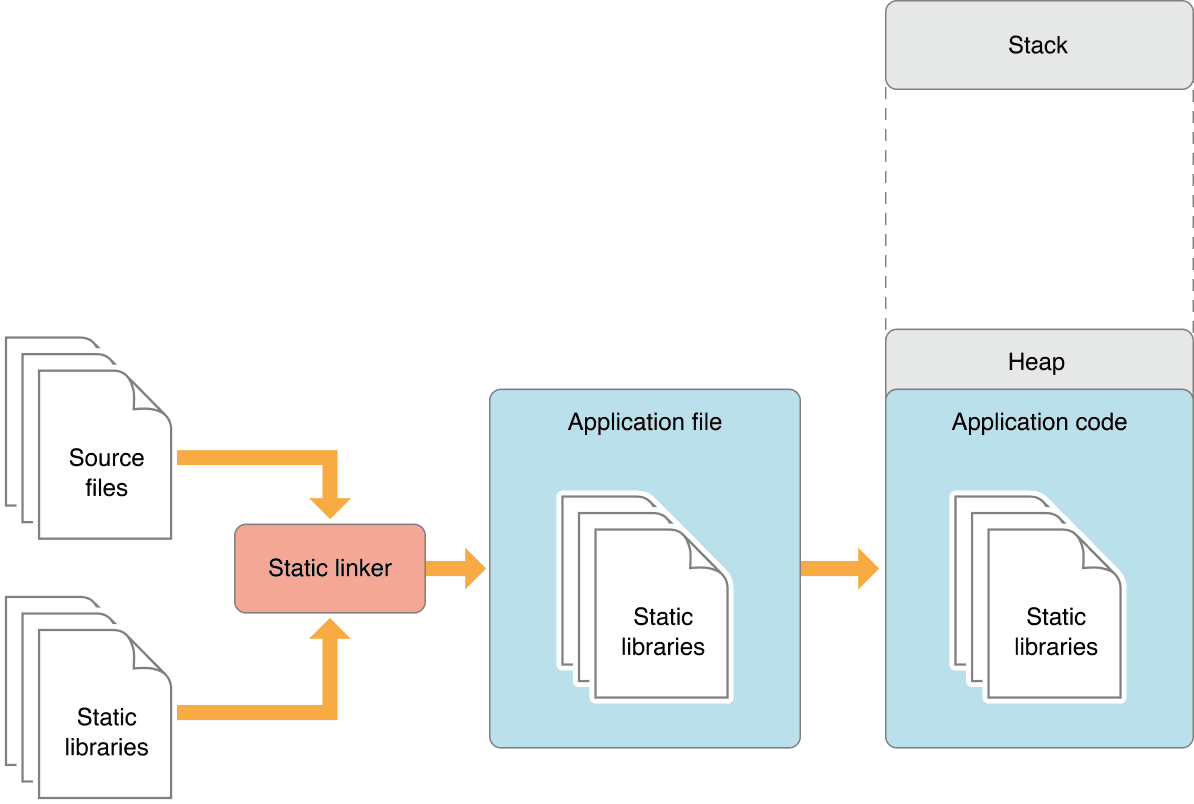
Static vs. Dynamic Linking: Code Size vs. Flexibility
Static linking bakes library code into your app, creating a large but self-contained executable. Dynamic linking loads libraries at runtime, saving space. This choice impacts app size, launch time, and updates.
We are hiring for this. Every open role lists the topics its interview covers, so you can prepare for the real thing rather than guessing.
See open roles