Everything in Mobile Dev, page 60

ProGuard Keep Rules: A "Do Not Remove" List for Your Code
ProGuard keep rules are a "do not remove" list for Android's code shrinker, telling it what to spare when it can't detect usage. This is crucial for code accessed via reflection or JNI.
Android Work Chaining: An Assembly Line for Tasks
Chaining work in Android is like an assembly line for background tasks, ensuring one task finishes successfully before the next begins. It's used for multi-step operations like fetching, processing, and saving data.
Android Overdraw: Stop Painting Pixels Twice
Overdraw is wasted GPU work, painting the same pixel multiple times in one frame. It causes UI stutter and drains battery. Fix it by removing unneeded backgrounds and flattening your UI layouts.
Google Play Release Tracks: A Funnel for Quality
Google Play's release tracks are a funnel for quality, moving from a small trusted group to the public. Use them to get feedback, from internal QA (Internal track) to a wider audience (Closed/Open tracks), before a full production launch.
Android Worker: For Deferrable Background Tasks
An Android Worker handles background tasks that must complete, even if the app closes or the device restarts. Use it for reliable, deferrable work like syncing data or uploading logs. The footgun is using it for immediate tasks; the OS can delay its execution.
Android Custom Views: Beyond the Standard Library
A custom view gives you full control over a UI component's drawing and interaction. Use it for unique elements like charts or radial menus that standard widgets can't handle. The footgun is building one when composing existing views would be simpler.
Android XML Layouts: The Classic UI Blueprint
XML layouts are the classic blueprints for Android screens, defining the structure of UI elements (Views) in a static file. You'll find them in legacy projects or when using View-based components like ConstraintLayout and RecyclerView.

Higher-Order Functions: Passing Code as Data
Higher-order functions treat code as data, accepting other functions as arguments. Lambdas are a concise syntax for creating these function arguments inline, powering collection operations like map and filter or UI listeners.
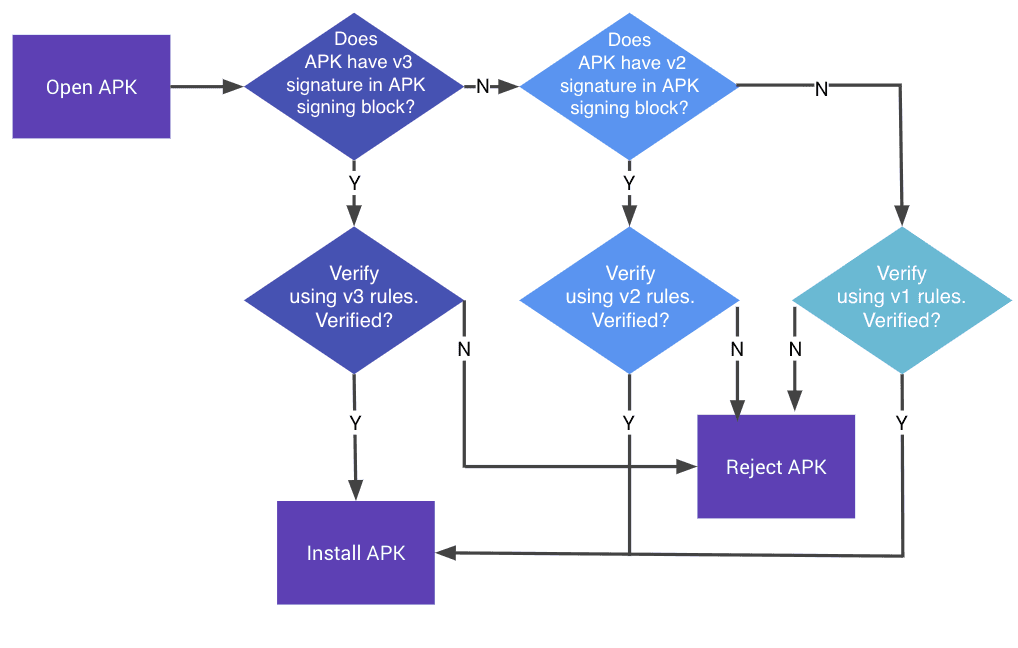
APK Signature Scheme: Verifying App Integrity
An APK signature is a tamper-evident seal, proving an app is from a specific developer and hasn't been altered. Android uses it to trust app updates and prevent malware. The footgun: losing your signing key means you can never update your app again.
Doze and App Standby: Android's Battery Savers
Doze and App Standby are Android's battery-saving modes that restrict background work. Doze activates when a device is idle, while App Standby targets unused apps. The footgun is assuming background jobs run on time; they are deferred and batched.
Android Network Security Configuration
Define your app's network trust rules in a simple XML file instead of writing complex code. Use it to block cleartext (HTTP) traffic, trust self-signed certs in debug builds, or pin certificates.
Isolating Units for Tests with Mockito-Kotlin
Mockito-Kotlin creates fake objects (mocks) to stand in for real dependencies in your tests. This lets you test a class in isolation, for example, testing a ViewModel without making a real network call. The footgun is testing implementation, not behavior.
CoroutineWorker: Background Tasks with Coroutines
CoroutineWorker simplifies background tasks by letting you use suspend functions inside a WorkManager job. It's for deferrable work, like syncing data, that needs to survive process death.
Dagger's Assisted Injection: Creating Objects with Runtime Data
Assisted Injection lets Dagger provide some dependencies while you supply the rest at runtime. It's for objects that need both graph-provided services and user-supplied data, like a specific ID. The footgun: you can't inject the object, only its factory.
Manual Dependency Injection: No Frameworks, Just Code
Manual dependency injection means you are the 'framework,' creating and passing dependencies yourself via constructors. It's great for simple apps where a full DI library is overkill, but the footgun is creating dependencies inside the class that needs them.
Retrofit Converters: Speaking Your API's Language
A Retrofit Converter is a translator that turns raw network data into your app's data classes (e.g., JSON to Kotlin objects). You add a converter factory, like for Moshi or Gson, when building your Retrofit instance. The footgun: converter order matters.
Android Navigation Actions: Defined Paths, Not Just Destinations
A Navigation Action is a configured pathway between screens, not just a destination. It bundles the target screen with transition animations and arguments. Use them in your XML nav graph to keep UI code clean.
NavController: The Single Source of Truth for App Navigation
NavController is the central API for managing screen transitions. Think of it as an air traffic controller for your UI, directing users between destinations. It's the core of Jetpack Navigation, handling clicks that lead to new screens.
Android Navigation Graph: A Map for Your UI
Think of the Navigation Graph as a visual map of your app's screens. It centralizes all navigation logic in one XML file, defining destinations (screens) and actions (paths between them), simplifying transitions and deep linking.
ConstraintLayout in Compose
ConstraintLayout in Compose lets you position elements relative to each other and to guidelines using constraints, the same model as the View system's ConstraintLayout. It solves layouts that would otherwise need deeply nested Row and Column combinations.
We are hiring for this. Every open role lists the topics its interview covers, so you can prepare for the real thing rather than guessing.
See open roles