Easy everything in TypeScript & Web APIs, page 4

Fetch API: Making Basic Network Requests
The Fetch API is like ordering from a catalog: you give it a URL and get a promise of delivery. It's used to load data from APIs without a page reload. The footgun: the promise resolves even on HTTP errors (like 404); you must check.
The Promise Object: A Placeholder for Future Values
A Promise is an IOU for a value from an async operation, like a network request. It's a placeholder that will eventually hold a result or an error. Use it for fetching data or reading files. The footgun: always add a .catch() to handle failures.
Callback Hell: Navigating JavaScript's Async Pyramid
Callback Hell is the 'pyramid of doom' structure from nesting async functions. It happens when chaining I/O tasks like API calls, where each step depends on the last. The footgun is writing async code as if it runs sequentially, creating unreadable nests.
Accessing data-* Attributes with `dataset`
The dataset property is a live map of an element's data-* attributes. It automatically converts HTML data-user-id to element.dataset.userId in JS, perfect for storing state. The footgun: name conversion is lossy; HTML attributes are always lowercased.
Type-Safe DOM Selection in TypeScript
TypeScript knows DOM types but can't guarantee an element exists. Selecting an element returns Type | null, forcing you to handle the null case. This prevents runtime errors when your script runs before the DOM element loads.
TypeScript Classes: Blueprints for Typed Objects
A TypeScript class is a blueprint for creating objects, adding type safety to JavaScript's object-oriented patterns. Use them for core data structures like a User. The main footgun is forgetting to initialize properties, which strict mode flags as an error.
TypeScript: Typing Function Inputs and Outputs
Think of function types as a contract defining what data goes in and what comes out. This is core to TypeScript, ensuring functions are called correctly. The footgun is relying on return type inference, which can hide bugs if logic changes unexpectedly.
TypeScript's `typeof`: Get a Type from a Value
TypeScript's typeof operator grabs the static type from a runtime value, like a variable. It's essential for utilities like ReturnType, letting you derive a type from a function's implementation without duplicating definitions.
Web Storage API: Browser Key-Value Stores
Web Storage provides simple browser key-value stores: localStorage and sessionStorage. Use localStorage for data that persists across sessions, like user settings, and sessionStorage for data tied to a single tab.
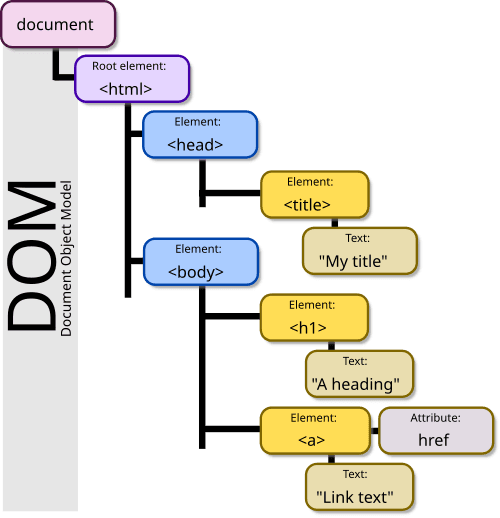
The DOM: Your HTML as a Live Object Tree
The DOM is the browser's live model of a webpage, represented as a tree of objects. JavaScript uses it to find elements, change content, and react to clicks. The footgun: DOM changes are in-memory; they don't edit the original HTML file on the server.
The `document` Object: Your Page's API
The document object is the root of the DOM tree, representing the entire webpage in your script. Use it to find elements (getElementById), create new ones (createElement), or read page info. The main footgun: accessing an element before it's been parsed.
The `window` Object: Your Browser's Global Scope
Think of the window object as the global stage for your JavaScript. It represents the browser tab and holds all global variables and APIs like fetch and setTimeout. You use it constantly, often implicitly.
TypeScript's Basic Types: The Building Blocks
TypeScript builds on JavaScript's primitives (string, number, boolean) by letting you explicitly declare a variable's type. This is the foundation for catching errors early. The main footgun is confusing tuples [string, number] with flexible arrays.
TypeScript Type Annotations: Defining Your Data's Shape
Type annotations are contracts for your data, telling TypeScript what to expect from variables and functions. You'll use them for primitives like string or number, and for arrays like string[].
We are hiring for this. Every open role lists the topics its interview covers, so you can prepare for the real thing rather than guessing.
See open roles