Everything in TypeScript & Web APIs, page 10

IndexedDB Transactions: The Gatekeepers of Data
An IndexedDB transaction is a short-lived container for all database operations, ensuring data integrity. Use it for any read or write. The main footgun: transactions auto-commit if idle, so you must queue all requests synchronously without waiting.
IndexedDB Object Stores: Your Browser's NoSQL Table
An IndexedDB Object Store is like a NoSQL table in your browser, holding JavaScript objects by key. Use it for offline data like to-do lists or cached API responses. The main footgun: you can only create stores during a database version upgrade.
IndexedDB: A NoSQL Database in Your Browser
Think of IndexedDB as a NoSQL database in the browser, built for large structured data that localStorage can't handle. It's ideal for offline apps or caching large assets. The footgun: browsers can evict your data, so it's not permanent storage.
HTTP Cookies: State for a Stateless Web
Think of a cookie as a server's nametag for your browser. Since HTTP is stateless, this nametag helps the server remember you across requests for logins, shopping carts, or personalization. The main footgun is security: always use security flags.
Storing Objects in Web Storage: The JSON Step
Web Storage only stores strings. To save complex data like objects, you must first serialize them with JSON.stringify(). This is essential for persisting user settings or session info.
sessionStorage: Tab-Specific Browser Memory
sessionStorage is temporary browser memory isolated to a single tab. Use it to save state within a single user workflow, like form data. The footgun: unlike localStorage, this data is *not* shared between tabs, even for the same site.
localStorage: Your Browser's Persistent Key-Value Store
localStorage is a simple dictionary saved in the browser that persists after the tab closes. Use it to save user settings like a theme. The footgun: all values are strings, so numbers and booleans need manual conversion, like parsing 'true' back to a boolean.
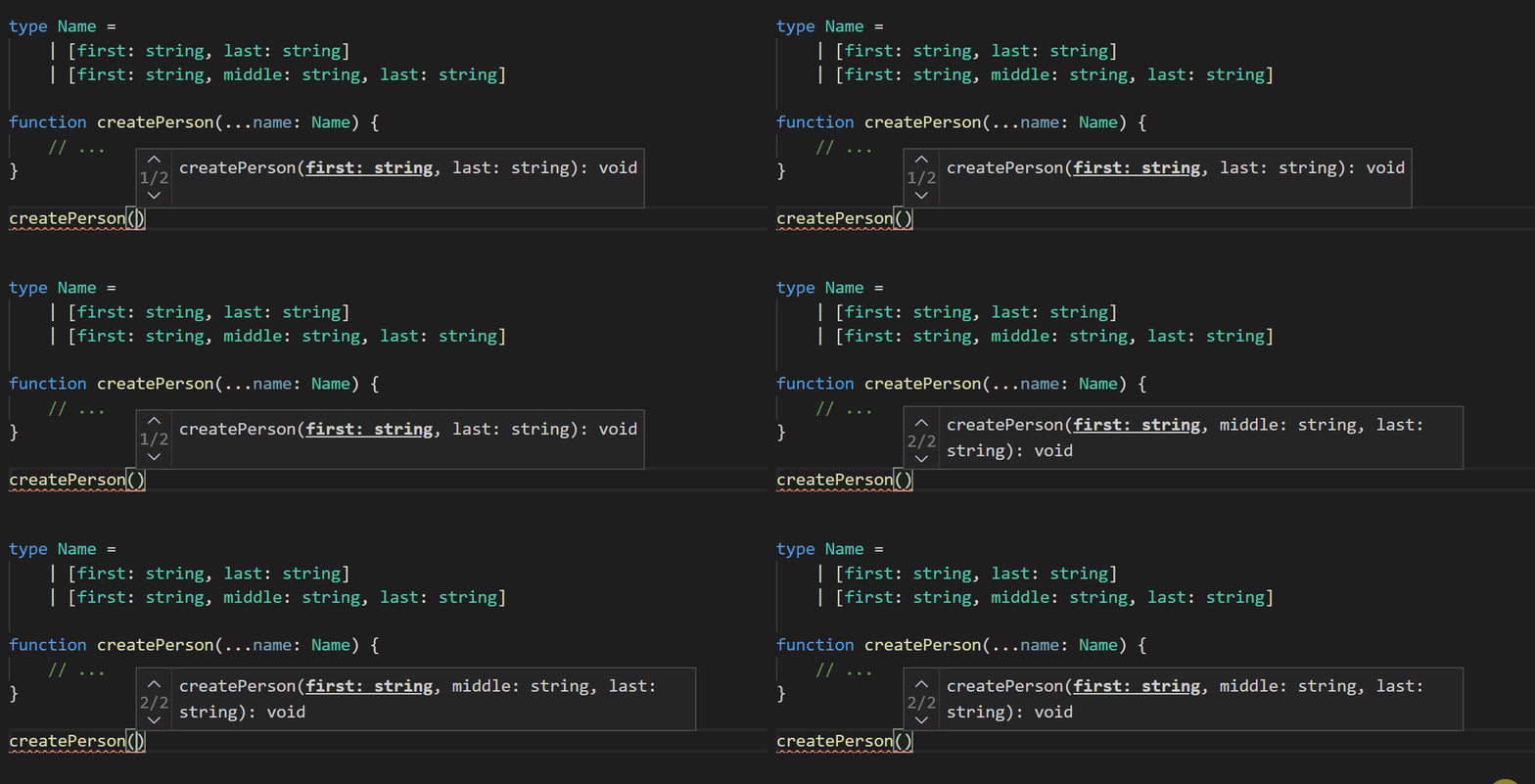
Variadic Tuple Types: Type-Safe Spreads for Tuples
Variadic tuple types let you use spread syntax (...) inside tuple type definitions, just like you do with array values. This is crucial for typing functions that manipulate tuples, like concat, without writing endless overloads or losing type information.

TypeScript's Optional Chaining (`?.`)
Optional chaining (?.) lets you safely access nested properties without crashing on null or undefined. Use it to replace verbose && checks when traversing deep objects. The footgun is that it only checks the value to its left, not the entire chain.
TypeScript: Modify Properties with Mapped Type Modifiers
Mapped type modifiers let you add or remove readonly and ? from a type's properties. Use them to create a fully required type from an optional one, or a mutable version of a readonly object. The footgun: remember the - prefix to *remove* modifiers.
Indexed Access Types: Look Up a Property's Type
Indexed access types let you look up a property's type on another type, like Person['age'] yielding number. Use them to create new types from existing ones, like getting an array element's type with MyArray[number].
Stream a Fetch Response Chunk by Chunk
Process a fetch response as it arrives, chunk by chunk, instead of buffering the whole file in memory. This is ideal for large files like videos or giant JSON datasets.
The Fetch API's Request Object
The Fetch API's Request object is a blueprint for an HTTP call, bundling URL, method, headers, and body. It's key for intercepting traffic in service workers or building reusable fetches. The main footgun: its body is a stream that can only be read once.
AbortController: Cancel In-Flight Web Requests
AbortController is a remote kill switch for web requests. You create a controller, pass its signal to a fetch call, and can then call abort() to cancel it. Use it to stop requests when a user navigates away. The footgun is forgetting this signal.
URLSearchParams: Safely Build and Parse URL Queries
Think of URLSearchParams as a structured object for a URL's query string, saving you from messy string manipulation. Use it to read incoming parameters or build a query for a fetch request. The footgun: get() only returns the first value for a key.
TypeScript `infer`: Create a Self-Typing Fetch Wrapper
Use TypeScript's infer to build one fetch wrapper that automatically knows the correct request/response types for every endpoint. It's essential for type-safe calls to APIs with a defined schema.
The Headers Object: A Safer Way to Manage HTTP Headers
The Headers object is a specialized map for HTTP headers that handles sanitization for you. Use it with the Fetch API to build requests or read response headers. The footgun: headers from a fetch() response are immutable and will throw an error if you try.
Fetch API Errors: Why a 404 is a 'Success'
A fetch() call only fails on network errors, not on HTTP errors like 404. You must check the response.ok property to see if the request was successful. The footgun is assuming a catch block will handle a 404; it won't.
Configuring Fetch Requests with `RequestInit`
RequestInit is the options object that customizes a fetch call beyond a simple GET. Use it to specify the HTTP method, send a request body, set headers, and control caching. A common footgun is sending a JSON body without setting the Content-Type header.
Fetch API: Making Basic Network Requests
The Fetch API is like ordering from a catalog: you give it a URL and get a promise of delivery. It's used to load data from APIs without a page reload. The footgun: the promise resolves even on HTTP errors (like 404); you must check.
We are hiring for this. Every open role lists the topics its interview covers, so you can prepare for the real thing rather than guessing.
See open roles