Concepts in TypeScript & Web APIs
TypeScript Type Annotations: Defining Your Data's Shape
Type annotations are contracts for your data, telling TypeScript what to expect from variables and functions. You'll use them for primitives like string or number, and for arrays like string[].
TypeScript's Basic Types: The Building Blocks
TypeScript builds on JavaScript's primitives (string, number, boolean) by letting you explicitly declare a variable's type. This is the foundation for catching errors early. The main footgun is confusing tuples [string, number] with flexible arrays.
TypeScript Type Inference: How It Knows Without Being Told
TypeScript's type inference deduces types so you don't have to annotate everything. It infers types from variable initializations and function returns. The main footgun is its 'best common type' for arrays, which can create an overly specific union type.
Union Types: When a Value Can Be One of Several Things
A Union Type is an 'OR' for your types, letting a value be one of several options, like string | number. Use it for flexible function arguments or varied API responses. The footgun: you can only use properties common to all types until you narrow.
TypeScript Interfaces: Naming the Shape of Your Data
An interface is a contract for an object's shape, caring what properties it has, not its class. Use it to define function parameters or API responses. The footgun: TypeScript allows objects with extra properties, checking only for the required ones.
TypeScript Function Types: Expressions vs. Signatures
TypeScript describes function shapes with type expressions or call signatures. Use a simple expression like (s: string) => void for callbacks. For functions with properties, use a call signature. The footgun: parameter names are required in type expressions.
tsconfig.json: The Rulebook for Your TypeScript Project
The tsconfig.json file is the rulebook for the TypeScript compiler, defining which files to process and what rules to enforce. It's essential for setting strictness, module resolution, and output targets.
TypeScript Enums: Named Constants for Clarity
TypeScript enums give friendly names to a fixed set of values, like Status.Success instead of a magic number. Use them for API response codes or state machines. The footgun: default numeric enums are just numbers at runtime, making them hard to debug.
Literal Types: Be More Specific Than `string`
Literal types specify the *exact* value a variable must hold, not just its general type like string. They're great for creating fixed option sets with unions, like type Status = "pending" | "complete".

The `window` Object: Your Browser's Global Scope
Think of the window object as the global stage for your JavaScript. It represents the browser tab and holds all global variables and APIs like fetch and setTimeout. You use it constantly, often implicitly.
The `document` Object: Your Page's API
The document object is the root of the DOM tree, representing the entire webpage in your script. Use it to find elements (getElementById), create new ones (createElement), or read page info. The main footgun: accessing an element before it's been parsed.
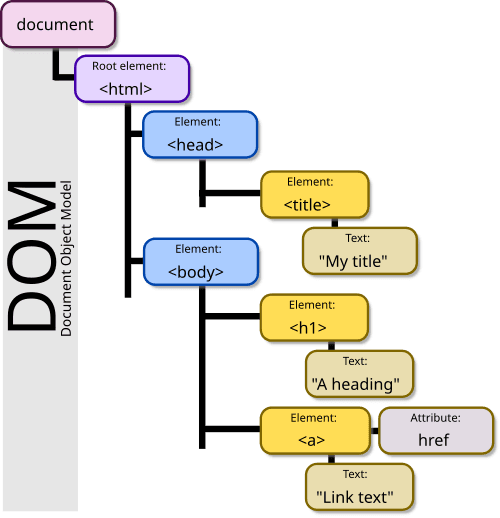
The DOM: Your HTML as a Live Object Tree
The DOM is the browser's live model of a webpage, represented as a tree of objects. JavaScript uses it to find elements, change content, and react to clicks. The footgun: DOM changes are in-memory; they don't edit the original HTML file on the server.
Web Storage API: Browser Key-Value Stores
Web Storage provides simple browser key-value stores: localStorage and sessionStorage. Use localStorage for data that persists across sessions, like user settings, and sessionStorage for data tied to a single tab.
DOM Manipulation: Treating Your Webpage Like a Live Object
The DOM is a live tree of your webpage's HTML. DOM manipulation is how JavaScript changes that tree—adding, removing, or updating elements. This is key for all interactive web development. The footgun: direct, frequent manipulation is slow.
DOM Traversal: Navigating the HTML Tree
DOM traversal is navigating a family tree of HTML nodes. You move between elements using properties like parentNode and nextSibling. This is key for finding elements relative to a known start point.
Browser Object Model: The Browser's Unruly API
The Browser Object Model (BOM) is the collection of non-standard APIs browsers expose for interacting with the browser window. Unlike the standardized DOM, its implementation is up to each vendor, creating a major cross-browser compatibility footgun.
Event Bubbling vs. Capturing: The DOM's Two-Way Street
An event fired on a nested element travels in two phases: first down from the root (capturing), then back up (bubbling). This is how all DOM events work, like clicks.
The JavaScript Event Loop: Asynchronicity on a Single Thread
The event loop is a queue that lets single-threaded JavaScript handle asynchronous tasks without blocking. It processes callbacks from Web APIs like fetch or setTimeout one at a time. The footgun: setTimeout(fn, 0) doesn't run instantly, just next.
Smooth Animations with requestAnimationFrame
Sync your code to the browser's repaint cycle for smooth, efficient animations with requestAnimationFrame. Use it for any visual change over time, like moving an element or running a game loop.
History API: Change URLs Without Page Reloads
The History API lets you manipulate browser session history, enabling single-page app (SPA) routing without full page reloads. It's used to create "virtual" pages by changing the URL and state.
We are hiring for this. Every open role lists the topics its interview covers, so you can prepare for the real thing rather than guessing.
See open roles