Everything in UI Design & Figma, page 3
How would you structure grids, spacing tokens, and components in Figma?
Tests balancing governance with autonomy via tokens. Propose base-8 semantic spacing tokens, responsive grid variants per breakpoint, and slot-based components with locked auto-layout. Red flag: rigid grids or hardcoded values that block platform needs.
How would you use Auto Layout for a complex data table?
Tests systems thinking in scalable component architecture. A strong answer nests Auto Layout frames: Hug for row height, Fill for column width, and component properties for variants. Red flag: manual resizing or flat frames without nested rows and cells.
When should you use Frames versus Groups in Figma?
This tests your grasp of Figma's layout primitives and constraint behavior. A strong answer: Frames own constraints, auto layout, and clip content; Groups only pass transforms to children.
What is the difference between a column grid and a modular grid?
This tests layout hierarchy. Column grids divide space vertically for responsive marketing pages. Modular grids add horizontal rows to form rigid two-dimensional cells for dense dashboards. A red flag is calling grids purely decorative.
Explain an 8-point grid and Figma spacing tokens setup
Tests your ability to systemize visual rhythm and encode it in Figma variables. Strong answers cite an 8pt base, define a 4/8/16/24/32/48/64 scale, and publish semantic tokens. Red flag: arbitrary values or manual nudging without variables.
How would you architect a Figma-to-code icon system?
Tests design-to-code systems thinking. Strong answers cover Figma variables as source of truth, automated API exports into transformed versioned packages, and strict naming taxonomy. Red flag: manual SVG exports and developers editing assets by hand.
Discuss custom web font performance and loading strategies
Critical rendering path tradeoffs between speed and design fidelity. Strong answers match font-display to UX goals, combine preloading with subsetting, and quantify byte savings. Red flag: calling swap a free win while ignoring layout shift from reflow.
How would you generate a functional palette from one brand color?
Tests systematic color scaling and accessibility. Strong answers use HSL/LCH lightness stops, enforce 4.5:1 text contrast, build 50-900 surface weights, and derive semantic hues independently. Red flag: manual hex tweaks without contrast checks.
How do you structure and maintain a Figma component library for scale?
This tests scalable Figma architecture bridging design and engineering. Strong answers cover atomic structure, variant booleans, auto-layout, and Dev Mode docs. Red flag: treating Figma as static mockups without properties or naming conventions.
How do you use boolean properties for optional icon and chevron?
This tests Figma boolean properties for avoiding variant explosion. A strong answer toggles icon and chevron visibility on one component for all four states. A red flag is creating variants for every permutation or manually hiding layers on instances.
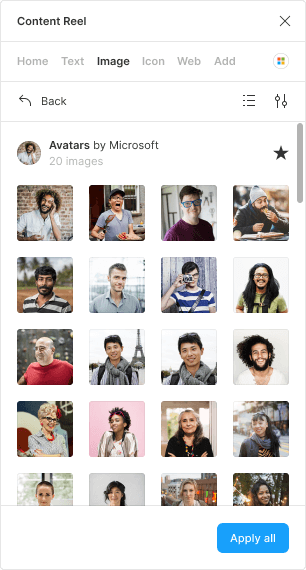
Which Figma plugin populates tables with realistic user data?
Tests Figma content automation. Name a plugin like Content Reel, select layers to apply text strings and image collections for names, emails, and avatars at once, and cite grouped content to keep rows aligned. Red flag: manual entry or mismatched placeholders.
How would you implement a light and dark mode theme switcher?
Tests scalable theming via Figma variable modes, not manual duplication. Create a color collection with Light and Dark modes, bind variables to component fills, then switch modes to toggle themes.

Difference between duplicating a page and branching in Figma
This tests version control hygiene in design files. A strong answer contrasts file-bloating duplication with isolated, reviewable branches, and names branching as superior for active projects where main must stay stable and changes need review before merge.
Difference between detaching and pushing overrides to main?
Tests component governance: detaching severs the link for local one-offs, while pushing overrides sends instance changes back to the main component globally. Strong answers contrast local versus library-wide scope and name specific scenarios.
How would you structure Figma files for a new design system?
Tests Figma memory limits and library publishing. Strong answers split files by type—tokens, icons, components—and publish each as shared libraries to limit memory and enable parallel ownership.
How would you use variants, booleans, and instance swap for a Button?
This tests fluency in Figma component properties for scalable design systems. Map variant properties to states, booleans to toggle the icon layer, and instance swap to change the icon type. Never suggest detached overrides or separate components per state.
How would you create a dismissible modal dialog over the current screen?
This tests modal architecture beyond visuals. A strong answer covers: dimming the inert background, trapping focus, returning focus on close, and supporting Escape plus a visible close button.
What is component nesting? Build a profile header from nested components.
Tests atomic design and system scalability. Answer: define nesting as instances inside a parent; describe a profile header using Avatar, Text, and Button instances; note base edits propagate globally. Red flag: one-off layers instead of reusable instances.
How do you let designers swap a component's icon without detaching?
Tests Figma component properties. Answer: apply an instance swap property to the nested icon, set preferred instances from your icon library, and keep it as a component instance. Red flag: suggesting boolean properties or detaching.

How would you structure a complex reusable Figma table with Auto Layout?
Tests nested Auto Layout and component properties for scalable Figma tables. Build atomic hug/fill cells in horizontal row Auto Layout, then stack rows vertically. Expose cell-type swaps via component properties. Red flag: manual resizing or variant bloat.
We are hiring for this. Every open role lists the topics its interview covers, so you can prepare for the real thing rather than guessing.
See open roles