All bites
The whole library, newest first. Filter by what you are here for, or pick a topic if you already know.
4247 bites
Page 150

Semantic HTML: Describe Meaning, Not Just Looks
Semantic HTML uses tags that describe the content's role (e.g., <article>), not just its appearance. This helps screen readers and search engines understand your page, improving accessibility and SEO. The footgun is using <div> for everything.

Build Accessible Animations with `prefers-reduced-motion`
prefers-reduced-motion lets you respect a user's system-wide request to minimize animations. Use this CSS media query to replace potentially jarring effects like zooms or parallax with simpler fades, preventing discomfort for users with vestibular disorders.
tabindex: Control Element Focus and Tab Order
The tabindex attribute lets you control an element's keyboard focus. Use tabindex="0" to make custom components tabbable in document order, or tabindex="-1" to make an element focusable only by script, like for a modal.
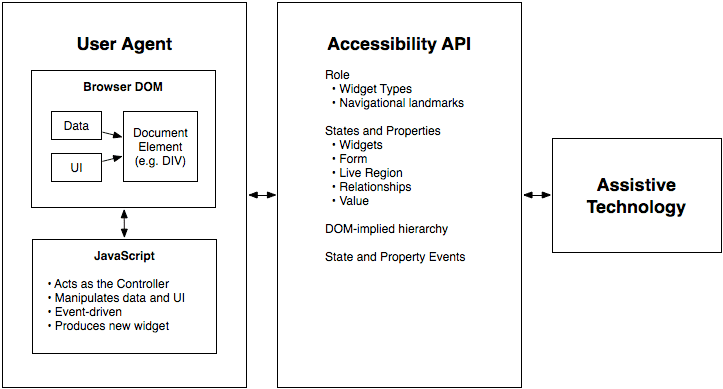
WAI-ARIA Roles: Semantics for Custom Components
WAI-ARIA roles are job titles for HTML elements, telling assistive tech what a generic <div> is meant to be, like a tab or button. Use them for custom UI components that lack a native HTML equivalent.
Accessible Name Computation: The UI Naming Algorithm
Browsers follow a strict algorithm to find a name for UI elements to announce to screen readers. It runs on every interactive element, creating the data source for assistive tech.
CSS :focus-visible: Smart Focus for Accessibility
:focus-visible is a smart focus ring that only appears when needed, like during keyboard navigation. This lets you style accessible focus indicators for keyboard users without showing an outline on every mouse click.
WAI-ARIA Authoring Practices: The Cookbook for Accessible Components
Think of WAI-ARIA Authoring Practices as the official cookbook for accessible web components. It provides patterns for widgets like tabs or accordions, ensuring they work with assistive tech.
ARIA Live Regions: Announcing Dynamic Content
ARIA live regions tell screen readers about content that changes without a page reload, like a notification banner. Use aria-live="polite" for most updates and assertive only for critical alerts.
Focus Trapping: Guiding Keyboard Users, Not Caging Them
Focus trapping intentionally confines keyboard navigation to a component, like a modal. It's a feature, not a bug, when used to prevent users from interacting with the page behind an overlay.
The Accessibility Tree: The DOM for Assistive Tech
The accessibility tree is the DOM's sibling, built for assistive tech. Browsers derive it from your HTML, exposing each element's name, role (e.g., 'button'), and state (e.g., 'checked') to screen readers.
Component Scaffolding: Automate Boilerplate, Enforce Consistency
Component scaffolding automates creating files from templates, ensuring new components start with the correct structure. Instead of copy-pasting, run a command to generate the component, its styles, and tests.
Doc Site Generators: Content-First Websites
A doc site generator turns your Markdown files into a complete, searchable website. Use it for project docs or blogs to focus on writing, not web dev. The footgun is thinking they're only for docs; many are powerful static site generators.
Pre-commit Hooks: Your Code's Quality Gatekeeper
Think of a pre-commit hook as a bouncer for your codebase. It's a script that runs before Git finalizes a commit, checking your changes against project rules. Use it to automatically lint code, run formatters, or check for secrets before they enter history.
Monorepo: Managing Multiple Projects in One Repository
A monorepo puts multiple projects into one repository, creating a single source of truth. It's great for design systems, allowing atomic updates to shared components and consuming apps.
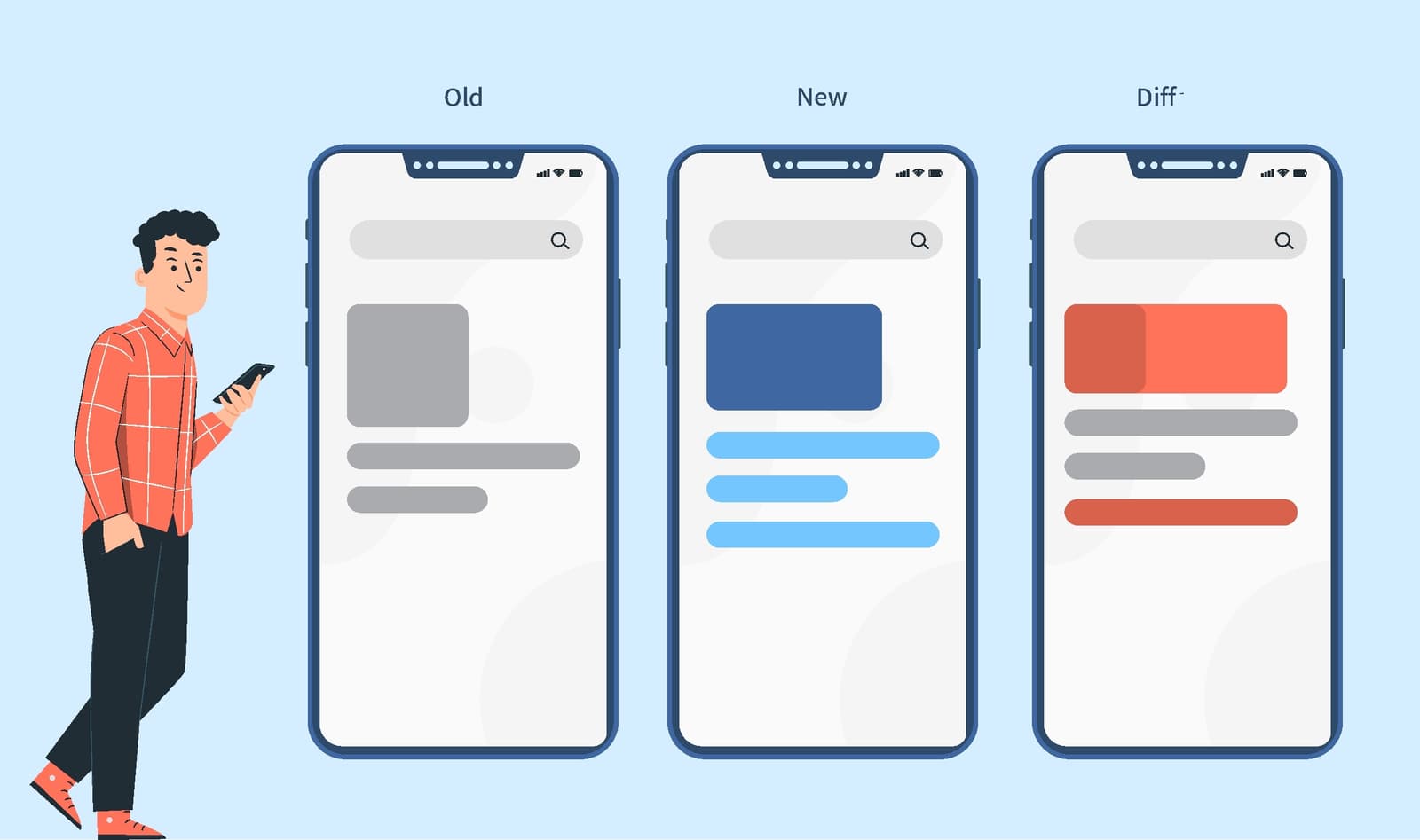
Visual Regression Testing: Spot the Difference for UIs
Visual regression testing is like an automated 'spot the difference' for your UI, catching visual bugs functional tests miss. It's used in CI/CD to compare screenshots before and after a code change.
Design System Build Pipeline: Automating UI Consistency
A design system pipeline treats UI rules like code, syncing design tokens from a single source of truth (like Figma) to your codebase. It prevents drift between design and code, but the biggest footgun is not starting one, leading to manual, error-prone…
Automated Accessibility Testing: Your First Line of Defense
Think of it as a linter for usability, scanning your code for machine-detectable issues like missing alt text or poor color contrast. It's often run in CI pipelines to catch regressions. The footgun is relying on it exclusively, as it misses most issues.

CODEOWNERS: Auto-Assigning PR Reviewers
A CODEOWNERS file maps repo paths to owners, auto-requesting their review on PRs. It ensures experts review changes to their code, like a platform team owning CI configs. The footgun: owners aren't notified for draft PRs and must have write permissions.
Semantic Release: Automate Versioning with Commit Messages
Semantic Release automates versioning by reading your commit messages. It decides if a change is a fix, feature, or breaking change and bumps the version for you. It's used in CI/CD to publish packages automatically.
Design System Dependency Update Automation
Automating dependency updates pushes design system releases to apps without manual pull requests. It matters when token changes must reach dozens of repositories at once. The footgun is automating bumps without visual regression, which silently breaks UI.