Easy concepts in Android & Kotlin

Kotlin Variables: `val` for Constants, `var` for Variables
In Kotlin, val creates a read-only constant you assign once, like a fixed setting. var creates a mutable variable you can change later. Always prefer val unless you explicitly need to reassign a value to prevent accidental state changes.
Kotlin Null Safety: Catch Nulls at Compile Time
Kotlin's type system catches null pointer errors at compile time. Variables are non-nullable by default; you must opt-in to nulls with a ? (e.g., String?). The compiler then forces you to handle the null case. The main footgun is the !! operator.
Kotlin's Control Flow Expressions: `if` and `when`
In Kotlin, if and when are expressions that return a value. This lets you assign their result directly to a variable, replacing Java's ternary operator. The footgun: when used as an expression, you must have an else branch to cover all cases.
Kotlin Functions: Named, Reusable Code Blocks
A function is a named recipe for your code. You give it ingredients (parameters) and it produces a result. They are used everywhere, from calculating values to handling button clicks.
Coroutine Dispatchers: Telling Your Coroutines Which Thread to Use
A Dispatcher tells a coroutine which thread or thread pool to use for its work. Use Dispatchers.Default for CPU-intensive tasks. If none is specified, it inherits from its parent. The main footgun: Unconfined can resume on an unexpected thread.
CoroutineScope: The Parent of Your Coroutines
A CoroutineScope acts as a parent to a group of coroutines, managing their lifecycles. When the parent scope is cancelled, all its children are cancelled too. It's used with builders like launch to group related work, like in an Android ViewModel.
Kotlin Flow: Asynchronous Data Streams
A Kotlin Flow is like an async Sequence, emitting multiple values over time without blocking. It's used for live data from a database or streaming network responses. The footgun: Flows are cold; the code doesn't run until a collector calls .collect().
Android Studio: The Official Workshop for Android Apps
Think of Android Studio as the all-in-one workshop for building Android apps. It bundles a code editor, build system, and emulators to write, test, and package software for any Android device. The footgun is underestimating its resource needs.

Android Project Structure: Your App's Filing Cabinet
Think of an Android project as a standardized filing cabinet. It organizes your code, images, and configuration into specific folders so the build system knows where to find everything. This is the foundation of every Android app you build or inspect.
AndroidManifest.xml: The Blueprint for Your App
AndroidManifest.xml is the blueprint for your app, telling the OS its components, permissions, and requirements before running any code. A missing declaration here is a common source of runtime crashes, as the OS simply won't see your component.
Android App Development: Core Languages and Tools
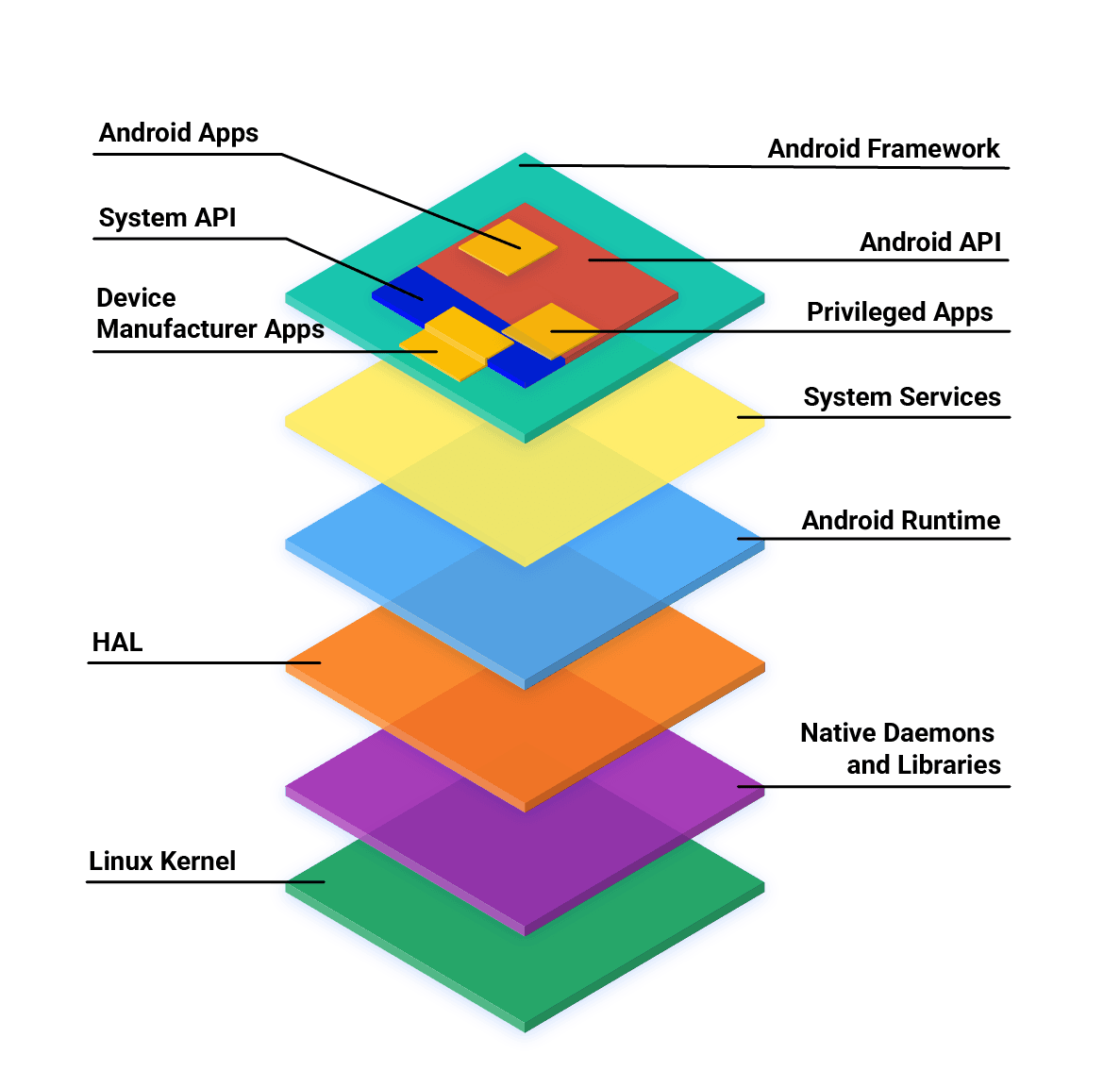
Android apps are primarily built with Kotlin, Java, and C++ using the official SDK. While other languages are possible, they often need 'glue' code to work and may have restricted API access. The main footgun is assuming any language has first-class support.
Logcat: The `tail -f` for Android Apps
Think of Logcat as tail -f for your Android app, streaming system and application messages from a device in real-time. It's your primary tool for debugging crashes, tracking execution flow, and inspecting variable values as your app runs.
Android Activity: A Single Screen in Your App
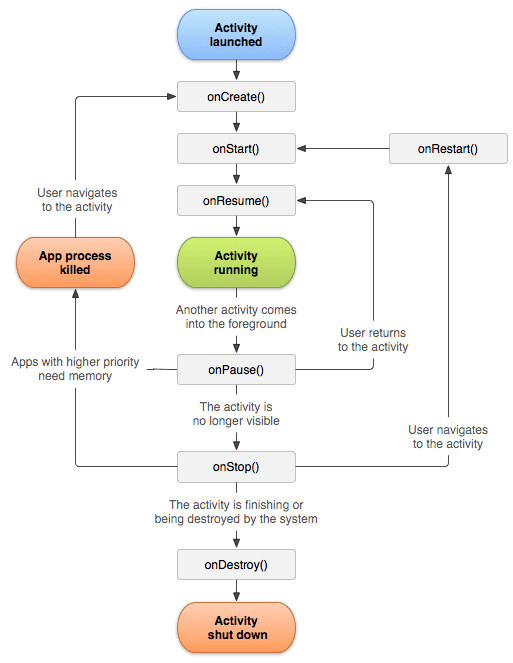
An Android Activity is the window for a single screen in your app where users interact with your UI. The OS manages a "back stack" of Activities; starting a new screen pushes one on, and pressing back pops it off.

Android Intents: The App's Messaging System
An Intent is a message requesting an action from another app component. It's the 'glue' that lets you start new screens, launch background services, or ask other apps to open a URL.
Android's Activity Lifecycle: A Screen's Journey
Think of an Activity's lifecycle as a stage play's script. Methods like onCreate() and onPause() are cues for your app screen to set up, appear, or hide. This manages state during interruptions like phone calls.
Broadcast Receiver: Responding to System-Wide Events
A Broadcast Receiver is your app's antenna for system-wide announcements. It listens for events like network changes or low battery. The main footgun is performing long tasks here; the system will kill it. Offload work to WorkManager.
View and ViewGroup: The Building Blocks of Android UI
A View is a single UI widget like a button; a ViewGroup is a container that arranges them. This is the fundamental structure for all Android UIs. The common footgun is creating deeply nested ViewGroups, which slows down rendering performance.
Handling Android UI Events: Listeners and Callbacks
Think of UI event handling as setting tripwires. You attach a "listener" object to a UI element, and when a user interacts with it, your listener's code (the "callback") is triggered. This is how you make buttons and lists interactive.
Composable Functions: Building UI with Kotlin Functions
Composable functions are Kotlin functions that describe your UI. Instead of creating View objects, you call functions like Text to build a UI tree. They are the core of Jetpack Compose for building Android UIs declaratively.
Compose Layouts: Build UI by Describing It
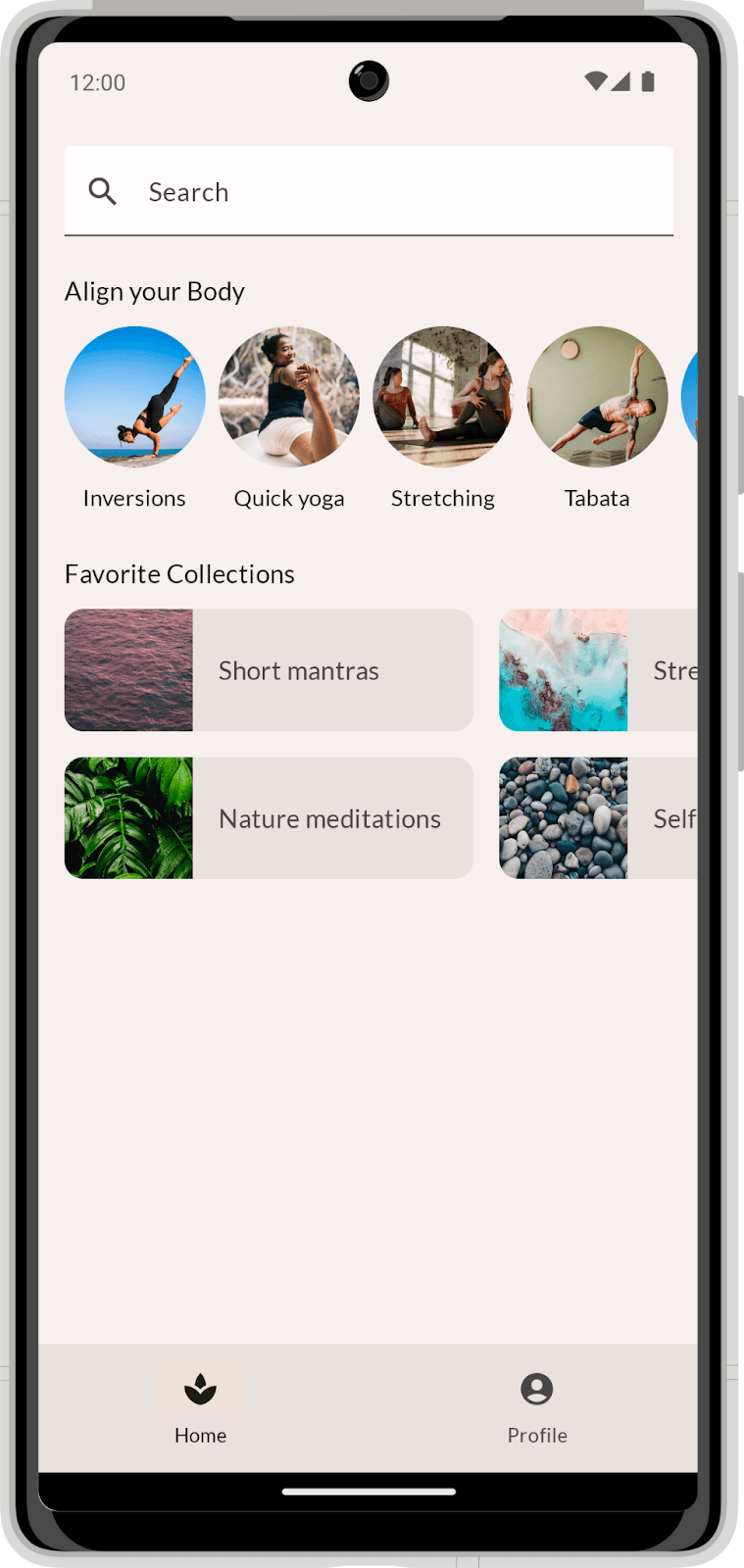
Describe your UI, and Compose draws it. Use Column and Row to position elements, then augment them with modifiers. The footgun is coding before you've broken the visual design into reusable parts, leading to a tangled mess.
We are hiring for this. Every open role lists the topics its interview covers, so you can prepare for the real thing rather than guessing.
See open roles