Everything in Android & Kotlin, page 17

Testing with Hilt: Swapping Dependencies for Isolation
Hilt testing swaps real app components for fakes, isolating your code under test without manual setup. It's used in UI and unit tests to replace production dependencies like network clients with test doubles.
@HiltViewModel: Simplified ViewModel Injection
@HiltViewModel automates creating ViewModels with dependencies. Instead of writing custom factories, just annotate the ViewModel and its constructor. It's the standard for injecting dependencies like repositories into ViewModels in a Hilt-powered Android app.
@HiltAndroidApp: The Entry Point for Hilt DI
@HiltAndroidApp is the main power switch for Hilt dependency injection. You place it on your Application class to trigger code generation and create the top-level dependency container.
Dependency Injection: Your Objects Shouldn't Create Their Own Helpers
Instead of creating its own helpers (like a network client), an object receives them from an outside source. This is crucial for building testable Android apps, as it lets you swap a real UserRepository with a fake one during tests.
OkHttp Caching: Beyond Simple Hits and Misses
OkHttp's cache acts like a browser's, saving network trips by storing responses on disk. It handles not just full hits and misses, but also validates stale data with the server. Use it for repeatable requests.
Certificate Pinning: Trusting Only Your Own Servers
Certificate pinning hardcodes your server's public key hash into your app, rejecting any other certificate. This prevents man-in-the-middle attacks from compromised CAs. The footgun: if the server certificate changes, your app breaks until you update the pin.
Moshi: Modern JSON for Kotlin & Android
Moshi is a modern JSON library that maps JSON strings to your Kotlin/Java objects. It's a translator between API text and your app's data classes, built with Kotlin-first features. The footgun: Kotlin classes require Moshi's codegen or reflection adapter.

Handling API State with a Sealed Class Wrapper
Treat API calls as states, not just data. A sealed class wrapper (Success, Error, Loading) models these states for your UI. Use this with Retrofit to show spinners or errors without crashing. The footgun: don't scatter try-catch blocks; centralize them.
OkHttp: A Smarter HTTP Client for Your App
OkHttp is a smart, resilient HTTP client for Android and Java. It automatically handles complexities like connection pooling, caching, and GZIP compression to make requests faster and more reliable.

Kotlinx.serialization: Kotlin's Native Data Converter
Kotlinx.serialization is Kotlin's native way to convert data classes into formats like JSON. It uses a compiler plugin to automate the process, making it ideal for API calls or saving data.
Retrofit: Turn Your HTTP API into an Interface
Retrofit turns your HTTP API into a simple interface, letting you define network calls as annotated methods. It's the standard for most Android network tasks. Footgun: forgetting to run calls off the main thread will crash your app.
REST: The Architectural Style for Web APIs
REST is the architectural style for web APIs, using standard HTTP methods like GET and POST to manage data. Your Android app uses it to fetch user profiles from a server. The footgun is treating REST as a strict protocol; it's a set of guidelines.
FileProvider: Securely Share Files Between Apps
FileProvider is Android's bouncer for files, replacing insecure file:/// URIs with temporary, permission-granted content:// URIs. Use it to send a photo for editing or attach a PDF to an email.
Testing Room Databases: On-Device vs. Local JVM
Test your Room database in two ways: on an Android device for realism, or on your local JVM for speed. This is crucial for verifying DAO queries and preventing data bugs. The footgun is assuming local tests behave identically to on-device tests.
Room: Querying Relational Data Without Manual Joins
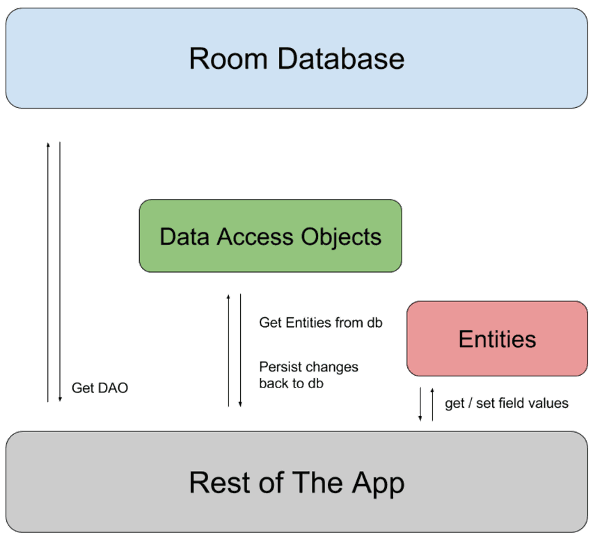
Room lets you query related objects without writing raw SQL joins, mapping one-to-many or many-to-many relationships into nested objects. This is key for fetching a user and their posts in one go.
Scoped Storage: Your App's Private File Cabinet
Scoped Storage gives your app a private file cabinet on external storage, not a key to the whole building. It's the default on modern Android for saving data or accessing media. The footgun: don't use direct file paths to shared files; you must use new.
App-Specific Storage: Your App's Private Locker
Think of app-specific storage as a private locker for your app's data, automatically cleaned up on uninstall. Use it for cache, settings, or internal data. The footgun: assuming this data is permanent—it's deleted when the user uninstalls.
Room Database Migrations: Evolving Your Schema Safely
A Room migration is a renovation plan for your database. When you change your schema, you provide SQL instructions to upgrade existing user data without loss, preventing crashes on app updates. The footgun is forgetting to increment the database version.
Room Type Converters: Teach Your Database New Tricks
Room Type Converters are translators for your database, teaching it to store types it doesn't natively understand, like Date. They let you persist simple objects by converting them to primitives like Long. The footgun is faking object relations with them.
Preferences DataStore: The Safe SharedPreferences
Preferences DataStore is Android's modern way to save simple key-value data. It uses Kotlin's Flow to read data asynchronously, preventing UI freezes. Use it for user settings, but remember you can't read values synchronously like with SharedPreferences.
We are hiring for this. Every open role lists the topics its interview covers, so you can prepare for the real thing rather than guessing.
See open roles