Everything in Android & Kotlin, page 19

Android View Animation: A Blueprint for Motion
Think of Android's view-based animations as a pre-written score. You define the animation (the "score") in an XML file, then apply it to a View (the "instrument") in your code. This is used for animating properties like alpha or translation on UI elements.
MotionLayout: Animate Layouts with States, Not Code
MotionLayout animates layouts by describing start and end states in XML, letting the system handle the transition. Use it for complex UI choreography, like a collapsing toolbar, or to link animation progress to a user's swipe.
Data Binding: Link Android UI to Data in XML
Data Binding lets you connect UI components to data sources directly in XML, eliminating manual findViewById calls. It's used to set view properties based on your ViewModel's state.
Android Styles and Themes: UI Consistency at Scale
A Style is a collection of attributes for a single View, like a button's font and color. A Theme is a style applied to an entire Activity or application, providing a consistent look and feel. They are essential for managing UI appearance efficiently.
RecyclerView: Efficiently Displaying Dynamic Lists
RecyclerView displays long lists by recycling views that scroll off-screen, like a restaurant reusing plates for new customers. It's essential for feeds or contact lists.
ConstraintLayout: Flexible UIs Without Nesting
ConstraintLayout positions UI elements by their relationships, like anchoring objects on a blueprint. It's ideal for responsive screens that avoid deep, slow view hierarchies.
Handling Android UI Events: Listeners and Callbacks
Think of UI event handling as setting tripwires. You attach a "listener" object to a UI element, and when a user interacts with it, your listener's code (the "callback") is triggered. This is how you make buttons and lists interactive.
View and ViewGroup: The Building Blocks of Android UI
A View is a single UI widget like a button; a ViewGroup is a container that arranges them. This is the fundamental structure for all Android UIs. The common footgun is creating deeply nested ViewGroups, which slows down rendering performance.
WorkManager: Guaranteed, Deferrable Background Work
WorkManager is Android's smart to-do list for background tasks. It guarantees execution for deferrable work, like syncing data, even if the app closes or the device reboots. The footgun is using it for immediate tasks; it prioritizes system health over speed.
Android Foreground Services: Work the User Can See
A foreground service tells Android, "Don't kill this process; the user knows it's running." It's a contract for long-running work made visible by a persistent notification, used for music playback or navigation.
ViewModel: Surviving Android Configuration Changes
A ViewModel acts like a durable backpack for your UI's data, surviving the destruction and recreation of an Activity during a screen rotation. It holds UI state, like user input or fetched data, preventing data loss.

Android's Task and Back Stack Explained
Think of the back stack as a stack of plates (screens). A "Task" is the entire stack for a user's workflow. The system manages this stack, but you can control it for custom navigation. The biggest footgun is misusing launch modes, which breaks back button.
LiveData: Lifecycle-Aware Data Observation
LiveData is a data holder that only notifies active UI components. It connects your ViewModel's data to your UI, preventing crashes and memory leaks by respecting the Android lifecycle.
Android ViewModel: Survive Screen Rotations
A ViewModel is a lifecycle-aware data holder that separates your UI's state from its controller. It keeps data alive during configuration changes like screen rotations, preventing data loss and repeated network calls.
Android Services: Running Work Without a UI
An Android Service is a component for long-running background tasks, even when the user isn't in your app. Use it for tasks like playing audio or syncing data.
Broadcast Receiver: Responding to System-Wide Events
A Broadcast Receiver is your app's antenna for system-wide announcements. It listens for events like network changes or low battery. The main footgun is performing long tasks here; the system will kill it. Offload work to WorkManager.
Android's Activity Lifecycle: A Screen's Journey
Think of an Activity's lifecycle as a stage play's script. Methods like onCreate() and onPause() are cues for your app screen to set up, appear, or hide. This manages state during interruptions like phone calls.

Android Intents: The App's Messaging System
An Intent is a message requesting an action from another app component. It's the 'glue' that lets you start new screens, launch background services, or ask other apps to open a URL.
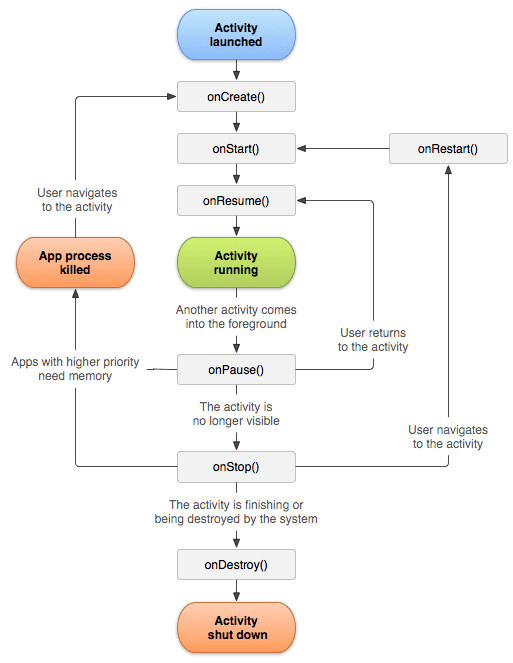
Android Activity: A Single Screen in Your App
An Android Activity is the window for a single screen in your app where users interact with your UI. The OS manages a "back stack" of Activities; starting a new screen pushes one on, and pressing back pops it off.
R8: Shrinking and Obfuscating Android Code
R8 is a compile-time tool that shrinks and obfuscates your Android app. It removes unused code and renames classes to reduce APK size and deter reverse-engineering.
We are hiring for this. Every open role lists the topics its interview covers, so you can prepare for the real thing rather than guessing.
See open roles