Everything in CI/CD & Automation, page 13
Ansible: Automating Infrastructure with Playbooks
Ansible is like a recipe book for your servers. You write simple "playbooks" describing a desired state, and Ansible makes it happen over SSH without installing agents. It's ideal for configuration management, app deployment, and orchestrating workflows.
Packer: Build Identical Machine Images Everywhere
Packer is a universal recipe for baking machine images. It takes a single template and builds identical images for multiple platforms like AWS or Docker. Use it to create consistent "golden images" for your infrastructure.
Terraform State: The Map to Your Infrastructure
Terraform state is the source of truth mapping your code to real cloud resources. It's used on every plan and apply to determine changes. The footgun: never store state in Git or edit the tfstate file directly; this risks corruption and secret leaks.
Vagrant: Your Dev Environment as Code
Vagrant is a scriptable remote for virtual machines, defining a dev environment in one text file. It ensures teams have identical, isolated setups, solving "it works on my machine" problems.
AWS CloudFormation: Your AWS Infrastructure as a Blueprint
AWS CloudFormation is your infrastructure's blueprint. Declare AWS resources in a YAML/JSON file, and AWS builds it. This is perfect for creating repeatable, version-controlled environments.
Terraform: Manage Infrastructure as Code
Terraform lets you define cloud infrastructure—servers, databases, networks—in a text file, like a blueprint. It reads this file and builds everything for you, making setups on AWS, GCP, or Azure repeatable.
Policy as Code in CI/CD with OPA
Treat pipeline rules as code using Open Policy Agent (OPA) to automate guardrails. Instead of scripts, write declarative policies to check test coverage or validate dependency licenses.
Dynamic Pipelines: Parent-Child vs. Multi-Project
Break up monolithic CI/CD pipelines into smaller, independent ones. Use parent-child pipelines for dynamic jobs in one project (like a monorepo), or multi-project pipelines to coordinate across repos. The footgun: the parent pipeline doesn't wait by default.
Pipeline Templates: Reusable CI/CD Building Blocks
Think of pipeline templates as versioned, shareable functions for your CI/CD. Instead of copy-pasting YAML, you import a standardized block of logic for tasks like security scanning or deployment.
Self-Hosted Runners: Bring Your Own CI/CD Hardware
A self-hosted runner is your own machine executing CI/CD jobs, giving you full control over its environment and network. Use it for private network access or custom hardware. The footgun: you are now responsible for all security, updates, and maintenance.
GitHub Composite Actions: Script Your CI Steps
A composite action is a reusable script for your CI workflow, bundling multiple steps into one. It's perfect for DRYing up common sequences like setup and testing, but remember you cannot nest composite actions within each other.
Jenkins Shared Libraries: Don't Repeat Your Pipeline Code
Jenkins Shared Libraries let you centralize and reuse Pipeline code, just like a common function library. Use them to define standard build or deployment stages across many projects.
Secrets Management in CI/CD Pipelines
Treat secrets like temporary keys, not permanent passwords. Your CI/CD pipeline should fetch them just-in-time from a central vault, never storing them in code. The biggest footgun is storing secrets as long-lived environment variables in the CI tool itself.
Conditional Pipeline Execution: Run Jobs Only When Needed
Think of conditional execution as if statements for your CI/CD pipeline, letting you run or skip jobs based on specific triggers. Use it to run tests on merge requests or deploy only from main.
CI/CD Pipelines: How Stages and Jobs Orchestrate Work
Think of a CI/CD pipeline as an assembly line. Stages are sequential stations (Build, Test, Deploy), while jobs are the parallel tasks at each station. This model automates software delivery. The footgun: a single failed job halts the entire line by default.

Pipeline Triggers: The 'If This, Then That' of CI/CD
Pipeline triggers are the "if this, then that" for automation. They kick off builds on a code push (CI), run tests for a pull request (PR), or execute jobs on a schedule. The footgun: many systems enable triggers on all branches by default, causing unwanted.
Jenkinsfile: Your CI/CD Pipeline as Code
A Jenkinsfile is a text file that defines your entire CI/CD pipeline as code, living in your source control. It automates build, test, and deploy steps. The main footgun is confusing its two syntaxes: Declarative is simpler, while Scripted offers more power.
Artifact Vulnerability Scanning: A Background Check for Code
Artifact vulnerability scanning is a background check for your software's dependencies, catching known security issues before they ship. It's a key CI/CD step, automatically scanning Docker images against databases of known CVEs. The footgun is alert fatigue.
Artifact Promotion: Build Once, Deploy Everywhere
Artifact promotion means you build software once, then deploy that exact same package to every environment. This prevents "it worked in staging" failures caused by rebuilds pulling different dependencies. The footgun is rebuilding per environment.
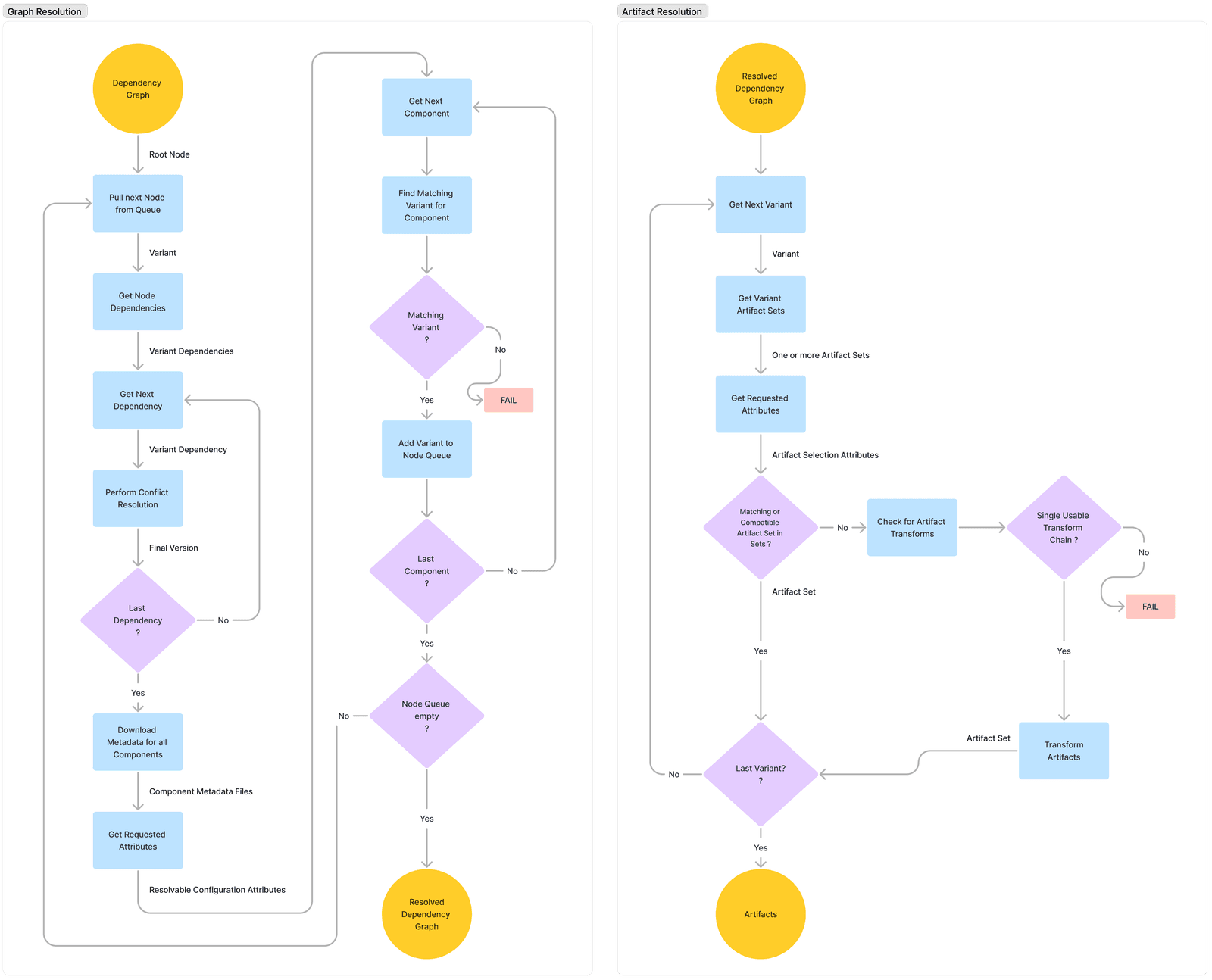
Dependency Conflict: When Your Dependencies Disagree
A dependency conflict occurs when two of your project's dependencies require different, incompatible versions of a shared library. This is common in any project with a dependency graph, forcing your build tool to pick one version, which can introduce subtle…
We are hiring for this. Every open role lists the topics its interview covers, so you can prepare for the real thing rather than guessing.
See open roles