Concepts in Mobile Dev, page 24
Flutter Packages: Bridging Dart to Native Features
Think of packages as pre-built bridges to native device features. They let your Dart code access the camera or GPS without you writing the complex, platform-specific code.

Swift Package Resources: Bundling Assets with Code
A Swift Package resource bundle is like a fanny pack for your code, letting you package assets like images and data files directly with your library. This makes your package self-contained.
Flutter: Requesting Runtime Permissions
Don't assume your app has access to the camera or contacts; you must ask the user for permission at runtime. This is required for features like photo uploads or location tracking. The common footgun is forgetting to declare permissions in native config files.

Testing Coroutines: Control Time with `runTest`
Test asynchronous coroutine code as if it were synchronous. The kotlinx-coroutines-test library lets you control a virtual clock. Use runTest to wrap tests calling suspend functions, ensuring your test waits for async work before asserting results.
OTA Updates: Ship JS Fixes Without App Store Review
Over-the-Air (OTA) updates let you ship JavaScript, styling, and image changes directly to users, bypassing app store review. Use it to fix JS bugs or tweak UI between releases. The footgun: you can't update native code or change permissions this way.
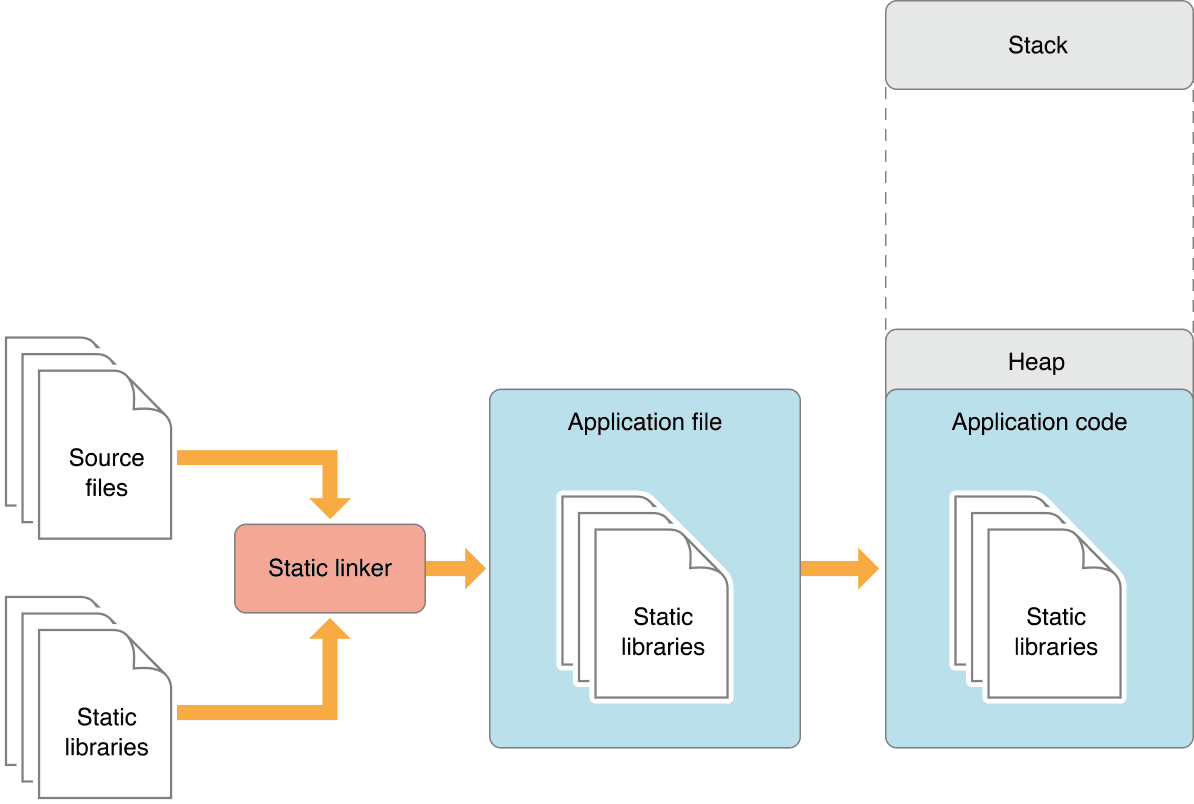
Static vs. Dynamic Linking: Code Size vs. Flexibility
Static linking bakes library code into your app, creating a large but self-contained executable. Dynamic linking loads libraries at runtime, saving space. This choice impacts app size, launch time, and updates.
Dart's Platform Class: Querying the Host Environment
Think of Dart's Platform class as a runtime detective for your app. It answers "where am I running?" by checking the OS, environment variables, and more. Use it to show different UI on iOS vs. Android.

fastlane for React Native: Automating Native Builds
fastlane automates the native build and release steps for your React Native app. It scripts Xcode and Gradle tasks like code signing and uploading to stores, letting you ship from one command. The footgun: it only automates native toolchains, not JS bundling.
Swift Library Evolution: Shipping Break-Proof Frameworks
Library Evolution lets you update a Swift framework without breaking apps that use it, even if they don't recompile. It's crucial for shipping binary SDKs. The footgun is that many seemingly safe changes, like adding a struct property, are binary-breaking by…
Flutter Platform Channels: Talking to Native Code
Platform Channels are a telephone line between your Dart code and native device APIs. Use them to access features like battery level or integrate a native SDK not available in Dart.
UI Automator: Black-Box UI Testing for Android
Think of UI Automator as a robot that tests your app by looking at the screen, not your code. It's for end-to-end tests that cross app boundaries, like interacting with the system Settings. The footgun: tests are powerful but can be slow and brittle.
CI/CD for React Native: Automating App Releases
CI/CD for React Native is an assembly line for your app, taming the complexity of managing JS, Android, and iOS code. It automates builds on every push and deploys to stores. The main footgun is storing signing keys directly in your repo instead of using.
Custom Frameworks: Best Practices for Sharing Code
A custom framework is a private toolkit, bundling shared code and resources for use across multiple apps. Use them for common logic in an app suite, but always prefix public symbols to avoid name collisions and static link errors.
StrictMode: Your Main Thread's Watchdog
StrictMode is a developer tool that acts like a strict supervisor for your app's main thread, catching slow operations like disk or network access. It helps you find performance issues before they cause "Application Not Responding" errors.
Expo: The New Default for React Native
Expo is the modern, production-ready default for React Native, not just a tool for prototypes. Use it for new apps to get smoother upgrades, cloud builds, and over-the-air updates out of the box.
Apple Developer: The Official Resource Hub
Think of Apple Developer as the official command center for building on Apple platforms. It's the central website for the tools, APIs, and technical resources you need to write software for iOS, macOS, watchOS, and more.
Platform Views: Embedding Native UI in Flutter
Platform Views cut a hole in your Flutter UI to show a native component. Use them to embed UI that can't be rebuilt in Dart, like Google Maps or a native WebView. Be warned: they are resource-heavy and can hurt performance if overused.
Memory Leaks: The Silent App Killer
A memory leak is when your app holds onto objects it no longer needs, preventing memory reclamation. This often happens with static references to UI elements or background tasks. The footgun: your app won't crash immediately, but will slow down and die later.
Native Modules: Bridge JS to Native Platform APIs
Native Modules are your bridge from JavaScript to platform-specific APIs, letting your app use features not exposed by default. Use them when you need direct access to Android or iOS SDKs. The main footgun is misconfiguring Codegen in your project.
App Store Connect: Your App's Mission Control
Think of App Store Connect as your app's mission control. It’s the web portal for managing your app's lifecycle after coding, from uploading builds and running TestFlight betas to submitting for final review.
We are hiring for this. Every open role lists the topics its interview covers, so you can prepare for the real thing rather than guessing.
See open roles